7 Reasons An Airplane Buyer Should Use An Airplane Broker

In the realm of buying airplanes, navigating through the complexities of the market can be as challenging as piloting through turbulent skies. Whether you’re a seasoned aircraft owner or a new pilot looking to acquire your first aircraft, enlisting the expertise of an airplane broker can significantly streamline the buying process. Here are some compelling reasons why engaging an airplane broker is a smart move for buyers:

  1. Expertise and Experience:
    Aircraft brokers are seasoned professionals with in-depth knowledge of the aviation industry. They understand what aircraft models fit different missions (you don’t want to have an expensive jet for 200 mile trips for 2 people), market trends, airplane values, and technical knowledge to help avoid “lemon” airplanes before even the inspection begins. Leveraging broker expertise can help buyers make informed decisions, avoid pitfalls, and secure the best deal possible.
  2. Access to a Vast Network:
    Airplane brokers have extensive networks comprising sellers, manufacturers, and maintenance facilities. This network gives buyers access to the experts on the aircraft they are wanting to buy. Whether you’re in the market for a brand-new aircraft or a pre-owned gem, brokers can tap into their connections to make sure the airplane selected is a well maintained aircraft.
  3. Time and Resource Efficiency:
    Searching for the right aircraft can be a time-consuming and labor-intensive process. From researching available options to arranging pre-buy inspections and negotiations, the tasks can quickly pile up. By entrusting these responsibilities to a broker, buyers can save valuable time and resources. Brokers handle the legwork, allowing buyers to focus on family, life and work while still staying informed and involved in the decision-making process.
  4. Objective Guidance and Advocacy:
    When emotions run high during the aircraft buying process, having an impartial advocate can be invaluable. Airplane brokers act as trusted advisors, offering objective guidance and a high level of knowledge about different airplanes. That knowledge comes in handy when evaluating aircraft specifications, assessing market value and negotiating terms. Brokers provide valuable insights and ensure that buyers make well-informed decisions aligned with their goals.
  5. Streamlined Transaction Process:
    Purchasing an aircraft involves navigating a complex web of legal, financial, and logistical considerations. Brokers are well-versed in handling these intricacies and can streamline the transaction process from start to finish. They coordinate with legal experts, financial institutions, escrow companies, maintenance shops and regulatory authorities to ensure a seamless and hassle-free experience for buyers, minimizing potential delays and complications along the way.
  6. Cost-Effective Solutions:
    While some buyers may be hesitant to engage a broker due to concerns about additional costs, the reality is that brokers often help buyers save money in the long run. By leveraging their industry knowledge and negotiation skills, brokers can steer buyers away from airplanes that are potential money pits and toward airplanes that have excellent maintenance pedigrees. Brokers are often able to secure favorable pricing and connect buyers to other experts in maintenance, insurance, and other essential services.
  7. Peace of Mind:
    Perhaps most importantly, working with an airplane broker provides buyers with peace of mind throughout the buying process. From the initial search to the final closing, buyers can rest assured knowing that they have a dedicated professional by their side, guiding them every step of the way and ensuring a successful outcome.

While purchasing an aircraft can be a daunting endeavor, enlisting the services of an airplane broker can turn the journey into a smooth and rewarding experience. With their expertise, industry connections, and commitment to client satisfaction, brokers empower buyers to make informed decisions, secure the best possible deal, and embark on their aviation adventures with confidence. So, whether you’re in the market for a single-engine propeller plane or a luxurious corporate jet, consider partnering with an airplane broker to navigate the skies of aircraft acquisition with ease.


Texas Top Aviation, LLC has 10 years of experience helping our customers purchase amazing airplanes. We specialize in TBM, Piper PA46, Cirrus and Columbia aircraft, but have extensive knowledge about a wide variety of piston and turbine aircraft. Contact us today to discuss our services for your next airplane.


Similar Posts

  • Pancake Fly-In At KCVB

    For those of you in the Hill Country looking to kick off the Christmas month right, head over to the Castroville Airport (KCVB) on Saturday, December 6th and get yourself a short stack of flapjacks.  For just $5, you can get yourself a good hearty breakfast that includes coffee or juice and bacon or sausage.  The eating starts at 0800 and goes until 1200, local time.  Come with an empty belly and an empty gas tank as CVB currently has some of the lowest priced gas in South Texas, currently listed at $4.70/gallon.

    There will be plenty of hangar flying, lots of airplanes to look at, and most importantly, lots of pancakes!

    CVB Pancake Breakfast

    For those of you in the Hill Country looking to kick off the Christmas month right, head over to the Castroville Airport (KCVB) on Saturday, December 6th and get yourself a short stack of flapjacks.  For just $5, you can get yourself a good hearty breakfast that includes coffee or juice and bacon or sausage….

  • PIREP: Austin Executive Opens a Control Tower

    Austin Executive Airport opened a control tower on Friday, February 23rd 2018.  The airport is now officially Class D airspace.  The charts and A/FD are not updated yet to reflect the tower, but there is a NOTAM with the tower and ground frequency information.  The tower hours are from 6am to 10pm.  The weather frequency remains the same.

    Make sure you check those NOTAMs if you are headed to KEDC anytime soon!

    KEDC Tower Frequency:  120.3

    KEDC Ground:  119.45

    Austin Executive Airport opened a control tower on Friday, February 23rd 2018.  The airport is now officially Class D airspace.  The charts and A/FD are not updated yet to reflect the tower, but there is a NOTAM with the tower and ground frequency information.  The tower hours are from 6am to 10pm.  The weather frequency remains…

  • Garmin Smart Glide

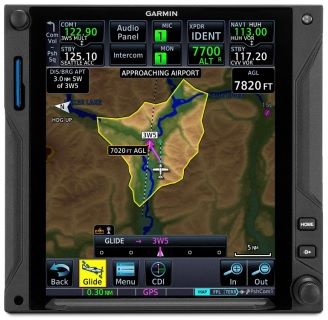
    Recently, I was training a customer who had a brand new instrument panel installed in his TBM 700. The avionics shop that did the work (Abilene Aero, who I highly recommend for any panel installs, located at KABI) told us when we picked the plane up that the new Garmin GTN 750Xi had the most recent software update, which included the Garmin Smart Glide.

    I had never used the Garmin Smart Glide before, so I was eager to check it out during our training. When we got to engine failures, we pushed the Emergency button on the Home page of the GTN 750Xi, and then the magic happened.

    The plane was also equipped with a Garmin G600TXi PFD and the Garmin GFC 600 Autopilot. In order for Smart Glide to work, there has to be either a GTN 750Xi or GTN 650Xi installed, along with a G500TXi or G600TXi and a Garmin Autopilot. Garmin is working on getting the legacy G500 as well as the GI 275 and G5 to work with the above GPS units for Smart Glide as well.

    Here’s what happens. The plane loses it’s engine. The pilot’s workload and stress level suddenly goes way up. Trim the airplane for best glide, find the nearest airport, attempt restart. Do it quickly so you have time to focus on the glide. Oh yeah, squawk 7700 and declare your emergency. All the while plummeting toward the ground in a somewhat controlled crash. Yikes.

    Garmin Smart Glide takes over the flying part, allowing the pilot to handle the restart, while making it much easier to squawk, talk and plan the engine out landing. On the home page of the GTN 750Xi/650Xi, the pilot simply taps the Emergency icon on the bottom of the screen. The Autopilot comes on and goes into IAS mode and maintains best glide while descending. The GPS immediately analyzes the Glide Advisor, and turns to the nearest airport in the glide ring (if there is no airport within gliding distance, the GTN 750Xi advises the pilot). Then, the Autopilot flies directly to the Nearest airport, allowing the pilot the ability to take attempt a restart.

    Once it is determined that the engine won’t start, the Garmin Smart Glide has excellent situation awareness tools. On all screens, the pilot is constantly being advised of how high AGL the plane is currently, while advising also of how high AGL the plane will be over the airport that the glide is set up for. There is also a short cut on the screen to tap to squawk 7700 as well as runway length information at the airport.

    The Garmin Smart Glide Button wasn’t installed yet in the TBM, but that will make things even easier when it is (it will be certified in January). This is amazing technology that all Garmin GTN 750Xi pilots should have their software updated to. Remember, you have to have a Garmin Autopilot and a Garmin PFD for it all to work.

    Recently, I was training a customer who had a brand new instrument panel installed in his TBM 700. The avionics shop that did the work (Abilene Aero, who I highly recommend for any panel installs, located at KABI) told us when we picked the plane up that the new Garmin GTN 750Xi had the most…

  • Flight Training Deemed Essential Business

    There have been lots of changes in all parts of our lives with the coming of COVID-19. All of our lives have been affected in one way or another. We hope and pray that none of your families have been directly affected by the illness.

    A lot of us have been living under Shelter in Place orders for several weeks now, only going out for groceries and making sure to keep our distance from people. We have to take a different mindset when we go out now. Even meeting new people is different since we can’t shake hands.

    Flying has been an afterthought for a lot of pilots. There have been multiple ATC facilities where controllers have been afflicted with the virus and have had to shut down for hours or days. Airspace can change pretty quickly, going from what we all know as normal, to an ATC-ZERO scenario. This was the case for New York Center several times over the last two weeks.

    There was some uncertainty regarding flight training under the shelter in place orders and Texas Top Aviation has been asked several questions about it over the last week. Yesterday, the Flight School Association of North America (FSANA) announced that flight instruction was indeed an essential business.

    In an article on GeneralAviationNews.com, the website quoted a memorandum of understanding written by attorney George Winton on March 24th. Winton was a senior attorney for the FAA and U.S. Department of Justice, and now operates The Aviation Law Firm in Annapolis, Maryland.

    “This memorandum affirms the statement that…flight training would be included as a critical infrastructure activity. Those engaged in the provision of and receipt of flight training who work to provide enhanced compliance with CDC recommendations for limiting potential COVID-19 exposure and spread would be considered exempt from travel limitations imposed by local authorities.”

    Winton’s memo was sent to the Department of Homeland Security’s Cybersecurity and Infrastructure Security Agency (CISA). In the memo, Winton stated:

    “CISA listed Other Community-Based Government Operations And Essential Functions as follows: Workers who support necessary credentialing, vetting and licensing operations for transportation workers.”

    “The aviation sub-sector stakeholders involved with operation of recreational aircraft and flight schools, who employ Essential Critical Infrastructure Workers from the Transportation Sector, support necessary credentialing, vetting and licensing operations for transportation workers seeking pilot certification by the Federal Aviation Administration. Since CISA intended to be overly inclusive to reflect the diversity of industries, the aviation mode stakeholders understand that essential employees involved with the operation of recreational aircraft and flight schools continue to be identified as Essential Critical Infrastructure Workers from the Transportation Sector. Accordingly, the aviation sub-sector stakeholders who employ Essential Critical Infrastructure Workers from the Transportation Sector will continue to operate recreational aircraft and flight schools, appropriately modified to account for CDC workforce and customer protection guidance, based upon the CISA memorandum dated March 19, 2020.”

    Based on the above guidance, Texas Top Aviation will continue to operate flight training in all of it’s normal capacities, while maintaining vigilance concerning sanitation, cleanliness, and health. Our company will keep it’s customer’s up to date on instructor health and wellness and won’t hesitate to cancel if there is any kind of health concern. We ask our customers to do the same.

    If you are scheduled to train with Texas Top Aviation, please don’t hesitate to contact us with any questions or concerns you might have.

    To read the entire memo from George Winton, you can find it here.


    Concerning the 2020 Texas Top Aviation Santa Fe Golf Fly In scheduled for June 5th-7th, that event is currently being re-scheduled for September 2020. Dates will be announced by the end of April. We look forward to seeing you in Santa Fe in September!

    There have been lots of changes in all parts of our lives with the coming of COVID-19. All of our lives have been affected in one way or another. We hope and pray that none of your families have been directly affected by the illness. A lot of us have been living under Shelter in…

  • That Pesky Rudder

    Whenever I get in an airplane with a pilot for recurrent training, I can assure myself that I will mention rudder usage more than once during the flight.  If it is in a tailwheel (or if the pilot is doing tailwheel training), I’m going to mention the rudder a lot.  How do I know this?  Because basic rudder skills are actually one of the most difficult things to master in flying.

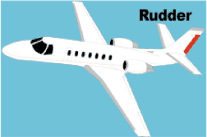
    Let’s start simple.  What does the rudder do?  The dictionary definition is it controls the movement about the vertical axis of the airplane.  If you stick a pole down through the CG of the airplane and rotate the airplane around that pole, this is the vertical axis.  Looking at it another way, the rudder moves the airplane’s nose left and right.  Keep this in mind as we move on.

    Rudder

    Every pilot thinks about the rudder during the takeoff roll.  Because of the torque effect, the pilot must add right rudder during the takeoff roll to stay on the runway centerline.  Depending on the airplane’s horsepower, more rudder pressure is needed in higher powered airplanes.  The problem usually shows up once the airplane gets in the air.

    In the worst situation, after takeoff, the pilot will set both feet on the floor and completely disregard the rudder.  Torque effect and now P-factor are continuing to cause the airplane to yaw left, causing the need for right rudder.  With his feet on the floor, though, the pilot is allowing the airplane to yaw.  It’s not terribly noticeable for him in the front seat, but the back seat passengers (especially in a six seat or larger airplane) are certainly feeling it.

    One particular problem spot on the climb is the climbing left turn.  In a climbing left turn, training says to add left rudder since it is a left turn (see below for the reasoning).  But, since the airplane is climbing and therefore experiencing left yawing tendencies due to the aforementioned effects, the pilot needs to continue pressing the right rudder, though the pressure won’t be as much as in a straight climb.  Watch the ball the next time you make a climbing left hand turn and it’ll make a believer out of you.

    I find only a handful of pilots are this egregious.  Most pilots have rudder problems in turns and in turbulence.  We’ll tackle turns first.  As we all learned when we first started flying, due to adverse yaw, a pilot must add rudder in the turn’s direction.  Again, this isn’t usually where the problem shows up.  During the rollout is the problem area.

    Let’s take a turn to the left.  The pilot rolls in, adding left rudder, arrives at his heading, then begins to roll out with the ailerons.  Left adverse yaw is now being experienced and right rudder is needed to smoothly transition back to level flight.  Need some visual assistance?  Watch the nose the next time you make a turn. If you are working the rudder properly, the nose will pivot on one point in the horizon.  If you aren’t using the rudder properly, the nose will draw a U shape on the horizon.  Try making some turns without rudder, see what it looks like, then use the rudder properly.  You’ll notice a big difference.

    Finally, let’s talk turbulence.  As we all know, turbulence in the hot summer afternoon is quite pronounced. When the airplane experiences a bump, it usually doesn’t bounce straight up in the air.  There is usually some kind of rolling motion involved.  As the pilot corrects this rolling motion by moving the ailerons, adverse yaw is experienced (just like rolling into and out of a turn that we talked about above), so rudder is needed.  There isn’t a need to stomp on the rudder or you’ll cause the airplane to severely yaw in the other direction, but rudder pressure is needed.

    Final approach is where this gets most pilots.  By controlling the nose and not allowing it to move around on final by using the rudder, this will make your approaches a little more stabilized leading to a more successful landing.

    Feeling lost when it comes to the rudder?  Ask your instructor the next time you go fly to do some rudder exercises.  Most instructors don’t emphasize these basic stick and rudder skills which leaves pilots lacking as they move on in their aviation lives.  So make it a point to do some basic rudder work the next time you fly with your instructor.

    Whenever I get in an airplane with a pilot for recurrent training, I can assure myself that I will mention rudder usage more than once during the flight.  If it is in a tailwheel (or if the pilot is doing tailwheel training), I’m going to mention the rudder a lot.  How do I know this?…

  • Garmin Perspective Tips & Tricks

    The Garmin Perspective and Perspective + are awesome pieces of equipment.  There is so much a pilot can do with this system that it can sometimes get overwhelming. There are two very important features of the Garmin Perspective that all IFR pilots need to know, but are tricky to do if the correct buttons aren’t pushed.

    The two features of the Garmin Perspective I want to focus on today are the “Load Airway” feature and the “Hold at Waypoint” feature.  The “Load Airway” feature is especially handy when flying IFR long distances with several airways as part of the clearance.  Here’s how to utilize both on the Garmin Perspective.

    Load Airway

    • On your flight plan page, insert the waypoint where you will be joining the airway, or, if your clearance was radar vectors to join an airway, then insert the waypoint on the airway that begins the leg you will be joining on
    • Press the Menu key on the keypad
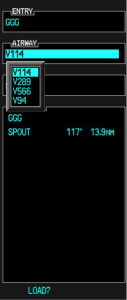
    • A menu will pop up. Scroll down to highlight Load Airway
    • Highlight the Airway you want from the next menu that pops up then press Enter
    • Then, a list of waypoints will display to exit the airway. Highlight the waypoint where you will be exiting the airway and Press Enter
    • The cursor will then move down to Load at the bottom of the menu. Press Enter to load the airway
    • The Airway and all the waypoints in between your entry and exit waypoints appear in your flight plan
    • If you are getting vectors to join the airway, you’ll need to use the Activate Leg function to activate the leg you will be joining the airway on
      • On the Flight Plan page, highlight the waypoint that ends the leg you want to activate
      • Look for the ACT LEG soft key on the lower right hand side of the MFD and press
      • This Activates the leg on the airway. Then, just simply fly the heading assigned by ATC until the CDI needle centers showing you are on the airway

    Hold At Waypoint

    The Garmin Perspective allows pilots to place a holding pattern at any waypoint that is in the Nav Database (or any user created waypoint).  Here’s how to do it.

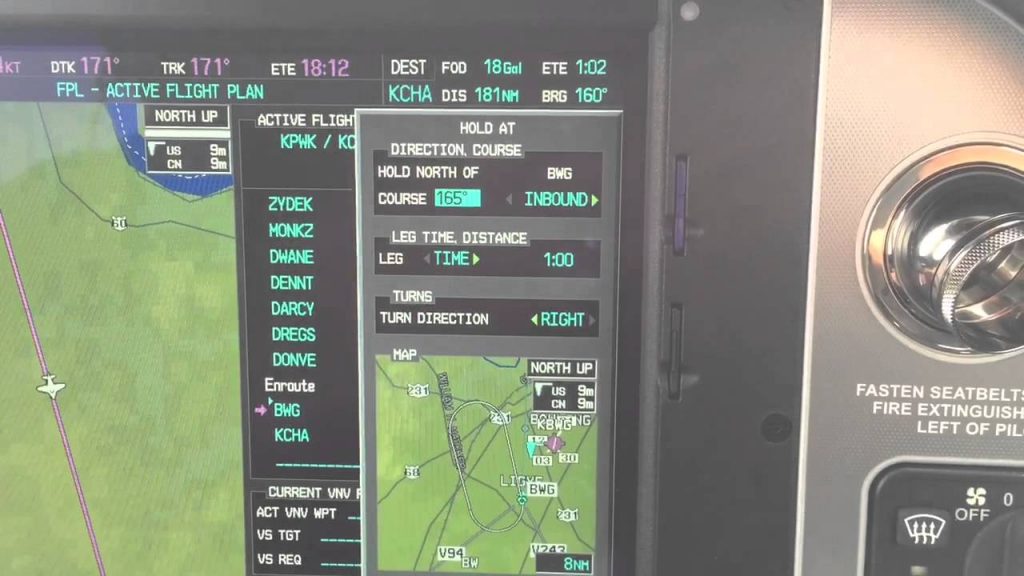
    • On the Flight Plan page, highlight the Waypoint that you want to hold over and press Menu on the keypad
    • On the menu that pops up, highlight Hold At Waypoint and press Enter
    • On the next menu that pops up, input either the inbound or outbound course, right or left turns, leg time or distance, and the EFC time, then highlight Load and press Enter
    • You will see the hold now as a Waypoint in your flight plan

    The Garmin Perspective and Perspective + are awesome pieces of equipment.  There is so much a pilot can do with this system that it can sometimes get overwhelming. There are two very important features of the Garmin Perspective that all IFR pilots need to know, but are tricky to do if the correct buttons aren’t…

Leave a Reply

Your email address will not be published. Required fields are marked *