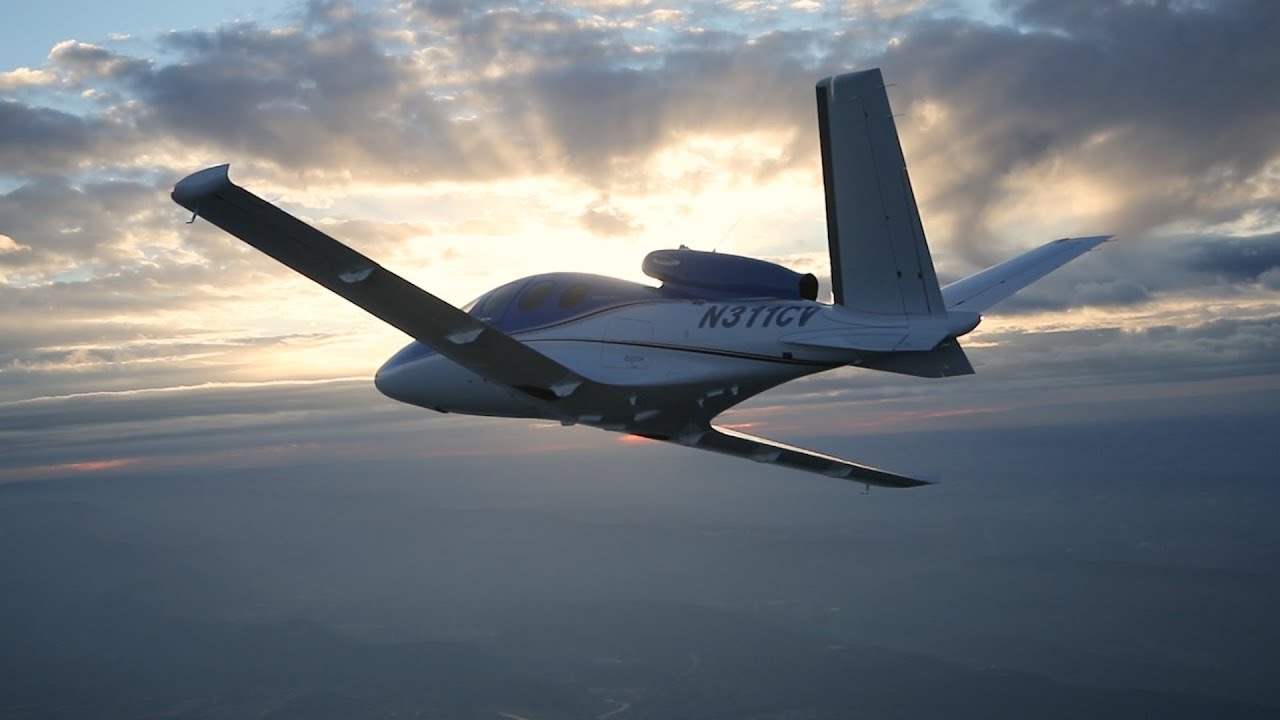
In January, Cirrus announced the Generation 2 SF50 Vision Jet. After getting the Generation 1 Vision Jet certified in late 2016, Cirrus didn’t waste any time in starting in on improvements.
The improvements are pretty sweet, making the G2 Vision Jet even easier to fly and step into for Cirrus’ target market, SR22 owners.
Here are the improvements on the G2 Vision Jet.
RVSM Approval
The G2 Vision Jet has received RVSM approval, allowing the airplane to fly at 31,000 feet. RVSM stands for Reduced Vertical Separation Minimums (read more about RVSM here). RVSM airspace starts at 28,000 feet, the G1 Vision Jet’s ceiling. Now that the G2 Vision Jet is RVSM certified, it can fly at 31,000 feet.
For piston pilots, you are left scratching your head as to the advantage of this. In a jet, the higher you go, the thinner the air, so the faster you go, and the less fuel you burn since the thin air needs less fuel to mix with. This caps out at a certain altitude and the speed begins dropping and you start losing efficiency (even though the fuel burn is quite low).
According to Cirrus, at 31,000 feet, the G2 Vision Jet cruises over 300 KTAS and gets a range boost to almost 1,200 nm.
Garmin Perspective Touch+
Cirrus & Garmin have taken the new NXi interface and paired it with the Garmin Perspective Touch to create the Touch+. You can read about the improvements on the NXi here, all of which are included in the Touch+ in the G2 Vision Jet.
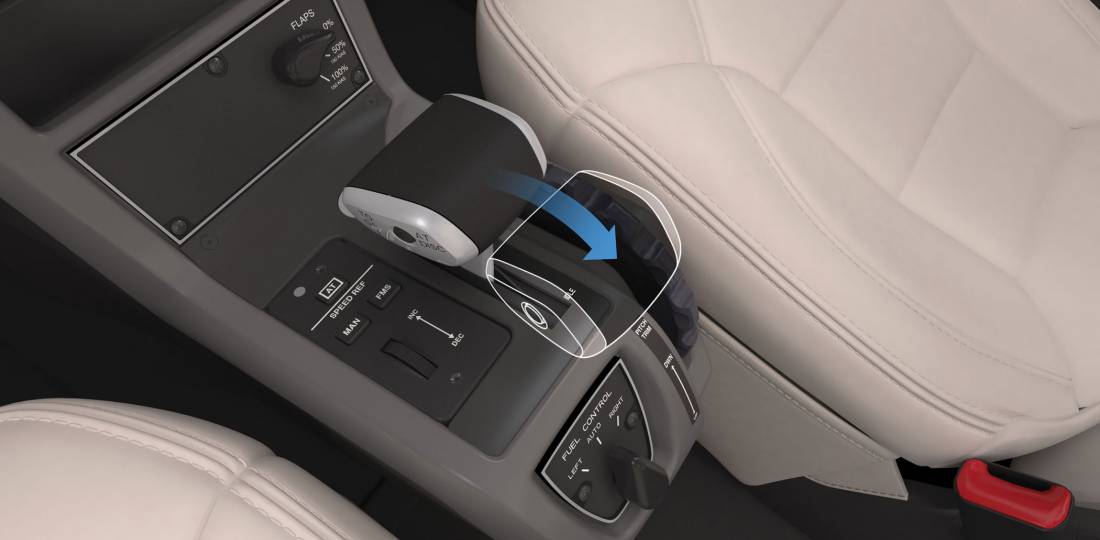
The big improvement that is included in the Touch+ is Autothrottle capability. An Autothrottle is integrated with the autopilot. It automatically adjusts power settings and speeds based on the phase of flight without the pilot having to touch the throttle. Pretty cool.
New Cabin
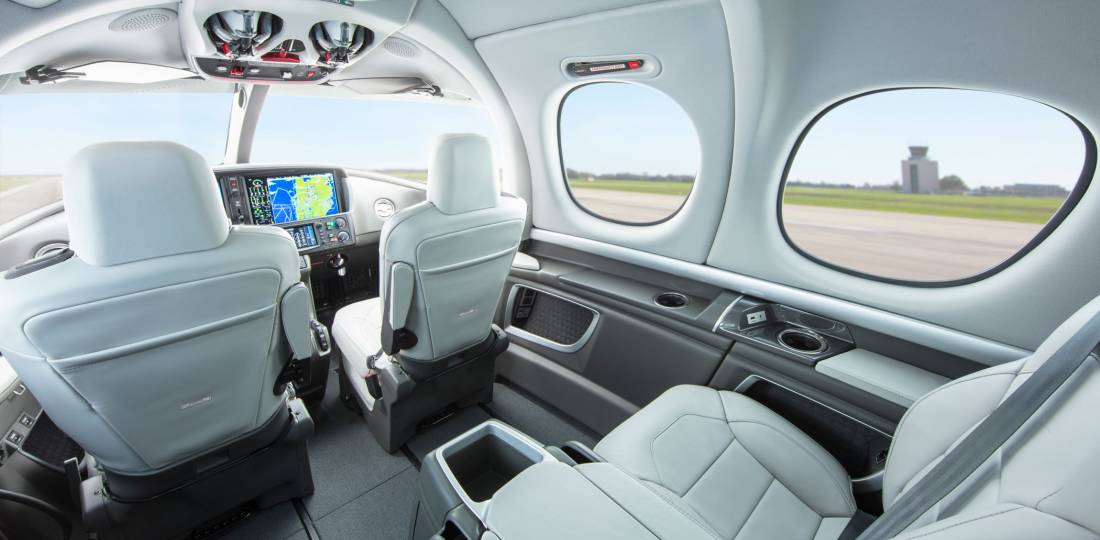
The G2 Vision Jet has a redesigned cabin as well, making it an extremely passenger friendly airplane. The second row has been redesigned and equipped with a center console. There is also a drop down TV screen that allows passengers to connect their mobile devices to it to watch movies or videos while traveling (no internet on board, yet. That’ll probably be the G3 Vision Jet!).
Cirrus also put in more noise reduction in the cabin, creating a quieter ride for passengers. Cirrus also allows for multiple different seating configurations, depending on the needs of the owner.
As always, Cirrus is on the leading edge of airplane technology, creating airplanes that are easy as well as fun to fly. I’m excited to see how they continue to improve the design to both the SR22 and the Vision Jet.
Two pilots walk into an FBO. “Nice airplane,” Pilot 1 says to Pilot 2. “What kind of panel do you have in it?”
“I just went all glass,” Pilot 2 says. “Put in the Garmin G500 TXi, a GTN 750, and upgraded to the GFC 600 Autopilot. Even put in the Mid-Continent standby instruments. It’s a pretty sweet set up. What about you?”
“Wow, sounds like it!” Pilot 1 responds. “I went a different route. I liked all my old BendixKing instruments, so I stuck with the company. I put in a BendixKing AeroVue Touch panel, a BendixKing KSN 770 touch screen GPS, kept my KFC 225 autopilot, got the ADS-B out compliant BendixKing KT 74 transponder, and finished it off with a King AeroFlight KI 300 Digital Backup instrument.”
Wait, what? BendixKing?
Yes, my friends, BendixKing is still around.
We are all used to the latest and greatest Garmin products these days. Don’t get me wrong, Garmin and Aspen make great retro-fit products for your instrument panel, while Garmin and Avidyne are at the top of the touch-screen GPS market, but don’t forget about BendixKing. They are staying in the game too.
BendixKing announced in April the xVue Touch for experimental aircraft, with the STC for the AeroVue Touch for certified aircraft coming later this summer. The xVue and AeroVue touch are pretty nifty units, comparable in features to what Garmin is doing with the G500 TXi and G600 TXi. It will be difficult to claw back into a competitive market share with Garmin, but BendixKing might find a niche market of followers.
Let’s take a look at the unit.
BendixKing AeroVue Touch
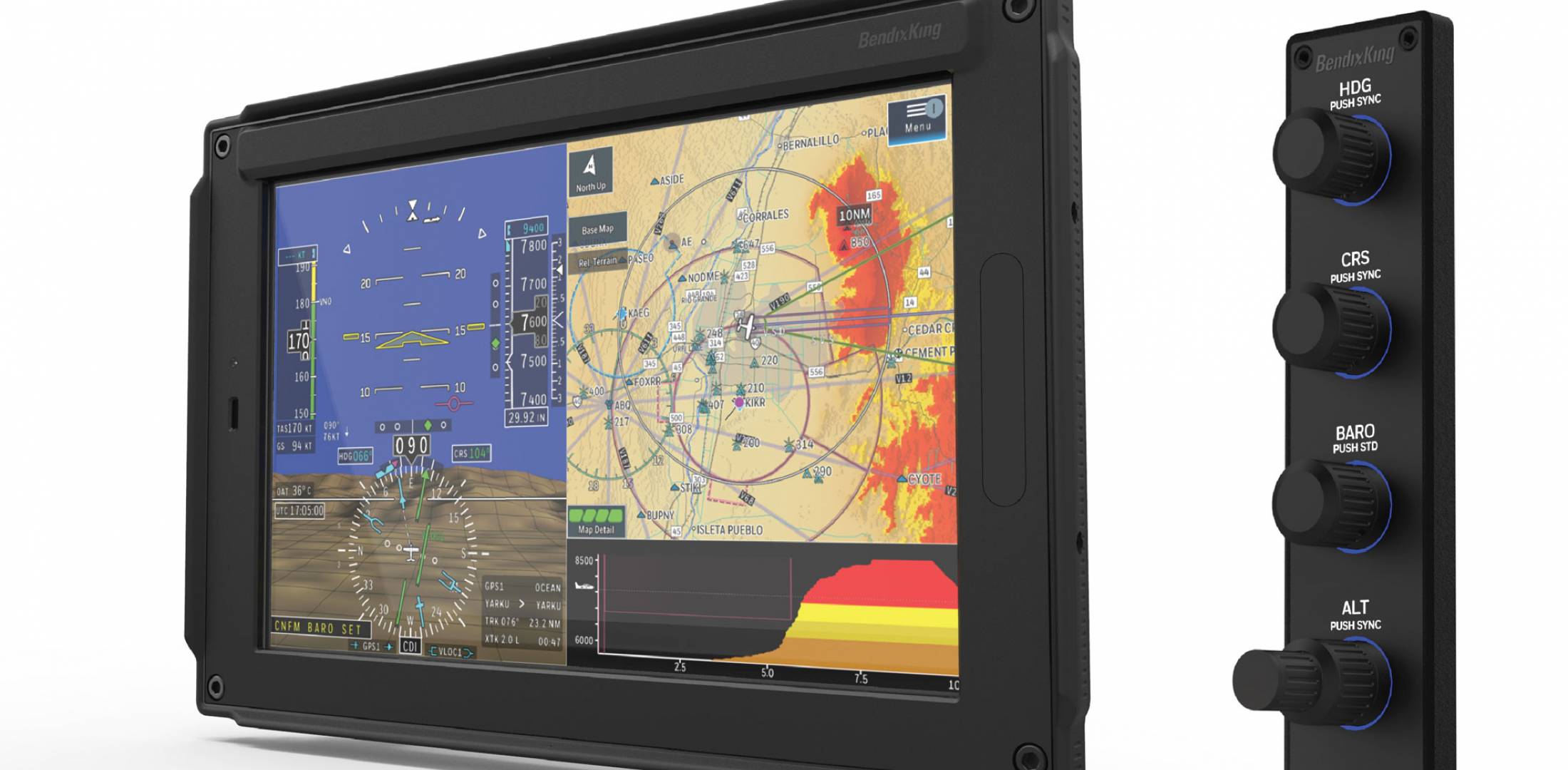
Now, I have not used the BendixKing AeroVue Touch or the xVue Touch, only read about them. But, what I’ve read sounds pretty cool. The display has really good resolution (BendixKing brags it is the highest screen resolution available), synthetic vision that comes standard (Garmin & Aspen charge extra for synthetic vision), plus VFR Sectional Charts & IFR High and Low Enroute charts, making paper charts even more obsolete.
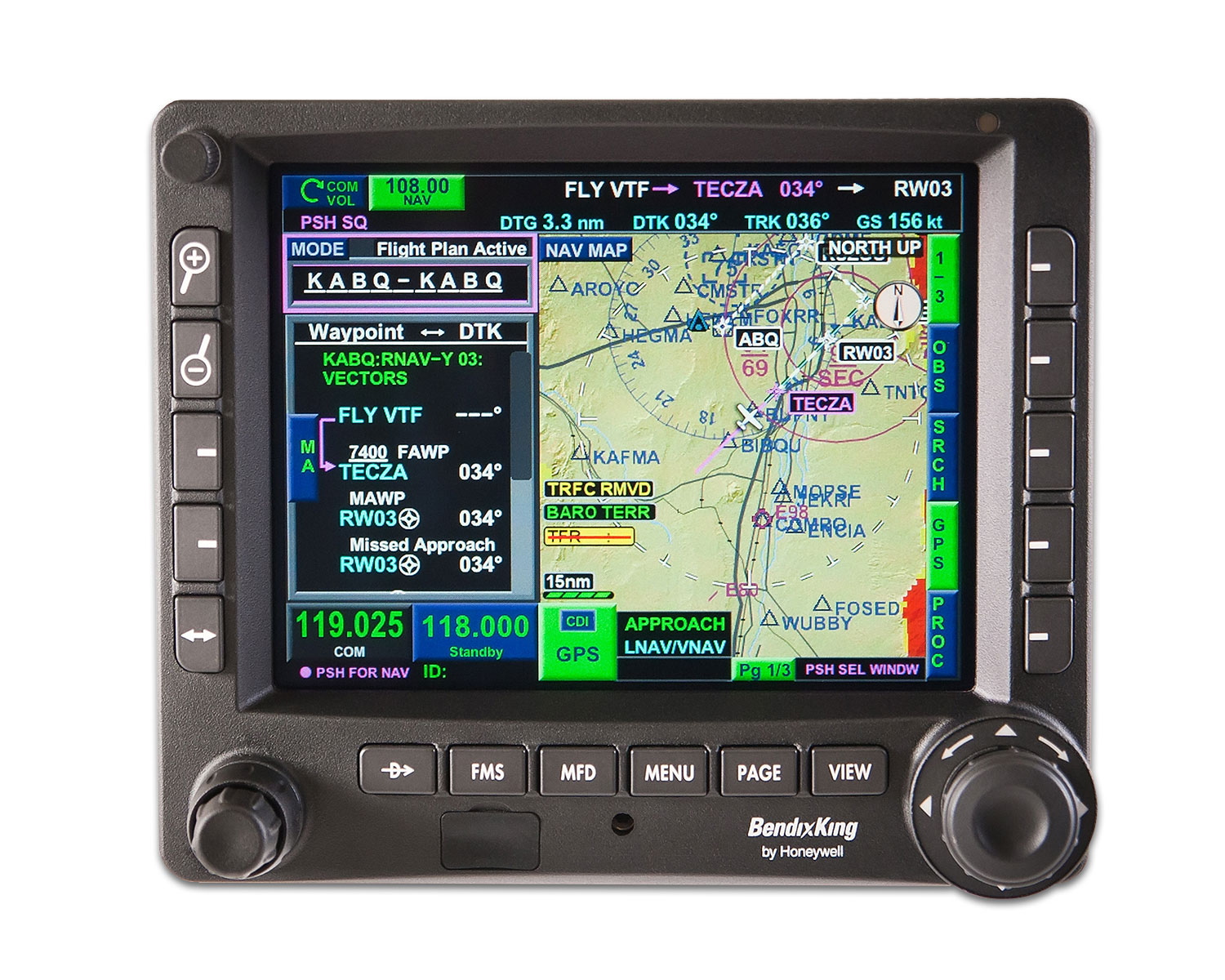
The display is 10.1 inches and can be easily swapped between a full screen instrument mode or a split screen setup as seen above. Apparently, BendixKing has 3-D moving maps available on the AeroVue Touch too, which is standard.
The one thing Garmin has on the BendixKing AeroVue Touch right now is engine information. The G500TXi has a full complement of engine gauges available; the AeroVue Touch doesn’t, yet. BendixKing says it’s in the works, as well as radio information and autopilot control. I’m assuming the future autopilot control software would mean you could remotely mount an autopilot controller and input all functions from the AeroVue Touch display. The nice thing about these future upgrades is all the software updates are free through BendixKing.
The sticker price for the forthcoming unit is going to be about $12,600. Garmin’s 10.5 inch G500 TXi is $16,000, while Aspen doesn’t offer anything quite that big.
BendixKing KSN 770
I’ve been keeping my eye on the BendixKing KSN 770 Touchscreen WAAS GPS for a few years now. It never really has caught on quite like the Garmin GTN 750 or the Avidyne IFD 540. BendixKing took the same route that Avidyne did in creating a hybrid touch GPS (or mini-MFD if you want to look at it that way) where a pilot can perform functions either using the touch screen or utilizing soft keys on the edges. I like the hybrid touch approach as I have been bounced around in turbulence while trying to tap something into a Garmin GTN 750 and it can prove difficult.
Similar to the AeroVue Touch, BendixKing utilized split screen technology in the KSN 770. It’s a full WAAS unit that is already certified. It’s sticker price is $14,200, compared to the Garmin GTN 750 at $17,200 and the Avidyne IFD 540 at $15,000.
Other BendixKing Gadgets
Here are some other BendixKing Gadgets both available now and in the works:
KFC 230 AeroCruz Touchscreen Digital Autopilot-2 or 3 axis options. Will be the only touchscreen digital autopilot available on the market. Also able to utilize the servos from older KFC autopilots. Should be available late fall or winter ’18.
Two pilots walk into an FBO. “Nice airplane,” Pilot 1 says to Pilot 2. “What kind of panel do you have in it?” “I just went all glass,” Pilot 2 says. “Put in the Garmin G500 TXi, a GTN 750, and upgraded to the GFC 600 Autopilot. Even put in the Mid-Continent standby instruments. It’s…
The Garmin Perspective and Perspective + are awesome pieces of equipment. There is so much a pilot can do with this system that it can sometimes get overwhelming. There are two very important features of the Garmin Perspective that all IFR pilots need to know, but are tricky to do if the correct buttons aren’t pushed.
The two features of the Garmin Perspective I want to focus on today are the “Load Airway” feature and the “Hold at Waypoint” feature. The “Load Airway” feature is especially handy when flying IFR long distances with several airways as part of the clearance. Here’s how to utilize both on the Garmin Perspective.
Load Airway
On your flight plan page, insert the waypoint where you will be joining the airway, or, if your clearance was radar vectors to join an airway, then insert the waypoint on the airway that begins the leg you will be joining on
Press the Menu key on the keypad
A menu will pop up. Scroll down to highlight Load Airway
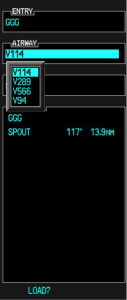
Highlight the Airway you want from the next menu that pops up then press Enter
Then, a list of waypoints will display to exit the airway. Highlight the waypoint where you will be exiting the airway and Press Enter
The cursor will then move down to Load at the bottom of the menu. Press Enter to load the airway
The Airway and all the waypoints in between your entry and exit waypoints appear in your flight plan
If you are getting vectors to join the airway, you’ll need to use the Activate Leg function to activate the leg you will be joining the airway on
On the Flight Plan page, highlight the waypoint that ends the leg you want to activate
Look for the ACT LEG soft key on the lower right hand side of the MFD and press
This Activates the leg on the airway. Then, just simply fly the heading assigned by ATC until the CDI needle centers showing you are on the airway
Hold At Waypoint
The Garmin Perspective allows pilots to place a holding pattern at any waypoint that is in the Nav Database (or any user created waypoint). Here’s how to do it.
On the Flight Plan page, highlight the Waypoint that you want to hold over and press Menu on the keypad
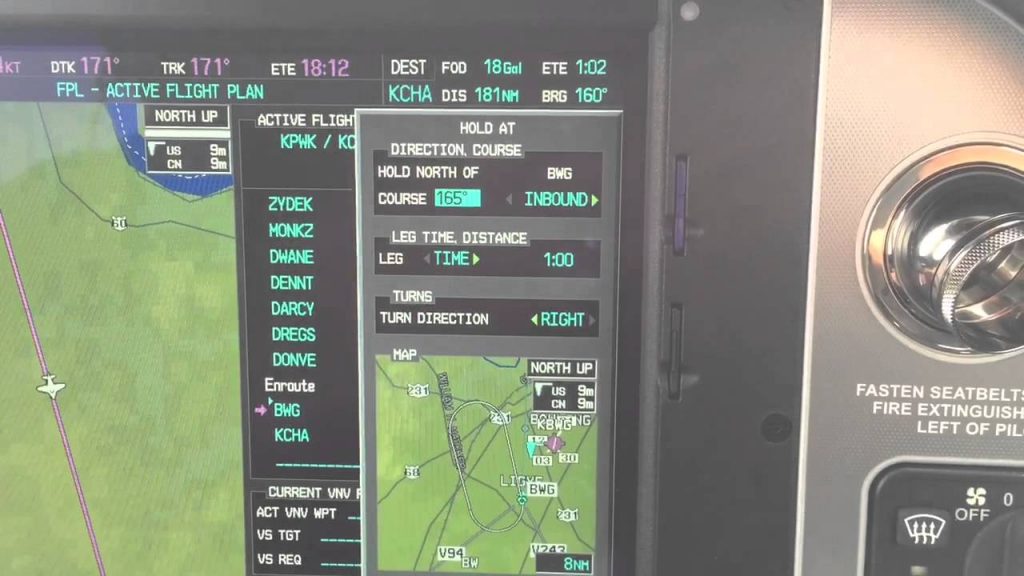
On the menu that pops up, highlight Hold At Waypoint and press Enter
On the next menu that pops up, input either the inbound or outbound course, right or left turns, leg time or distance, and the EFC time, then highlight Load and press Enter
You will see the hold now as a Waypoint in your flight plan
The Garmin Perspective and Perspective + are awesome pieces of equipment. There is so much a pilot can do with this system that it can sometimes get overwhelming. There are two very important features of the Garmin Perspective that all IFR pilots need to know, but are tricky to do if the correct buttons aren’t…
Raise your hand if, after you have officially become a pilot by passing your private pilot check ride, you consistently file VFR flight plans with Flight Service.
Anybody?
Okay, let’s revise the question. Raise your hand if you have filed VFR flight plans at least 5 times in the last year.
Okay, one or two hands go up.
That’s it?
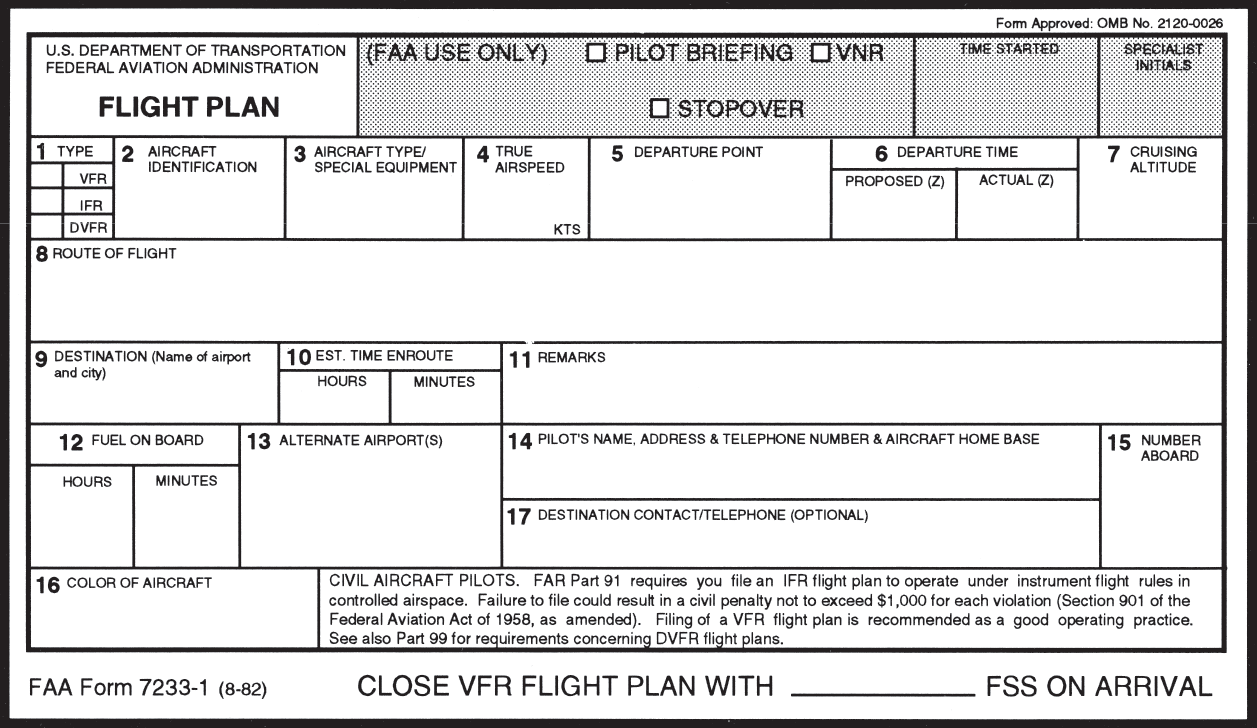
To be perfectly honest, I have filed VFR Flight Plans twice (I think) in the last year. The only reason I did was because I was flying in an area that had poor radar/radio communications and I wanted someone to know where I was (I was ferrying an airplane through southern Oregon and northern Nevada which is mountainous and is hard to get coverage into at lower altitudes). I was so unaccustomed to doing it that I nearly forgot to call and close my flight plan.
This is a common complaint amongst pilots concerning VFR flight plans. It’s extremely easy to get to your destination, hop in the car and completely forget to close your VFR flight plans. Thankfully, now a days, the Flight Service Station will typically call the number you put in your VFR flight plans (your cell phone number most of the time) to make sure you are on the ground before initiating search and rescue services.
Another complaint is that it is cumbersome to call the Flight Service Station after departing to open the VFR flight plans. This is especially true in a busy airspace area or if the pilot is getting a VFR Flight Following and talking to ATC on a different frequency.
I still think it is a great idea to file and utilize VFR flight plans. If you don’t show up at your destination, someone will come looking for you which could mean the difference between getting stranded after an off airport landing and getting a warm cup of coffee at the end of the day. Even if the you get flight following from ATC, it’s still good to file a flight plan.
Lockheed Martin, who runs all the Flight Service Stations across the US, heard these complaints from pilots and decided to come into the modern age and make it easier to open and close flight plans. They developed EasyActivate and EasyClose.
File your VFR flight plans first, through calling the FSS or on your favorite iPad app. Then, for EasyActivate, you’ll receive an email 30 minutes prior to your ETD with a link in it. Simply click/tap on the link and your flight plan is activated. No having to call FSS in the air, no having to try to get them on the ground. Just tap the link and you’re good to go.
For EasyClose, you’ll receive an email 30 minutes prior to your ETA at your destination. When you get on the ground, you’ll see the email in your phone or iPad and you just tap the link and your flight plan is closed. Since we all have our phones and iPads with us constantly, there will be no more forgetting to close the flight plan and getting that angry call from the FSS.
Sign up is quick and easy. All Lockheed Martin needs is your email address, last name and phone number. They’ll send you the password to set up your account. Log in (they will have you change your password immediately), then just click on EasyActivate/EasyClose up at the top. You have to register the email address you want (you can also put in a phone number to receive a text message, and you can put multiple email addresses and phone numbers if you’d like), then you are all set to go.
Raise your hand if, after you have officially become a pilot by passing your private pilot check ride, you consistently file VFR flight plans with Flight Service. Anybody? Okay, let’s revise the question. Raise your hand if you have filed VFR flight plans at least 5 times in the last year. Okay, one or two…
Sadly, Texas Top Aviation is having to cancel it’s 2020 Santa Fe Fly In due to COVID. New Mexico has continued to implement travel restrictions, making it difficult for Texas Top Aviation to complete the event.
Mark your calendars now, though, as Texas Top Aviation has scheduled is 2021 Fly In. We are returning to the Lajitas Golf Resort in the Big Bend area of Texas. The event will be March 24th-26th, 2021. Stay tuned for more information. We hope to see you there!
Sadly, Texas Top Aviation is having to cancel it’s 2020 Santa Fe Fly In due to COVID. New Mexico has continued to implement travel restrictions, making it difficult for Texas Top Aviation to complete the event. Mark your calendars now, though, as Texas Top Aviation has scheduled is 2021 Fly In. We are returning to…
Figuring out the pattern altitude at an airport should be pretty simple, right? But, in this day of helpful technology, most pilots actually get it wrong. How can you always get it right? Well, it just takes about an extra 15 seconds. Here’s how.
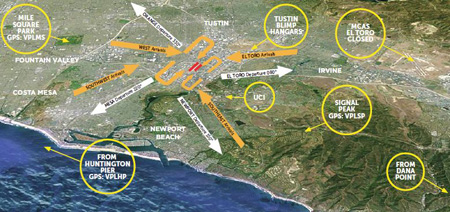
John Wayne Airport Traffic Patterns
As outlined in the Aeronautical Information Manual, section 4-3-3, “traffic pattern altitudes for propeller-driven aircraft generally extend from 600 feet to as high as 1,500 feet above the ground.” Further, in the Pilot’s Handbook of Aeronautical Knowledge on page 13-10, it states: “1,000 AGL is recommended pattern altitude unless established otherwise.”
Okay, so for piston driver’s, we’ve got it narrowed down to 1,000 AGL (Above Ground Level for those who don’t like acronyms). But wait! There’s that very important phrase at the end of the last quote: “unless established otherwise.” That means not all airports have traffic pattern altitudes of 1,000 AGL, or else they wouldn’t put that line in there!
How do you find out what the TPA (Traffic Pattern Altitude) is for a certain airport if it’s not 1,000 AGL? Great question! Your first guess is probably to look on Foreflight. Though this is a good start, it is not the full answer.
Let’s use an example. Look up KAQO, the Llano Airport on Foreflight. At the top of the page, the airport elevation is stated as 1,101′ MSL and the pattern altitude is stated as 1,902′ MSL. From what we just learned, 1,902′ MSL is not 1,000 AGL, so is 1,902′ MSL otherwise established?
On the Airports page with KAQO pulled up, tap the A/FD tab, second to last on the left. Scroll down to Llano Muni. Read the whole entry. Does it state in the entry that pattern altitude is different than 1,000 AGL? It sure doesn’t. So, because it is not otherwise established, pattern altitude at KAQO is 2,102′ MSL not 1,902′ MSL.
Where did Foreflight get that? I have no idea. Too often, though, pilots look at the Foreflight pattern altitude and don’t actually check the Airport Facilities Directory (A/FD). Then, they get the pattern altitude wrong.
What does it look like when pattern altitude is otherwise established? Look up KSGR, Sugar Land Regional, on your Foreflight app. Foreflight states the elevation as 82′ MSL and the Pattern Altitude as 1,000′ MSL. Is this correct? Well, tap that A/FD button again and let’s find out.
On the second line of the A/FD entry, it says TPA-See Remarks. Down in the remarks section, we find the following:
TPA-1000 (918) single engine piston acft, TPA-1500 (1418) for twin and turbojet acft, TPA-500 (418) for helicopters within 2NM.
Foreflight got it right this time for single engine pistons, but if you are in a twin, the pattern altitude is different. What’s the lesson here? Always check the A/FD and don’t always go by what Foreflight says. The A/FD is always right and usually has a little more detail to help set you straight.
One last thing. Both the AIM and the Pilot’s Handbook of Aeronautical Knowledge, when talking about pattern altitude, state, “When operating at an airport, traffic pattern altitudes should be maintained unless otherwise required by the applicable distance from cloud criteria in…section 91.155.” 91.155 defines basic VFR weather minimums. So, to fully interpret what the AIM is saying, we have to take into account the type of airspace we are in to determine if we can safely and legally operate at pattern altitude at a particular airport.
For example, let’s say we are at KCVB, the Castroville Airport. Pattern altitude there is 1,602 feet, which is 829 AGL. CVB is Class G airspace up to 700 AGL, then Class E above that. Let’s say there is a 700 AGL broken cloud layer. Pattern altitude is 829 AGL, so you won’t be able to get up that high with a broken ceiling. What altitude can you do pattern work at to stay legal?
Class G VFR weather minimums during the day below 1,200 AGL is 1 SM visibility and clear of clouds. So, legally, you could fly at 699 AGL (which at CVB would be 1,472 MSL) while in the pattern and be legal. Safe? Maybe, but probably not if you are skimming the base of the clouds. Is 1300 MSL a safer pattern altitude in this example? Well, that is 527 AGL, so probably not, since towers tend to stick up that high sometimes.
Let’s go back to KSGR and put a 1,000 AGL overcast ceiling there. SGR is Class D airspace and we already determined pattern altitude there was 1,000 MSL for piston singles. VFR visibility and cloud clearance requirements in Class D airspace are 1,000 feet above clouds, 500 feet below clouds, and 2,000 feet horizontally from the clouds with 3 SM visibility. In order to stay 500 feet below the clouds, you would be flying a 582 MSL pattern. Safe? Probably not, though it is legal.
To summarize, don’t take Foreflight’s word for pattern altitude. Cross reference the A/FD (it only takes 15 seconds at the most) to verify. If it’s cloudy, it’s really best to stay on the ground, but if you want to find out your legal pattern altitude with a cloud deck, cross reference 91.155. I don’t recommend flying below pattern altitude because it is there for a reason.
Figuring out the pattern altitude at an airport should be pretty simple, right? But, in this day of helpful technology, most pilots actually get it wrong. How can you always get it right? Well, it just takes about an extra 15 seconds. Here’s how. As outlined in the Aeronautical Information Manual, section 4-3-3, “traffic pattern…
You are hand-flying an in-the-weather descent, power back, heading for the FAF. You start a 30 degree banked turn at your lead point to cross the FAF, when your passenger behind you gasps. Looking over your shoulder, you see he has spilled his drink into his lap…too bad for him! However, when you turn your head back to your panel, your inner ear tumbles and you see 45 degrees of bank, 15 degrees nose low, airspeed increasing.
Congratulations! You have managed to get distracted and sucked into an unusual attitude recovery. By the book, you should roll wings level, pull to the horizon, and adjust power as necessary to keep the airspeed within limits. In this scenario, if you had not experienced vertigo, you might have been able to roll to less than 30 degrees of bank, recover your turn, pull the nose up to less than the original descent attitude, pulled a bit of power to slow back to your desired penetration speed and then resumed your desired ground track. However, this would only be appropriate if you had full situational awareness as to the deviations caused by the look over your shoulder, plus full confidence that the moderate corrective actions would put you back on your desired flight path.
As a military aviator, I learned unusual attitude recoveries based upon hard maneuvering at extreme pitch and bank angles. In the hard-maneuvering environment, an unusual attitude could be 90 degrees straight up, airspeed decreasing below 120 kts…or 80 degrees nose low, 135 degrees of bank, airspeed increasing through 500 kts… etc. In these cases, understanding angle of attack, or AOA, is critical to maintaining controlled flight and returning to a normal attitude.
In an extreme nose-high attitude, a military aviator is trained to roll the aircraft to 90 degrees of bank, ease off the back-stick pressure to reduce AOA, add power as required, and allow the nose to slice back towards level, rolling to wings level as the nose approaches the horizon. If nose low, the recovery procedure is to roll rapidly, within asymmetric g limits, until wings level, then to pull at optimum g loading to recover to level flight. For the nose-low recovery, power was normally reduced until airspeed could be assessed and brought under control. However, when doing the nose-low pullout at 7-9 gs, pulling the power for too long would leave you much to slow to resume combat.
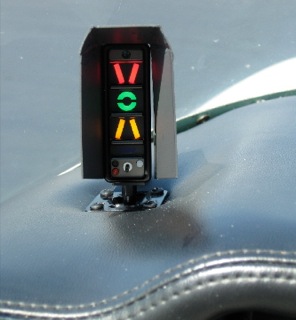
The AOA gauge on a fighter’s glare shield is a primary reference during hard maneuvering and for landing. The AOA for optimum maneuvering is 13 degrees, displayed as the green circle or “green donut” on the gauge. The red chevron on top represents a slow condition of 15 degrees or more and the yellow lower chevron represents 11 degrees or less.
For normal landing in the F-16C, the pilot slows to 220 kts and configures abeam the touchdown point while mentally computing the final approach airspeed of 136 kts plus 4 additional knots for each 1000 lbs of fuel. When rolling off the perch and flying the final turn, the pilot would usually only glance once at the airspeed once to ensure final turn airspeed of 180 kts while using the AOA sight gauge as the primary indicator of a best performance turn. As long as the AOA was green donut (13 degrees) or less, you would not stall. If on speed and 13 degrees wasn’t going to get you around the turn to line up with the runway, you knew you were going to overshoot. You never wanted to see the red chevron of 15 degrees or more as that meant you were too slow, pulling too hard, and in danger of building an un-recoverable sink rate!
Few GA aircraft are currently equipped with AOA indicators, though there are several after market devices available for retrofit. However, knowing the impact of AOA and how to manage it is vital to safe aviating, even without an AOA gauge. The bottom line is, as long as you don’t ask the wing to produce more angle of attack than it can handle, you won’t stall.
Practicing final turn stalls, to know what the wing feels like as you get too slow or pull too much on the controls, increasing AOA past the critical point, will keep you safe when you encounter that unexpected overshooting wind or you find yourself inadvertently on too tight of a downwind leg. Better to overshoot or take it around to try again, than to pull too hard and exceed critical AOA.
Mike Hostage is a retired USAF pilot with 37 years of experience, flying a wide variety of aircraft. An instructor pilot for more than half of his 4800 flight hours, Mike is currently qualified in a Cirrus SR-22T and regularly flies his two homebuilt sailplanes.
You are hand-flying an in-the-weather descent, power back, heading for the FAF. You start a 30 degree banked turn at your lead point to cross the FAF, when your passenger behind you gasps. Looking over your shoulder, you see he has spilled his drink into his lap…too bad for him! However, when you turn your…