Fuel Planning

A few years ago I took off out of Chicago’s Dupage airport (KDPA) in a Bonanza headed for Deck Airport (9D4), a small uncontrolled airport about 60nm to the west of Philadelphia. It was late November and, unfortunately, due to some unexpected ice, I found myself flying a significant portion of the flight at 4-5,000 feet instead of the 11,000’ at which I had originally planned. This was an issue because I was burning significantly more fuel at 4,000’ than I would have at 11,000’. I did my fuel planning math and came to the conclusion that I would still make it to 9D4 with the required minimums. On I flew, watching the number on the totalizer decrease.

I arrived at 9D4 after dark. Although I didn’t think I would need one, I ended up having to fly an approach to get down below the cloud deck. My troubles weren’t over. After breaking out of the clouds, I was terrified to realize that the runway lights weren’t working.

Now, I had a problem. I was in a relatively unfamiliar area in marginal VFR at night and I was quickly running out of options as far as my fuel was concerned. Fortunately for me, 9D4 is located 14nm north of Lancaster Airport (KLNS), which is a towered airport with very nice approaches and facilities. Also working in my favor was the fact that Lancaster was reporting VFR. I headed as quickly as I could for Lancaster and landed uneventfully.

When I landed I had the required fuel minimums on the airplane, but I managed to scare myself pretty thoroughly. I realized that while I had been forced to deal with some unexpected complications: icing forcing me down several hours before my planned descent and inoperative runway lights that were not listed in the airport NOTAMs. I was very blessed that Lancaster was so close by and that I was able to land without having make an approach. Had LNS not been VFR, I could have easily burned through another 15 minutes of fuel maneuvering for and executing an approach. If, for some reason I’d had to go missed or perform a hold, I would have gone through my remaining fuel pretty quickly. To me, this is a classic example of “just because it’s legal, doesn’t mean it’s safe.” I realized I needed to change how I did my fuel planning.

Since then, I have enforced a personal minimum: 18 gallons must be on the Bonanza at the time I reach my destination. If things change un-expectedly enroute and I realize I won’t make it to my airport with at least 18 gallons, I stop. I had always tried to have an hour of fuel on board as a reserve, but having a hard number is an easy way for me to make decisions.

Having a fuel totalizer installed in an airplane is a really nice way to upgrade the panel and give the pilot a clearer idea of how much gas is being burned/ how much is remaining. The totalizer installed in our Bonanza is a JPI Fuel Flow 450. It has a lot of nice features which make fuel management chores much easier. If a totalizer is something that you are considering installing in your aircraft, or if you have one already, here are a few things that I’ve learned from my experience flying with them.


  • While helpful, don’t rely too heavily on the totalizer to do your fuel math for you. Similar to the negative effect that using GPS navigation can have on a pilot’s ability to navigate via a chart, over dependence on digital fuel systems can lead to problems. A fuel totalizer should be telling you what you already know, not doing all your math for you. Do your fuel math and confirm it with the totalizer. If it failed, you should still know how much you have and how much is needed.
  • Likewise, don’t rely completely on the accuracy of a totalizer. Technology isn’t perfect, and if the instrument isn’t quite calibrated correctly, the numbers could be wrong. Fuel information is absolutely critical, and thus warrants constant monitoring and double checking. When you do arrive at your destination, keep track of how much fuel the airplane takes and compare it to the numbers on the totalizer to verify its accuracy.
  • Unless you are flying an airplane which has a “both” setting, you will still need to be keeping track of how much fuel is available in the aircraft’s individual tanks. For example: our Bonanza has two tanks, but the totalizer doesn’t keep track of that information. If I don’t remember to switch tanks, I can run one completely dry and the digital read out will indicate the remaining gas in the other tank. The totalizer won’t indicate anything about the individual tank quantity until the engine quits and the flow drops to zero.


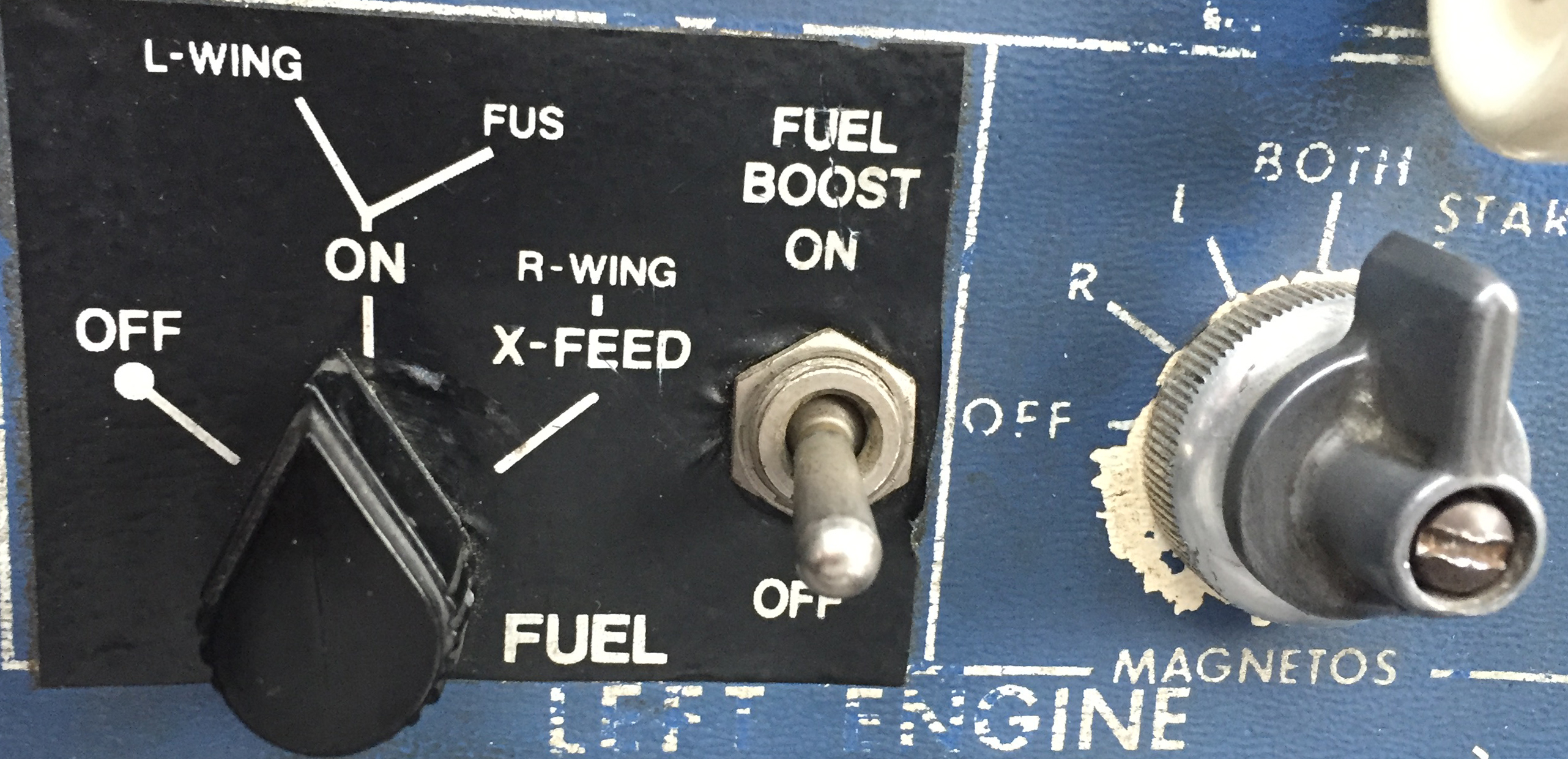
Pictured below on the left is a fuel selector from a Piper Aerostar. The airplane has two selector valves and three fuel tanks. While the system is not difficult to use, it does require proper understanding and regular monitoring to ensure that the fuel is distributed correctly. The picture on the right is the selector out of an A36 Bonanza. I love the simplicity of the Bonanza’s fuel system, but it still takes attention and intention on the part of the pilot to keep track of how much gas is available on either side.
 

  • The JPI unit that we have installed on our airplane even has an “hours and minutes remaining” screen as well as a “fuel required” screen. The totalizer actually talks to the GPS and is able to tell me how much gas I will need to get to my destination. Just remember that those numbers are computed only at the current flow and do not take into account the potential increases/ decreases in consumption which will occur as power settings are changed for descent and arrival into the airport. I may feel pretty good about my hours and minutes remaining when I’m sitting at 12,000 feet, but when center makes me descend to 5,000’ and I’m still an hour away from my destination, endurance will decrease. It also can’t take into account any additional flight time that may be required to shoot approaches, hold, or divert.
  • Have you ever heard of “G.I.G.O?” It stands for “Garbage In, Garbage Out.” What it means is that the information which the fuel totalizer is giving the pilot is only as good as the information that the pilot gave it at the beginning of the flight. The totalizer in our Bonanza does not have any method of checking the quantity in the fuel tanks. At start up the pilot inputs the amount of fuel on board the airplane and the totalizer keeps track of how much is burned which is then subtracted from that inputted number. Ergo, if the amount of fuel is not updated or is incorrect, the fuel total numbers displayed will be inaccurate. If a pilot told the computer that the tanks had been topped off, but didn’t verify it, the fuel could be exhausted and the totalizer would still indicate that there was fuel available. It is, therefore, VERY IMPORTANT to confirm the airplane is fueled to the amount desired (visually if possible) and use the fuel gauges in the airplane to verify the accuracy of the totalizer.
  • Use a timer: I like to use the timer on my phone to remind me when it is time to switch the fuel tanks. If I set the phone to vibrate and put it in my pocket, it will remind me to change tanks at the desired time if I haven’t remembered to otherwise. It’s also nice because I can write down exactly at what time (or quantity) I changed tanks so I can keep very accurate track of how much fuel I have in any given tank. This is especially helpful in airplanes that have more than two fuel tanks. Another option is setting the timer on a Garmin 430, 530, or G1000 to give an alert or message reminding the pilot to change tanks at a preset time.


It shouldn’t come as news to anyone that the importance of fuel planning cannot be overstated. I personally know multiple people who have run airplanes out of fuel because their planning wasn’t quite right or the weather changed and they were unwilling to take the time to stop. In the case of my Bonanza story earlier in this article, it was obvious to me before I even landed that I should have picked a fuel stop when it became apparent that I would arrive at my destination with less than my desired one hour margin.

The technology that we have now to help us keep track of our fuel usage is wonderful, but use it as an aid; not as your only source of fuel calculation. Remember to verify the amount of fuel on the airplane before you go because the number on the totalizer won’t mean anything if it doesn’t match the amount in the tanks! Above all, don’t be afraid to stop and get fuel when you need it. I’d rather have to tell the passengers that we need to stop for gas than deal with the potential consequences of running out.

Andrew Robinson is a 135 Charter Pilot and flight instructor who lives with his wife and 2 daughters in Pennsylvania.  He flies Pilatus PC-12s and instructs in Beechcraft Bonanzas.

Similar Posts

  • Medical Reforms Get Passed

    On July 15th, the medical reforms that AOPA and many other aviation advocacy organizations had pushed so hard for were passed into law.  President Obama signed the medical reforms law on the 15th, but, before practical application of the law takes place, the FAA has to translate the law into regulations.

    Doctor

    What do the new medical reforms mean for medical certificates and flying?  First, you still have to get a medical examination at some point in your flying career.  Student pilots will still need an initial medical examination. Initially, for pilots who have held a medical certificate at some point over the previous 10 years, a new medical examination may not be needed (this still has to be regulated by the FAA so exact details aren’t known yet).

    So, if you’re medical certificate has expired but you have had one in the past 10 years, you qualify.  But, if you have had your medical certificate revoked, suspended, withdrawn or denied, you don’t qualify.

    Once that student pilot receives the initial medical certificate (or the experienced pilot decides to start flying again), all that needs be accomplished is to take a free, online course on aeromedical factors every two years and meet with a physician at least once every four years.

    There are some operating limitations that will be put into place for folks operating without a third class medical.  Pilot’s can operate aircraft with no more than 6 seats that weigh less than 6,000 pounds, can carry 5 passengers, and are able to operate in day or night VFR or IFR conditions.  Pilot’s may not operate for hire, nor climb above 18,000 feet or fly faster than 250 knots.

    It will take some time for the FAA to put the regulations in place, but the process has begun.

    On July 15th, the medical reforms that AOPA and many other aviation advocacy organizations had pushed so hard for were passed into law.  President Obama signed the medical reforms law on the 15th, but, before practical application of the law takes place, the FAA has to translate the law into regulations. What do the new…

  • Cirrus Alternator Failure

    A Cirrus is an electric airplane.  There are no vacuum pumps and therefore no vacuum driven instruments. The Klapmeier brothers did this on purpose, trying to make it a modern airplane.  No vacuum systems means no vacuum pump failures, hence there is a lower likelihood of instrument failures in IMC.

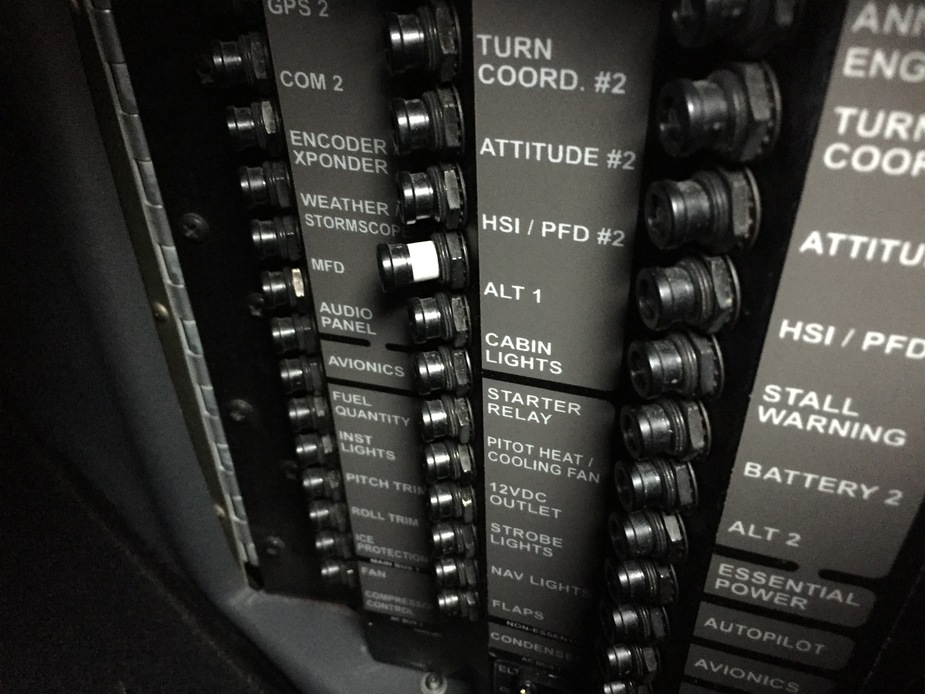
    What Cirrus did instead was put a lot of electricity producing and storing devices in the airplane.  All SR20 and SR22s are equipped with 2 engine driven alternators and 2 backup batteries.  Alternator 1 is a 28 volt alternator (the amperage varies based on whether or not you have an air conditioner) while Alternator 2 is a 28.5 volt alternator.  There are 2 24 volt backup batteries, as well.  Battery 1 is also used for starting.

    In traditional airplanes that have 1 alternator, an alternator failure can affect a lot of things.  Depending on how many electronics are in the airplane, the battery can get depleted quite quickly.

    The Cirrus electrical system is quite ingenious.  It’s a little bit different based on whether you have an Avidyne Cirrus or a Garmin Perspective Cirrus.  I will discuss that further below.

    The main goal of this article is to talk through what happens in the event of a #1 Cirrus Alternator Failure (an Alternator 2 failure actually isn’t a big deal at all, though Alt 2 is required for IFR flight), the procedure for trying to fix it, and a technique I have developed that makes the pilot’s job easier.  First, let’s go through the #1 Cirrus Alternator Failure procedure.

    Alternator 1 Failure

    In either avionics configuration, the Cirrus Alternator Failure procedure is the same.

    • Check and reset the circuit breaker for Alternator 1 (Reset only once)
    • Cycle the Alternator 1 master switch
    • If Alternator 1 doesn’t come back online, leave the Alternator 1 master switch off and shed load on the battery

    Avidyne Entegra

    The Avidyne Entegra has 2 busses, the Main Bus and the Essential Bus.  Alternator 2 isn’t set to come on until the engine RPM reaches 1700.  While on the ground, Alternator 1 runs both the Main and Essential Buses.  In the air, Alternator 1 runs the Main Bus and Alternator 2 runs the Essential Bus.  Since Alt 2 is 28.5 volts, the higher voltage won’t allow the power from Alt 1 to cross over and run the Essential Bus.  There are also 2 one-way directional diodes that prevent the voltage from Alt 2 to cross over and run the Main Bus.

    Having said all that, when Alternator 1 fails, Battery 1 is now running the items on the Main Bus.  There are a significant number of items on the Main Bus which causes the 24 volt battery to quickly lose it’s charge. This precipitates the need for shedding load.  Items like GPS 2, the air conditioner and aircraft lights can all be turned off.

    In the above scenario, Alternator 2 is running the Essential Bus still that has all the Essential items on it.  Those include:

    • The PFD
    • Flight Instruments and associated Avidyne computers
    • Engine Instruments and associated Avidyne computers
    • GPS 1
    • Com 1
    • Nav 1
    • Autopilot
    • Stall Warning
    • Charging Battery 2

    Note 2 important items that are not on the Essential Bus:  the flaps and the landing light (which is very handy at night).  Those two are only on the Main Bus, which Battery 1 is now powering.

    Let’s further enhance our scenario.  You are flying over Nevada (quite remote and not a lot of airports) at night, 30 minutes from the nearest airport when your Alt 1 fails.  When you get to the airport you are planning on landing at, you want to have your flaps and your landing light, but we don’t know how long Battery 1 will last.

    The solution (this is where my technique comes in):  Turn off the Battery 1 master switch.  This is an easy solution to ensuring you have battery power to use your flaps and landing light.  Instead of going through and shedding load, simply turn off the source.  You’ll still have all the above items on the Essential Bus, which is all you need to keep safely flying.  Then, when you get to your landing airport, turn Battery 1 back on to utilize your flaps and landing light.

    Garmin Perspective

    Cirrus wired the Garmin Perspective plane a little bit differently.  There are now 2 Main Buses along with the Essential Bus.  Alternator 1 runs Main Bus 1, while Alternator 2 runs Main Bus 2 and the Essential Bus. Both Alternators are running all the time.  The Alternator 1 Failure procedure remains the same.

    The cool thing that comes along with the second Main Bus in the Perspective is the amount of items you still have available to you in the event of an Alternator 1 failure.  The only items you lose will be:

    • Yaw Damper
    • Landing Light
    • Air Conditioner and associated components
    • EVS Camera
    • 12 Volt power supply in armrest

    Everything else is powered off of Alternator 2.  That’s not much.  The only item you really want on the above list is the landing light if you are going to be landing at night.

    Follow the Alternator 1 Failure procedure, then do my technique again.  Turn off Battery 1 to save the battery power in order to use the landing light when needed.

    Cirrus did a great job creating an all electric airplane with plenty of backups in case something fails.  I focused mainly on the Alternator 1 failure here.  If Alternator 2 fails, the system is wired for Alternator 1 to run everything while still charging Battery 1 and 2.  No big deal.

    In my experience, turning off Battery 1 to conserve battery power is just a simpler solution when shedding load in the event of a Cirrus Alternator Failure.

    A Cirrus is an electric airplane.  There are no vacuum pumps and therefore no vacuum driven instruments. The Klapmeier brothers did this on purpose, trying to make it a modern airplane.  No vacuum systems means no vacuum pump failures, hence there is a lower likelihood of instrument failures in IMC. What Cirrus did instead was…

  • Garmin G1000 Updates

    You have just received the keys of your shiny new (to you) airplane complete with a beautiful Garmin G1000 glass panel flight deck. Synthetic Vision, WAAS, and ADS-B are all installed. You are ready to cruise in high technology.

    You turn on the PFD and MFD and notice one problem. All your databases are expired. No big deal, right? Your Garmin 530W was easy as pie to update with it’s single data card.

    You start looking around and can’t find the data card. Then you notice that there are several SD cards in slots on the panels. SD cards won’t fit in your Blue Jepp Skybound card reader. Confusion sets in which quickly leads to full on panic.

    What have you gotten yourself into?!

    No need to fear, Texas Top Aviation is here to help with your Garmin G1000 database update confusion (and hopefully not panic).

    Database Update Providers

    First, you have to choose who to get your Garmin G1000 updates from. You have two options. One is Garmin (fly.garmin.com; always use either Firefox or Chrome to update, don’t use Safari). The other is Jeppesen.

    Honestly, there is no difference between the data that each provides. If you had a 530 or 430 before, you used Jepp already. Just keep the Jepp account, call them, and have them get you set up for your Garmin G1000 updates.

    If you didn’t have a Jepp account before, I would use Garmin, for a couple of reasons. You get multiple downloads in case you mess something up (Jepp NavData gives 1 download per month, while Safe Taxi, etc. you get 2-3). On Jepp, you have to call in and have them reset the account, which can be a pain if it’s after hours or a Saturday or Sunday.

    The other problem with Jepp is since Boeing bought Jeppesen, I have found it extremely difficult to find online where to set up a new account and purchase databases. Yes, you can always call, but, again, problematic after hours or on a weekend.

    The only problem with Fly Garmin for your Garmin G1000 updates is Garmin is constantly updating their program. You have to update their downloader quite often, which can be a bit frustrating.

    I’m going to use Fly Garmin as my example.

    What to Buy

    Garmin gives you a couple of different bundle options for your Garmin G1000 updates, the OnePak and the PilotPak. The main difference between the two is the PilotPak includes approach charts that display on your PFD and the OnePak doesn’t. Therefore, the OnePak is about $200 cheaper.

    Both include Navigation Data, SafeTaxi, Obstacles, Airport Directory, Terrain, and the BaseMap.

    How to Update

    Once you have followed all the instructions on Garmin’s website (or gotten Jeppesen set up), here is what to put on which SD card.

    NOTE: YOU WILL NEED TO PURCHASE ONE OR TWO BLANK SD CARDS FOR THE NAVIGATION DATABASES. DO NOT PUT THE NAVIGATION DATA ON THE SD CARD THAT IS ALREADY IN THE TOP SLOT ON THE MFD. THAT IS FOR ENGINE DATA LOGGING ONLY. NO NAVIGATION DATA SHOULD EVER BE PUT THAT ON THAT CARD.

    Bottom Card, PFD

    • SafeTaxi
    • Obstacles

    Bottom Card, MFD

    • SafeTaxi
    • Obstacles
    • Airport Directory
    • Flite Charts

    Top Card, PFD & MFD (This is the new blank SD card(s) you bought)

    NOTE: REMOVE THE TOP SD CARD IN THE MFD THAT IS ALREADY IN THE SLOT AND DON’T PUT ANY DATABASE INFORMATION ON IT.

    • Navigation Data

    Garmin G1000 NXi Users (or Cirrus Perspective + Users)

    Ignore everything above and put all databases on the bottom card of the MFD. You have database sync, so you don’t have to mess with multiple cards. When you do an update though, go to the AUX chapter on the MFD and scroll down to the Databases page. Ensure that all dates match what you just put on the SD Card.


    For you Jeppesen users, check out the new Bad Elf Wombat updater that works with the iPad JDM app for updates.

    You have just received the keys of your shiny new (to you) airplane complete with a beautiful Garmin G1000 glass panel flight deck. Synthetic Vision, WAAS, and ADS-B are all installed. You are ready to cruise in high technology. You turn on the PFD and MFD and notice one problem. All your databases are expired….

  • Stephanie Mertz Joins Texas Top Aviation

    Texas Top Aviation has added a new member to our instructing team. Stephanie Mertz was hired in March 2019 and will be specializing in G1000 & Instrument instruction.

    Stephanie graduated from LeTourneau University in Longview, Texas with a degree in Aeronautical Science, earning her commercial single and multi ratings while there. She began her aviation career in Ontario, California flying a Pilatus PC-12 for charter and medical trips. While operating the PC-12, she gained valuable experience flying all over the US and Mexico.

    In 2013, Stephanie moved back to East Texas with her husband where she worked as a contract pilot flying a variety of Citations as well as a Falcon 10. A few years later, she became involved in her local Ninety-Nines chapter and joined their mentorship program.

    After earning her CFI, CFII, and MEI, Stephanie returned to her alma mater to pass on her flying passions to college students through flight instructing. After a year of teaching at LeTourneau, she and her husband, with their first baby in tow, moved to the Austin area. Now she is instructing with Texas Top Aviation while acting as a mentor for other women working on achieving their flying dreams.

    Texas Top Aviation has added a new member to our instructing team. Stephanie Mertz was hired in March 2019 and will be specializing in G1000 & Instrument instruction. Stephanie graduated from LeTourneau University in Longview, Texas with a degree in Aeronautical Science, earning her commercial single and multi ratings while there. She began her aviation…

  • Removing a Hold on Foreflight Approach

    I’m a big fan of having my Foreflight map always match up exactly with the way I am flying. Having a Flight Stream in the airplane helps a lot with that as it always prompts me to load the new flight plan from the GPS into my Foreflight map. When I load an approach in the GPS flight plan, Foreflight will put it into my Foreflight flight plan via the Flight Stream.

    The problem I run into on Foreflight is when there is a published hold at the Initial Approach Fix (IAF), but ATC has told me to fly the straight in approach and skip the hold. Up until recently, I didn’t think there was a way to set up a straight in approach on Foreflight, so I just settled for the hold staying on there.

    Not anymore! There is a simple trick that I discovered that allows you to remove the hold from the Foreflight flight plan. Here’s how to do it.

    Load the Approach

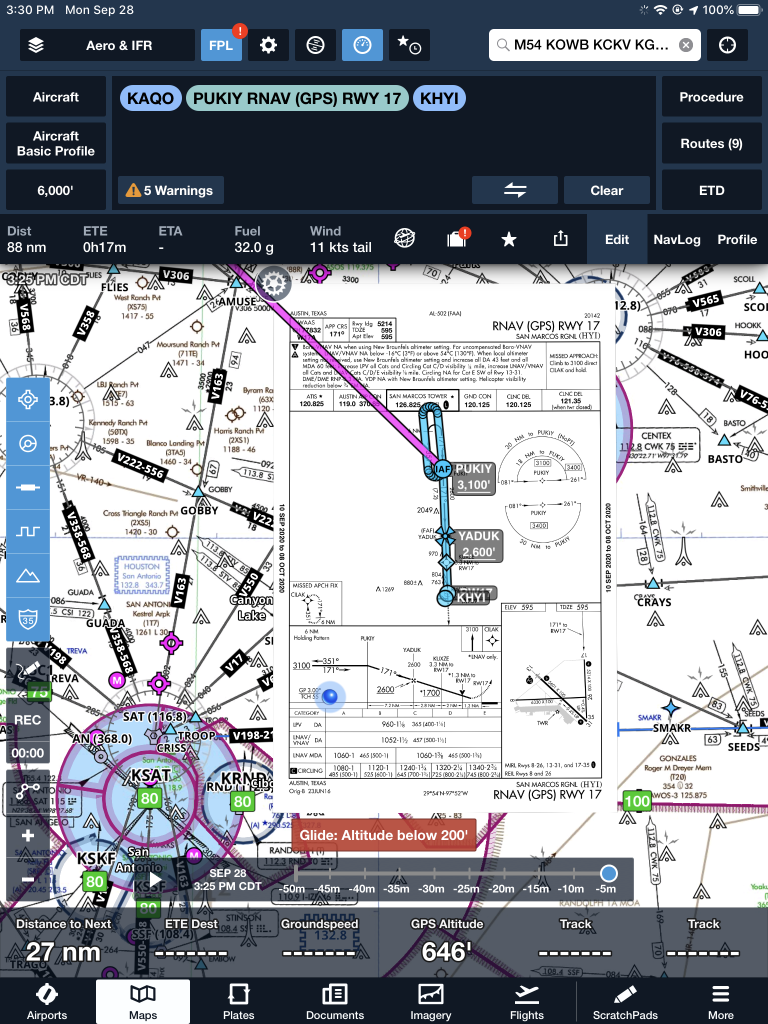
    The first step is still to load the approach into your Foreflight flight plan on the Map page. In this scenario, we are flying from KAQO, the Llano Airport, to KHYI, the San Marcos Airport. Austin Approach has told us to expect the straight in RNAV 17 KHYI via PUKIY. So, on Foreflight, we have KAQO and KHYI in our flight plan. Then, I tap the Procedures button on the upper right hand corner of the screen. I then tap Approach, then RNAV 17 KHYI. Then I select my transition.

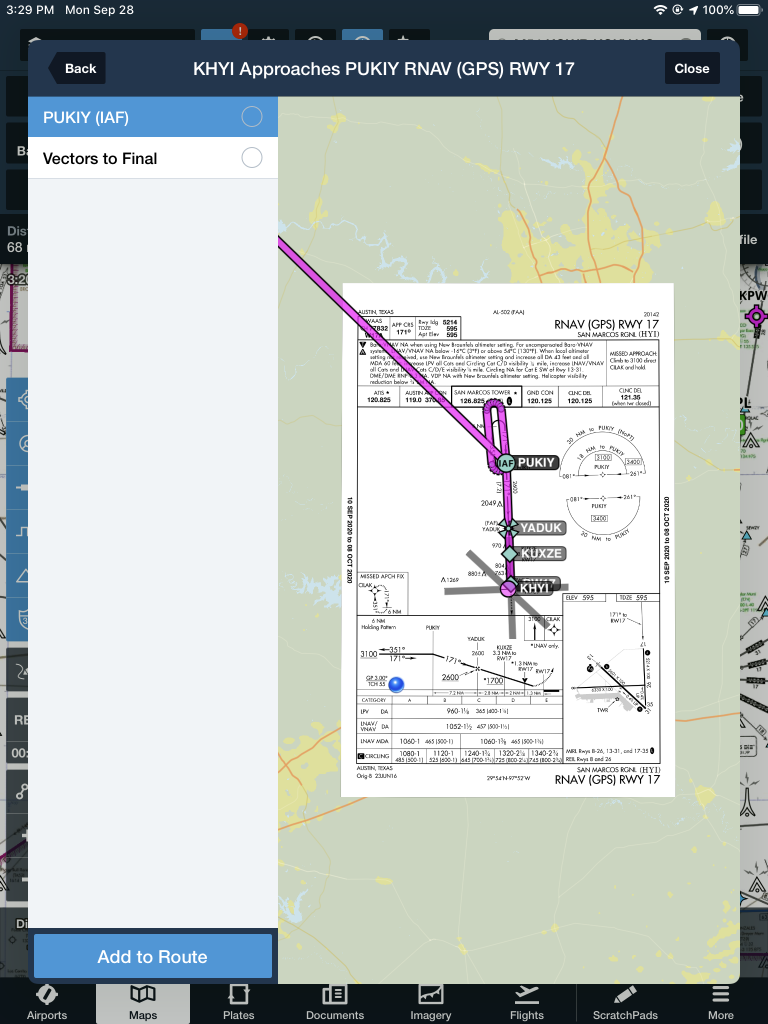
    The options given are either PUKIY with the hold, seen below;

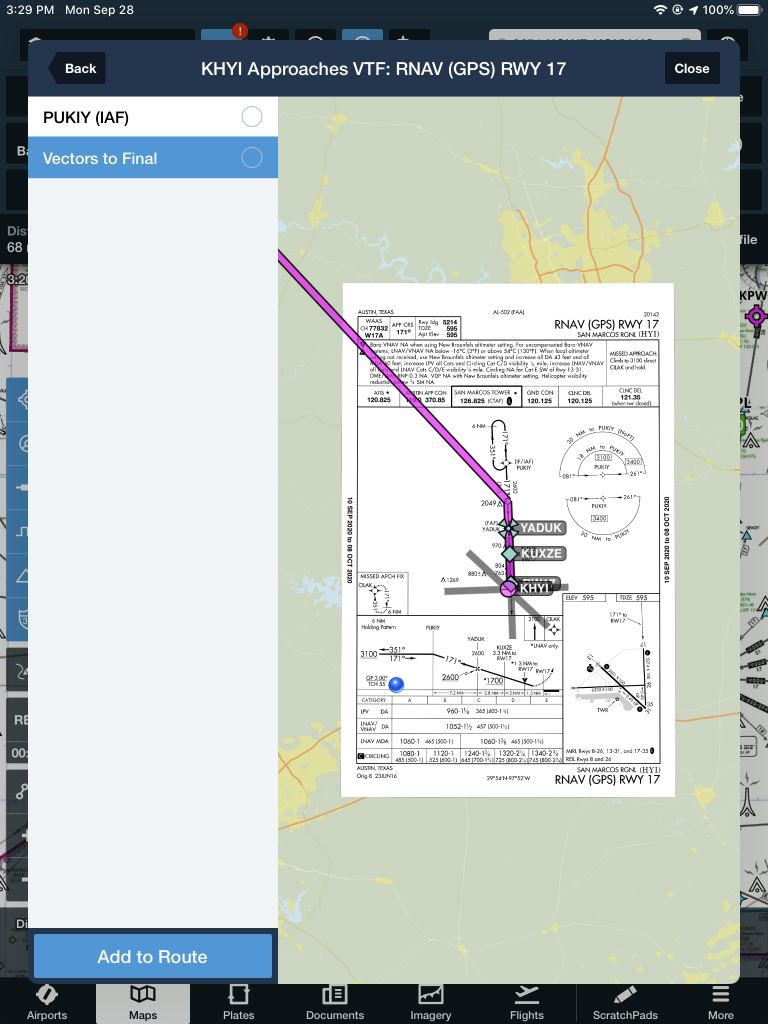
    Or Vectors to Final, which lines me up inside of PUKIY. Neither of these are what I want.

    But, to get this to work, I select PUKIY, then tap add to route. Now we have our approach loaded into our flight plan.

    Removing the Hold

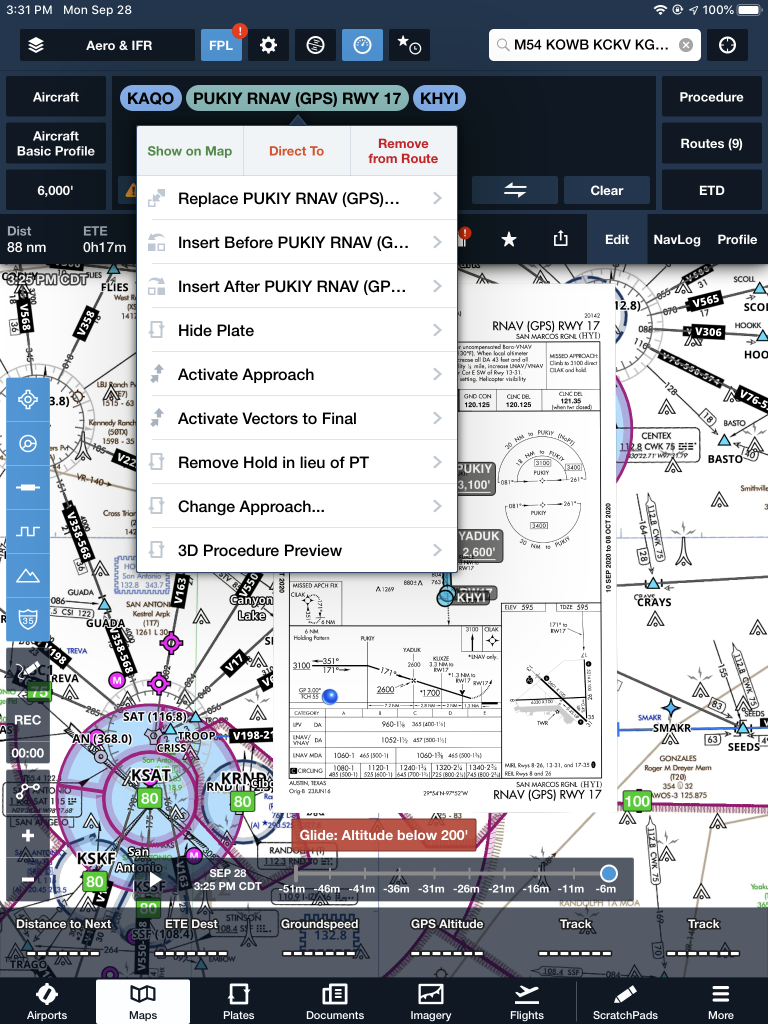
    The RNAV 17 is now in the Foreflight flight plan, but the hold is displayed at PUKIY. To remove the hold, the first step is to tap the approach in green and a menu pops up.

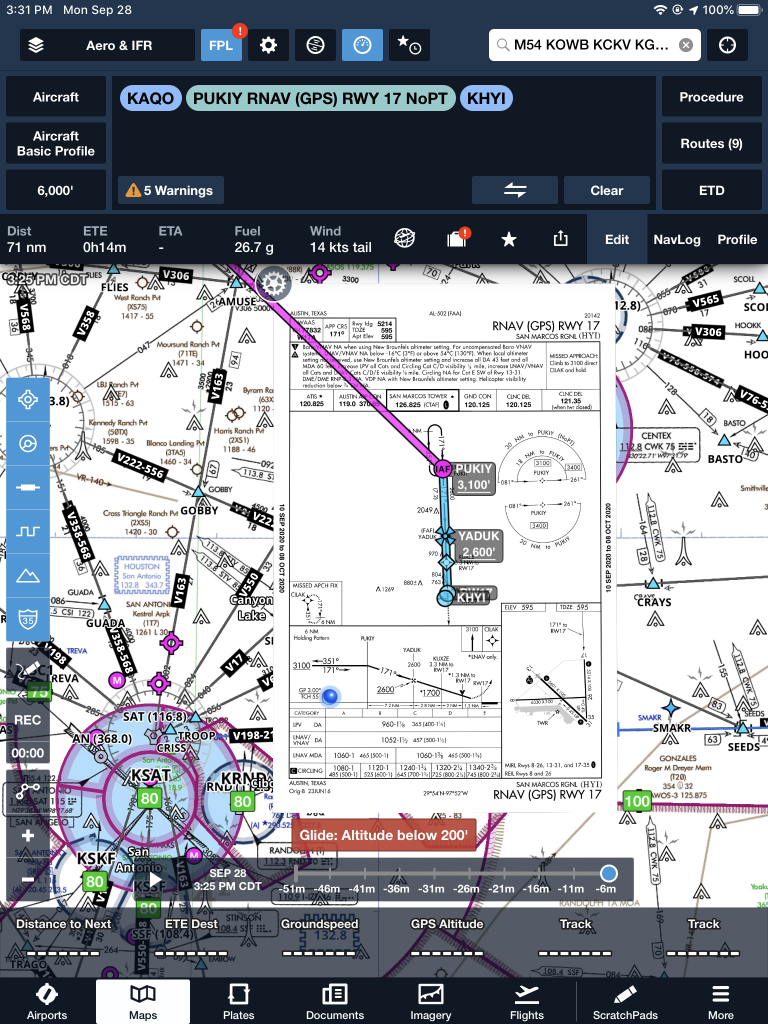
    The 7th option down is “Remove Hold in lieu of PT.” Eureka! Tap that, then the approach is displayed without the hold. Houston, we have success! It even says “NoPT” in the flight plan.

    I’m a big fan of having my Foreflight map always match up exactly with the way I am flying. Having a Flight Stream in the airplane helps a lot with that as it always prompts me to load the new flight plan from the GPS into my Foreflight map. When I load an approach in…

  • AOPA Air Safety Foundation Survival Seminar

    The AOPA’s Air Safety Foundation will be returning to Texas this coming week with their After the Crash:  Surviving An Aircraft Accident seminar.  Though aircraft accidents are rare to most pilots, they still happen.  It is best to be prepared with the proper knowledge and supplies in case you are stranded in a remote area while awaiting help to arrive.

    The seminar will cover the following items:

    • How and what to pack in a survival kit
    • Ways to help search parties find you
    • What to do first immediately after the off airport landing
    • How to survive will awaiting rescue

    The seminar will be put on in Houston, San Antonio, and Austin on three consecutive nights, the 20th-22nd, so everyone will get a chance to attend.  The location and times are below.

    No signup is necessary, just show up and be ready to learn.  The seminar does count for WINGs credit and there will be a sign in sheet at each event.

    The AOPA Air Safety Foundation puts on numerous seminars throughout the country during the year covering a wide variety of topics relevant to general aviation pilots.  The content is always interesting and the presenter always knowledgeable and entertaining.  Hope to see you there!

    Tuesday, January 20th

    Wyndham Hotel, Houston West
    14703 Park Row Blvd.
    Houston, TX 77079
    7:00pm-9:00pm

    Wednesday, January 21st

    Doubletree Hotel, San Antonio Airport
    37 NE Loop 410
    San Antonio, TX 78216
    7:00pm-9:00pm

    Thursday, January 22nd

    Omni Hotel, Southpark
    4140 Governor’s Row
    Austin, TX 78744
    7:00pm-9:00pm

    For more information on the event and the locations, please click here.

    The AOPA’s Air Safety Foundation will be returning to Texas this coming week with their After the Crash:  Surviving An Aircraft Accident seminar.  Though aircraft accidents are rare to most pilots, they still happen.  It is best to be prepared with the proper knowledge and supplies in case you are stranded in a remote area…

Leave a Reply

Your email address will not be published. Required fields are marked *