VFR Flight Plans in the Modern Age

Raise your hand if, after you have officially become a pilot by passing your private pilot check ride, you consistently file VFR flight plans with Flight Service.

Anybody?

Okay, let’s revise the question.  Raise your hand if you have filed VFR flight plans at least 5 times in the last year.

Okay, one or two hands go up.

That’s it?

To be perfectly honest, I have filed VFR Flight Plans twice (I think) in the last year.  The only reason I did was because I was flying in an area that had poor radar/radio communications and I wanted someone to know where I was (I was ferrying an airplane through southern Oregon and northern Nevada which is mountainous and is hard to get coverage into at lower altitudes).  I was so unaccustomed to doing it that I nearly forgot to call and close my flight plan.
FlightPlanForm

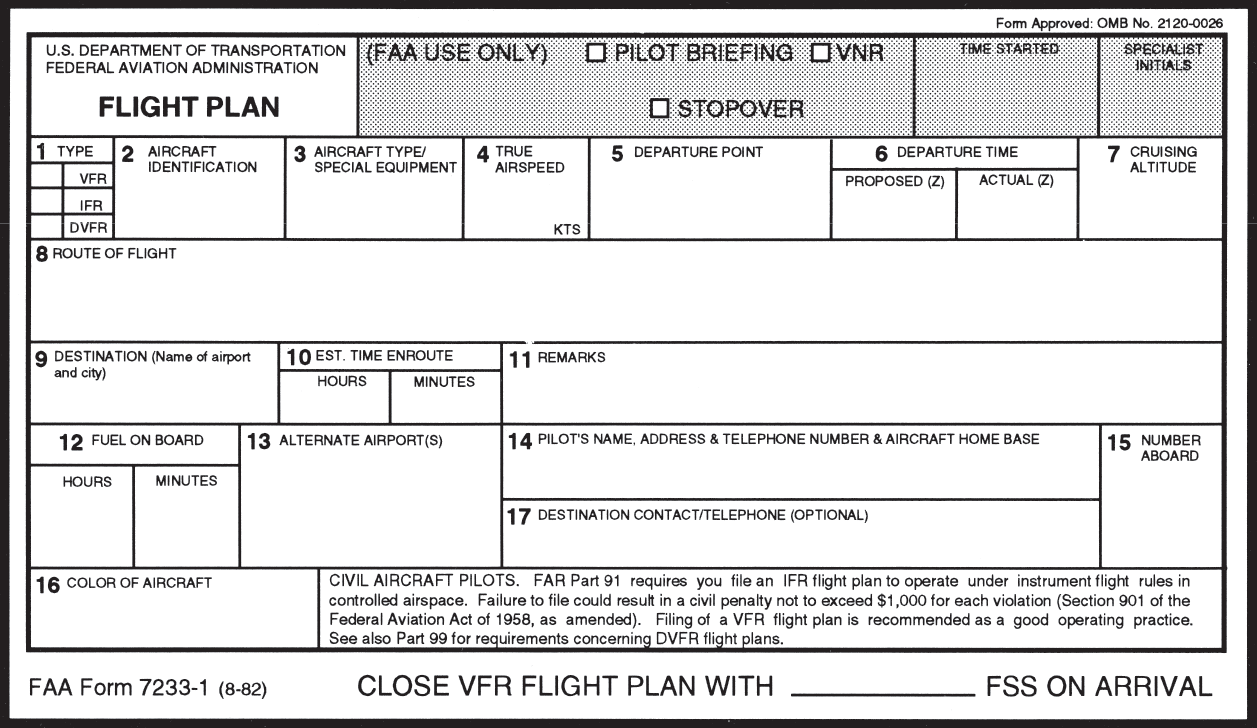
This is a common complaint amongst pilots concerning VFR flight plans.  It’s extremely easy to get to your destination, hop in the car and completely forget to close your VFR flight plans.  Thankfully, now a days, the Flight Service Station will typically call the number you put in your VFR flight plans (your cell phone number most of the time) to make sure you are on the ground before initiating search and rescue services.

Another complaint is that it is cumbersome to call the Flight Service Station after departing to open the VFR flight plans.  This is especially true in a busy airspace area or if the pilot is getting a VFR Flight Following and talking to ATC on a different frequency.

I still think it is a great idea to file and utilize VFR flight plans.  If you don’t show up at your destination, someone will come looking for you which could mean the difference between getting stranded after an off airport landing and getting a warm cup of coffee at the end of the day.  Even if the you get flight following from ATC, it’s still good to file a flight plan.

Lockheed Martin, who runs all the Flight Service Stations across the US, heard these complaints from pilots and decided to come into the modern age and make it easier to open and close flight plans.  They developed EasyActivate and EasyClose.

These services are very simple.  Just go to Lockheed Martin’s Flight Service Station website, set up a new account, then file VFR flight plans to see the services in action.

File your VFR flight plans first, through calling the FSS or on your favorite iPad app.  Then, for EasyActivate, you’ll receive an email 30 minutes prior to your ETD with a link in it.  Simply click/tap on the link and your flight plan is activated.  No having to call FSS in the air, no having to try to get them on the ground.  Just tap the link and you’re good to go.

For EasyClose, you’ll receive an email 30 minutes prior to your ETA at your destination.  When you get on the ground, you’ll see the email in your phone or iPad and you just tap the link and your flight plan is closed.  Since we all have our phones and iPads with us constantly, there will be no more forgetting to close the flight plan and getting that angry call from the FSS.

Sign up is quick and easy.  All Lockheed Martin needs is your email address, last name and phone number. They’ll send you the password to set up your account.  Log in (they will have you change your password immediately), then just click on EasyActivate/EasyClose up at the top.  You have to register the email address you want (you can also put in a phone number to receive a text message, and you can put multiple email addresses and phone numbers if you’d like), then you are all set to go.

Similar Posts

  • Cirrus Electrical System Health

    As all Cirrus pilots know, SR20s and SR22s have 2 batteries in the Cirrus electrical system (technically, they have 3, as Battery 2 is made up of 2 12 volt batteries in series with each other).  Battery 1 provides power to the starter and is a backup for the entire Cirrus electrical system, while Battery 2 provides backup for the Essential Bus items.

    Cirrus Engine Page

    If you look on the engine page of either an Avidyne or a Garmin Cirrus, there is a section showing the Cirrus electrical system health.  With the engine running, you have voltmeters showing the voltage from Alternator 1 and Alternator 2, ammeters showing the amperage output from Alt 1 and Alt 2, and an ammeter showing the charging rate of Battery 1.  There is no indication for Battery 2.

    This brings up a question.  How does the pilot know that Battery 2 has any kind of a charge?  What happens if the whole Cirrus electrical system goes caput and all that’s left is Battery 2?  Will Battery 2 have juice then?

    The answer is actually rather simple.  As part of the pre-flight inspection, the first step in the cabin inspection is to turn the Battery 2 switch on, then check the Essential bus volt meter.  The checklist says the voltmeter should be reading between 23-25 volts.  This tells you how much voltage Battery 2 currently has. The next step (after ensuring the flap lights are out) is the turn Battery 1 on.  Battery 1 then powers the Main Bus and Essential Bus.  The voltage showing on the Main Bus shows how much voltage Battery 1 currently has.

    Easy enough right?  Now you can impress friends and family alike with your Cirrus electrical knowledge!

  • Scud Running

    I was speaking with a pilot a few months back who was not instrument rated.  He was telling me of his flying experience while continually speaking fondly of scud running.  He told me several stories, most of the time with a smile on his face, about scud running to his destination while staying clear of clouds.  While he was talking, my mind was cycling through the numerous accident reports I’ve seen where a scud running VFR pilot has crashed into terrain or an obstacle.  Needless to say, scud running is not a very good idea.

    This pilot’s stories got me to thinking, how common is the practice of scud running amongst VFR only pilots?  As an instructor, I always teach my private students about personal minimums and making that no-go decision when clouds are below those personal minimums.  The act of scud running falls under several of those dangerous pilot mindsets, get-there-itis, invincibility, and macho-ism, to name a few.

    To bring everyone on the same page, let’s define scud running.  Wikipedia has a very good definition:

    Scud running is a practice in which pilots lower their altitude to avoid clouds or instrument meteorological conditions (IMC). The goal of scud running is to stay clear of weather to continue flying with visual, rather than instrument, references. This practice is widely accepted to be dangerous, and has led to death in many cases from pilots flying into radio towers and high tension wires; however, even instrument-rated pilots sometimes elect to take the risk to avoid icing or embedded thunderstorms in cloud, or in situations where the minimum instrument altitudes are too high for their aircraft.

    To put some numbers with that definition, a scud running VFR pilot would takeoff with a 1200-1500 foot ceiling and stay 700-1000 feet above the ground, right in the area where towers, hills, and rapidly rising terrain reside.

    Scud Running

    How do we change this mindset?  Well, if someone has been scud running for years without incident, the practice becomes normal, like the pilot I mentioned above.  The mindset of invincibility sets in and the practice continues.  This particular pilot can also lead other pilots to adopt the same practice, encouraging them that nothing will happen to them, since we all know that our pilot peers know better than our flight instructors (insert heavy sarcasm here).

    In order to change this mindset, instructors need to emphasize personal minimums from day one.  This includes ceilings, visibility, and winds.  For a seasoned pilot, a review of accident statistics might help the process.

    Scud running is not a safe practice.  If you’re a scud runner, you need to rethink your attitude.  Is getting there really worth it?

    Still not convinced?  Read this pilot’s experience from AOPA.

  • An Innovative ADS-B Solution from uAvionix

    The closer we get to 2020, the more innovative companies are getting with ADS-B out solutions.  There are a myriad of transponders out there that have been released in to meet the ADS-B out requirement and to offer ADS-B in options.  L3 has the Lynx transponder line (and hardware to upgrade an already installed GTX 327 or GTX 330), Garmin has the GTX 345 and offers upgrades to the GTX 330, Appareo has it’s Stratus ESGi ADS-B out transponder, and Avidyne offers it’s AXP340 transponder, among others.

    Most of the ADS-B solutions require some kind of panel work, whether it’s pulling out the Garmin GTX 330 to send off, or making panel modifications to fit the L3 Lynx in.  Very few are actual slide in replacements, so there is some labor involved in swapping transponders.

    Want a simpler and more innovative solution?  uAvionix, a Montana based company that makes the recently released Scout portable ADS-B In solution, has a product for you.  Meet the SkyBeacon.

    What is it?  The uAvionix SkyBeacon is simply a navigation light replacement that bolts on your wing with a fin that hangs down.  All the ADS-B out transmitting equipment is placed behind the nav light on the device.  It has an integrated WAAS GPS unit, can work with any Mode C or Mode S transponder wirelessly, and it mounts directly in to where the original nav light was, same screws and everything.  No additional hardware needed.  uAvionix claims installation should take 10 minutes.

    Configuration is super easy too, as it is all done on a smart phone on the uAvionix app.

    Right now, the uAvionix SkyBeacon is only approved for experimental aircraft, but, according to their website, uAvionix expects FAA certification in early spring.  With a price tag of only $1,500 and a strobe light to be added as well, this is your simplest and easiest ADS-B compliance solution.

  • The New Diamond DA50 Line

    Diamond has joined the high performance single engine fray with the announcement of it’s new line of DA50 models.  Cirrus currently has the cornered the market on easy flying, fixed gear, speedy HP single engine airplanes.  But, (assuming that the Diamond DA50 gets certified in a timely manner and the appeal of the Jet A sipping SMA diesel engines appeals to a broad enough audience), Cirrus could have some competition soon.

    The proposed Diamond DA50 will come in 3 different configurations, the IV, the V, and the VII.  The IV and the V will each burn under 10 GPH of Jet A. The VII will burn about 14 GPH of Jet A, using the same amount of fuel as a normally aspirated SR22, but at cheaper Jet A prices (plus the discount of fuel companies like CAA or AEG Fuels).

    According to AOPA, all 3 Diamond DA50 models will be equipped with the Garmin G1000 NXi panel and the GFC 700 Autopilot. The Diamond DA50 -V will be the first model expected out next year, with the IV to follow soon after.  The wait for the VII will be a bit longer.

    In testing, the Diamond DA50 -V showed true airspeeds of 173 knots with an expected range of almost 1100 miles.  Gone is the bubble canopy that greatly increased the green house affect of the airplane.  It’s replaced by two suicide doors, similar to what is on the Cessna TTx.  The single back seat door on the pilot’s side remains.

    Carrying capacity will be greater than the Cirrus as well.  The Diamond DA50 -V will have a gross weight of around 4,000 pounds, giving it a useful load of 1,250 pounds, giving pilots a lot more flexibility in weight carrying.  The Diamond DA50 exterior will be fully customizable as well as advances in carbon fiber paint and decals has come a long way since the early 2000s when white was the only option.

    Here are some basic specs for each DA50 model:

    Diamond DA50 -IV

    • 230 HP
    • 4 seats
    • Less than 10GPH fuel burn

    Diamond DA50 -V

    • 260 HP
    • 5 seats
    • 10 GPH Fuel Burn

    Diamond DA50 -VII

    • 360 HP
    • 7 seats
    • Retractable Gear
    • Turboprop option

    I am most excited to see the performance numbers on the VII model when it comes to market.  With a 360 HP engine and retractable gear, it seems like it will be a screamer.

    There are also rumors that Diamond is working on a rotorcraft, the Dart 280, but there isn’t a flying model at the moment.

  • Synthetic Vision Technology

    Let’s say you’re flying in the mountains of Colorado on a cloudy day.  There’s a solid layer from the surface all the way up to 14,000 feet.  You’re inbound to Eagle (KEGE) on the RNAV (GPS) D approach.  There are mountains next to you and below you, but you aren’t concerned since you can see them all.  The base of the last reported overcast layer was 3,000 feet, so you know you’ll break out before the MDA and land no problem.

    At 11,100 over AWACC, you clearly see the top of the mountain below you.  You are comfortably above it. You already have the runway in sight as well.  You pop out of the clouds on the approach at 9,700 feet, spot the airport and follow the tower’s instructions to circle north of the runway for a left base for runway 7.

    How could you see the mountains inside the clouds?  You have Synthetic Vision installed on your glass panel, that’s how.

    Aspen Synthetic Vision
    Aspen Synthetic Vision

    Synthetic Vision, which has actually been around since the ’70s when NASA and the US Military first developed it, was first FAA certified for the Gulfstream PlaneView flight deck in 2009.  Garmin, Avidyne, and Aspen are the main general aviation manufacturers of synthetic vision these days.  All Garmin PFDs are now equipped with Synthetic Vision while Aspen gives you the option to upgrade to Synthetic Vision when you get one of their PFDs installed.  Avidyne gives you Synthetic Vision in their R9 upgrade for the Cirrus.

    What is Synthetic Vision?  Basically, it’s a 3-D picture on the primary flight display showing terrain, obstacles, traffic, and runways.  It greatly enhances situation awareness in areas of terrain or high obstacles during IFR conditions or at night.

    The goal behind the development of Synthetic Vision was to decrease the amount of controlled flight into terrain (CFIT) accidents.  A CFIT accident consists of a perfectly airworthy airplane flown by a pilot (or autopilot) unintentionally into terrain. These accidents can happen in low visibility conditions or at night, but the reason is mainly due to the pilot losing track of his position in relation to obstacles or terrain (or water as was the case with JFK Jr.).

    With Synthetic Vision, the goal is to enhance pilot knowledge of what is around the airplane at all times. When you’re at altitude, the terrain below you looks flat.  When you start descending down amongst the rocks, the hills or mountains start to rise up on your screen.  For those used to the coloration with the 2-D terrain feature on a GPS unit, it translates very easily to the terrain coloration on a Synthetic Vision equipped PFD. Terrain that is between 100 and 500 feet below the aircraft is shown as yellow, while terrain closer than 100 feet is depicted as red.

    Garmin Synthetic Vision
    Garmin Synthetic Vision


    One neat feature on Garmin units is the Highway in the Sky.  When a pilot puts a course or a flight plan in the GPS, the PFD displays magenta boxes at the altitude selected displaying the route.  It’s handy when hand flying to just “fly through the boxes.”  They also display descent angles on approaches.

    Synthetic Vision is still optional on Garmin and Aspen units, but I highly recommend springing for it.  It will give you a higher level of safety and keep you out of the rocks.

  • Garmin 430 Guide By Pilot Workshops

    Are you still trying to master the Garmin 430 in your airplane?  Is it giving you fits because you keep twisting the big knob instead of the small knob?  Would you like a step-by-step guide to each and every part of the Garmin 430?

    Garmin 430 GuidePilot proficiency website PilotWorkshops.com has published a very thorough, step-by-step manual on how to use the Garmin 430.  Want to load a flight plan?  There’s a section for that.  Want to load an approach?  There is a section for that as well.

    The Pilot-friendly Garmin 430 manual is a great reference to have for Garmin pilots.  Pilot Workshops offers a guide for the Garmin 430 and the Garmin 430W, depending on if you have WAAS or not.

    The hard copy guides are $44.95, but you can also download the PDF version of each for $19.95.

    To get more information on the guide or to order one, you can visit the Pilot Workshops website. (Have another Garmin or King GPS unit?  Pilot Workshops has guides for a variety of different GPS units)

Leave a Reply

Your email address will not be published. Required fields are marked *