Beechcraft Bonanza Ownership

If you walk up to any Beechcraft Bonanza sitting on the ramp at an airport and ask the owner, “How do you like your Bonanza?” be prepared to stand there and listen for 15-20 minutes while he brags about his airplane.
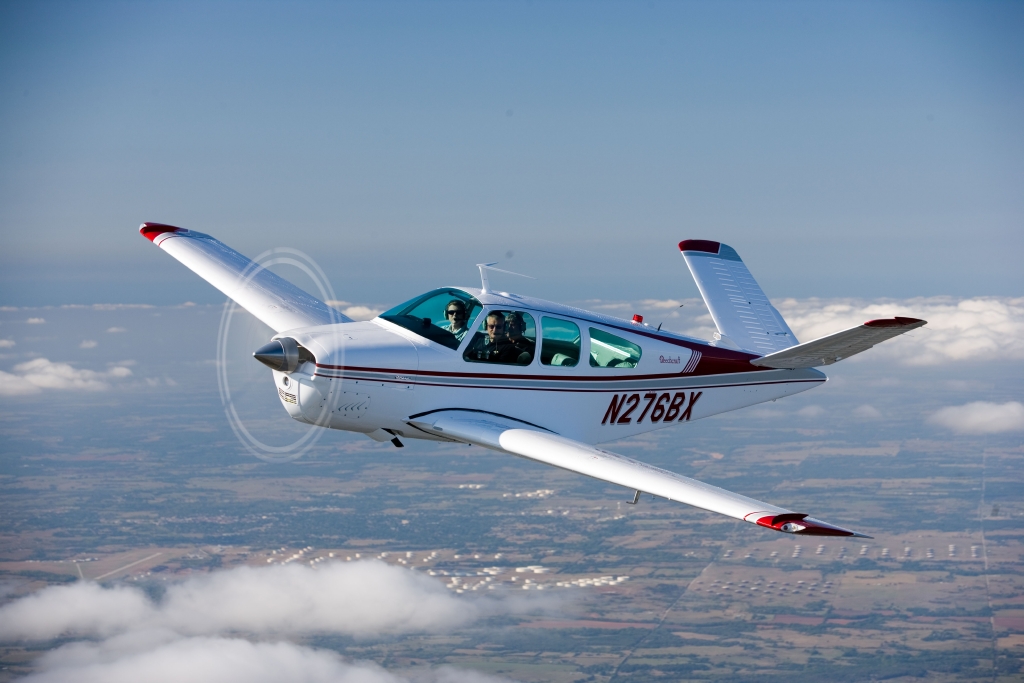
V35 Bonanza

The thing about Beechcraft Bonanza owners is that they are almost a part of a cult. They will tell you up and down why the Bonanza is the best airplane out there. They’ll tell you why all the others don’t even come close. They’ll tell you about the payload, the six seats, the variety of configurations you can select from, the ability to land pretty much anywhere. By the time you walk away, you will probably be convinced to buy one yourself.

Bonanza’s are great airplanes. For those of you new to the single engine piston market, a good comparison for a Beechcraft Bonanza would be a Suburban. Not the flashiest ride out there, but extremely capable, comfortable, and family conscious. If you’re hauling a load, you’ll take a Bonanza over a Cirrus or Mooney any day. Have six people? No problem!

One of the best things about a Beechcraft Bonanza is the variety of designs. Four seats, six seats, long range tanks, tip tanks, turbo charged, normally aspirated, steam gauge, G1000, Aspen or G500 retrofitted, dual yoke, single yoke, leather, cloth, and a variety of different colors out there on the market make finding a Bonanza that fits your need pretty easy.

When it comes to picking out an airplane, the first question is always the mission. If you’re thinking about a Beechcraft Bonanza, you’ve already determined you need something with a good useful load. Do you need four seats or six? Depends on how often you’ll be carrying someone or how new of an airplane you want. Older Bonanzas have four seats, but a lot have had significant updating. Newer A36 and B36 Bonanzas have six seats, but are going to cost you more.

Beech Bonanza

Do you need a turbo charged Bonanza? If you’re in a high elevation area or expect to visit the mountains a lot, then absolutely. If you want a better cruise speed and don’t mind a little less useful load, then go for it. If you’re more concerned about being able to load it up and you aren’t going to cross the Rockies often, then normally aspirated is what you want. You’re probably looking at about 160-170 KTAS with the normally aspirated whereas you get between 180-190 KTAS at altitude with the turbo.

Do you need tip tanks? Tip tanks have two advantages. One is the most obvious: you get to carry more fuel, therefore you get to go farther without having to stop (or when you stop for the bathroom, you don’t have to fill up with gas). The other advantage is you get a bump up in useful load. I talked to a Beechcraft Bonanza owner a few weeks ago who had tip tanks on his. He told me max gross on his Bonanza was 3,800 pounds and was eligible for an upgrade of up to 4,000 pounds and all it took was paper work for the STC. That’s quite a bit of load!
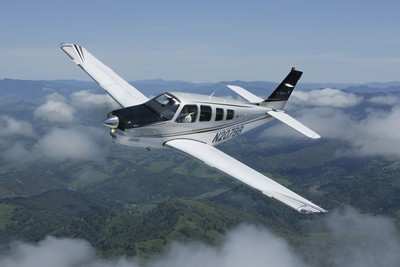
G36 Bonanza

Are Bonanzas hard to fly? When moving up from a typical 172 or Cherokee that most people learn to fly in, it does take some adjustment. But, with good Bonanza training from a qualified Bonanza training instructor, then the transition is no problem. There are tons of resources out there to aid all future and present Bonanza owners in their foray into the Bonanza nation. With the American Bonanza Society and Bonanza Pilot Training, there is no lack of training, thoughts and opinions.

In need of an airplane that can pretty much do whatever you need? Then a Bonanza may be right for you.


 

Similar Posts

  • Landing Light Replacement

    One evening this summer, my wife and I were flying down the southern shore of Long Island in my father’s E33 Bonanza. We enjoyed the sunset as we flew westbound and our plan was to fly the New York Hudson corridor, where we would arrive just after dark. As we approached New York’s airspace, two voices in my head started having a debate.

    The first voice said: “You should turn on your landing light when you get to New York to make the airplane more visible.”

    The other voice said: “That’s true, but I bet you’ll burn the landing light out”

    Well, as it turned out, both voices were right. My landing light fired right up when I needed it to fly the Hudson, but when it came time to land back home I had no such luck. Unfortunately, this was not the first time that I had been given the chance to practice my blackout landings. This Bonanza model has only one landing/ taxi light which is mounted in the lower cowling behind the propeller. This location is less than ideal because the filament in the bulb is fragile and can be damaged by engine vibration.

    We landed uneventfully and after putting the airplane away, I decided it was time to look into upgrading the lighting to something a little more modern. I was unsure of my options, but seeing as the airplane needed a replacement bulb regardless, it seemed like a good opportunity to make a change.

    After doing a little reading, I learned that HID or LED landing lights would be the best solution to my problem. I was familiar with LED aircraft lights, but had never heard of HID before.

    Here is what I learned:

    HID Landing Lights

    HID, or High Intensity Discharge landing lights, create light by arcing electricity through a sealed gas capsule. They are brighter than LED and traditional incandescent, and the light created more closely resembles the look and feel of sunlight. HID installations require a ballast to carefully regulate the flow of electricity to the gas capsule and also require a “warm up” period after being turned on in order to reach their full brightness.

    Fitting an aircraft with HID landing lights tends to be more expensive and time consuming than installing an LED light and would likely require involvement by an A&P/ IA. However, if you want the brightest light available, HID is probably the best bet.

    Pros

    • Brighter, more natural looking light
    • Draws less power than standard bulbs
    • Long bulb life
    • Does not generate much heat

    Cons

    • More expensive than other lighting options
    • Lights must “warm up” after being turned on
    • Cannot be pulsed easily
    • Cost/complexity of installations

    LED Landing Lights

    LED, or Light Emitting Diode landing lights, have no filament and work by moving electricity through diodes which are connected into a circuit. These lights have become very popular for many uses due to their simplicity, low cost, and brightness.

    While not as bright as HID light, the LED lights require no “warm up period” and can be easily pulsed. LED lights draw much less power from the aircraft’s electrical system than traditional bulbs and boast incredible life length. LED bulb installation is very simple and can often serve as a direct replacement for the original lights.

    Pros

    • Instant light (no warm up)
    • Incredible life length (>5,000 hours)
    • Low Cost
    • Simplicity of installation
    • Can be pulsed easily
    • Low power draw

    Cons

    • Not as bright as HID lighting


    After weighing the options, I decided to replace the incandescent bulb in the Bonanza with an LED bulb. I read the reviews online and talked to some of my friends who work in aviation and eventually decided on the Lycoming Alphabeam. The Alphabeam is FAA/PMA approved and is available through Aircraft Spruce and other aviation parts vendors. The bulb cost around 250-300 dollars and I was able to install it as a direct replacement for our old light. All I had to do was take the old one out, put the new one in, and make a logbook entry.

    Below are some pictures of the installation:

    Last weekend I finally had an opportunity to take the airplane out after dark and see how the new light compared to the old one. I am pleased to say that it did a wonderful job and exceeded my expectations.

    If you are interested in seeing a side by side comparison of the different lighting options, a quick Google search should provide what you are looking for. In my own experience, I would say that the LED light was brighter than the old light and did a very good job illuminating the taxiway and runway. It was extremely nice not to be concerned that my light wouldn’t work as I was setting up for landing at an unfamiliar field after dark. I also enjoyed feeling that I had the option to leave it on during climb and cruise in order to increase my visibility to other aircraft.

    Many models of aircraft have multiple landing/ taxi lights installed which greatly reduces the likelihood of having to land without one. In our case, spending the extra money to upgrade to the LED bulb made sense because of the desire for increased reliability. If you are looking for a relatively inexpensive way to upgrade your airplane, LED or HID lighting may be something to consider.

    Andrew Robinson is a 135 Charter Pilot and flight instructor who lives with his wife and 2 daughters in Pennsylvania.  He flies Pilatus PC-12s and instructs in Beechcraft Bonanzas.

  • How to Get the Current Weather

    For a long time, I was happy if an FBO had a radio where I could tune the ATIS or automated weather before getting into the plane. This would allow me to skip listening to the weather in the airplane with the engine running, giving me a quicker exit from the ramp while burning a little less fuel. I would also be able to brief my taxi route from the ramp since I would know which runway was in use before getting in the plane.

    As we progress forward in technology, I’m constantly amazed at how much more planning I can do from the palm of my hand. Now, I can call a phone number and get the ATIS, AWOS, or ASOS, depending on the size of the airport; if you prefer reading a text version…well, there’s an app for that.

    With this technology, it’s very important for pilots to be aware of what service they are utilizing when calling these numbers. Usually only a Class B or larger Class C airport will have a phone number specifically for ATIS as well as one for AWOS/ASOS. These are listed in the Airport/Facility Directory (AFD), as well as all flight planning apps (Foreflight, Garmin Pilot, Stratus Insight). More then one pilot has called the AWOS/ASOS number for an airport thinking they would receive the ATIS (because towered airports that have ATIS phone numbers often also have AWOS/ASOS phone numbers that are different). Since the pilot didn’t hear a code on the phone, that led to the false thinking that either the tower was closed or the pilot did not have the code (ie. Information Bravo) to give to ground control when calling for taxi instructions.  The minute weather can be very useful for flight planning, but the ATIS must be received before contacting ATC at a towered airport.

    Notice the red box just past halfway down the page. There is a phone number for the ASOS at KSAT and a separate phone number for the ATIS next to the frequency.

    Sometimes, you may get a busy tone if someone else is on the line. Usually, waiting a few minutes and trying again will lead to success. Just like old school phone lines, only one call can go through at at time! If it’s a particularly stormy day, you may be fighting a number of pilots to get on the line. In this case, an app where you can read the ATIS may be particularly helpful (Yes, there actually is a dedicated ATIS App!).

    The ATIS app allows us lowly pilots without an Aircraft Communicating and Reporting System (ACARS) to access the Digital ATIS (D-ATIS ) at airports where ATIS is available. Only 76 airports in the US have D-ATIS, most of which are either Class B or busier Class C airports. Foreflight also provides D-ATIS textually at the same 76 airports, though it is only accessible depending on which subscription level you have with Foreflight (since I’m not a Garmin Pilot or Stratus Insight user, I’m not sure if either of them give D-ATIS reports).

    ATIS App Symbol

    With Foreflight’s D-ATIS, it does not get updated over ADS-B, only when your iPad or phone have an internet signal. When inbound to an airport with D-ATIS, the pilot has to listen to the radio frequency to get the current ATIS. Foreflight will display the last D-ATIS it received, but typically, it’s old. Check the time in the upper right hand corner.

    Foreflight now offers Pre-Departure Clearance (PDC) at those same 76 airports. With either a pre-registered tail number or a Foreflight call sign (starting in FFL), once a pilot files an IFR flight plan, the D-ATIS and the IFR clearance in it’s entirety are texted to the phone number the pilot filed with. All that is left to do is call ground, state “I have information Romeo and my clearance, ready to taxi,” then away you go. Skipping listening to the ATIS and talking to Clearance Delivery saves a good 5-10 minutes at times, depending on how busy the airport is.

    These days, there are many different avenues to get the current weather (and IFR clearances!). When calling on the phone, the key is to be aware, know which number you are calling and, if you are expecting to hear an ATIS message but instead hear the AWOS/ASOS, verify the Chart Supplement Guide and Notices to Airmen (NOTAMS) to check tower hours of operation before flying into the airspace. 

  • Present Position Hold

    When I was working on my instrument rating back in 2007, my instructor and I did a lot of unpublished holds.  In ground school, I heard a lot about holding for weather or holding due to a traffic delay.  At my first job, my chief flight instructor was also a Continental (now United) captain and he told me a lot about having to hold for weather going into different places.

    I heard all this, but I figured it would never happen to me when I’m flying GA airplanes.

    Boy was I wrong!

    I was flying a Piper Malibu into Phoenix with two passengers for Super Bowl weekend and the weather was awful.  No thunderstorms, but moderate precipitation and low ceilings.  We were coming into Deer Valley (KDVT) on the north side of Phoenix and about an hour out, ATC advised me that arrivals into DVT were having to hold and to expect a delay.  The controller said the delay would be about 30 minutes, so by doing a quick calculation, I determined the delay would probably be all cleared up by the time I got in the area.  At the time, I didn’t know if the delay was due to weather or traffic congestion.

    Twenty minutes later, the controller advised me that there was still a delay.  I queried what it was for and he informed me it was due to weather.  He asked me if I wanted to hold or divert.  I listened to the ATIS and heard the ceilings were variable from just below the minimums to just above.  I told him I would hold as the TAF I saw predicted the ceilings to go up.

    “Malibu, hold present position, hold east, expect further clearance 2140 Zulu.”  Gulp.

    At this point, my autopilot had gone out, it was turbulent and I was definitely in the soup.  This was going to be fun.

    After recovering my wits, I read back the clearance, then set about setting up this hold without getting too far from my present position.  The Malibu I was flying had a Garmin 530 which I was using as my primary means of navigation.  I was on V190, but I didn’t have all the fixes in my flight plan.  What to do?  And what to do fast?

    The 530 has a rarely used function called a User Waypoint.  It comes in handy in situations like these.  On the moving map, you can turn the cursor on, move the cursor to any point on the map, and, by pressing enter, create a User Waypoint.  This is what I did on V190.  After I created it, I had to go to my flight plan, find the right spot, and input the User Waypoint just like I would any fix.  Just a note here, when you create a User Waypoint, make sure you remember what you named it so you can find it again.

    After I input the User Waypoint in the flight plan, I had to go back and activate the leg that the User Waypoint was the end point on.  Then, to make sure the flight plan didn’t go to the next waypoint once I crossed my User Waypoint, I had to press the OBS button on the 530 in order to put the GPS in suspend mode.

    Keep in mind, my autopilot wasn’t working, so this involved a lot of multi-tasking!

    That’s how to do a present position hold using the Garmin 530.  Got all that?  Here’s a concise review:

    • Create a User Waypoint
      • Turn the cursor on by pressing the FMS knob
      • Move the cursor to the point where you want your User Waypoint
      • Press enter and name the User Waypoint
    • Press the Flight Plan button
    • Input the User Waypoint into your flight plan at the proper point
    • Activate the leg that the User Waypoint is the end point on
    • Finally, press the OBS button to put the GPS in suspend mode
    • After you’re cleared onward, just press the OBS button again to take the GPS out of suspend mode
  • Hold Anywhere

    The latest Garmin software version on the Garmin G1000 and Cirrus Perspective by Garmin has a really neat feature.  It gives the pilot the ability to create a hold at any fix, VOR, NDB, or even airport.  If the point is in the GPS database, a hold can be created over it.

    How does it work?  Here are the steps.

    Let’s say ATC tells you to hold over an intersection on a Victor Airway that you are already on.  Since you are tracking the airway already, the airway should be in your flight plan complete with all the waypoints on it.

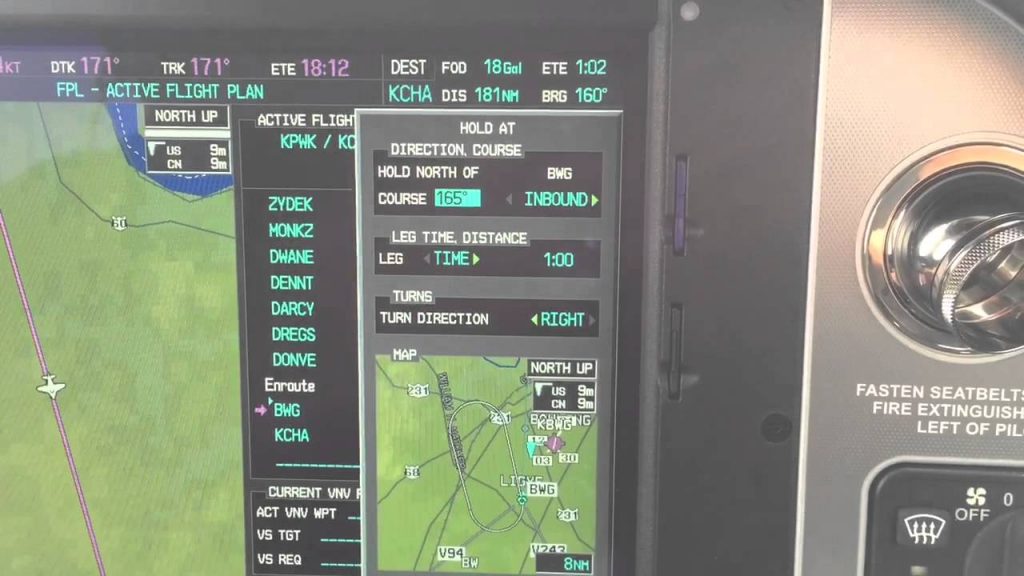
    Bring up your flight plan and highlight the waypoint to hold at.  Press the menu key.  Using the big knob, scroll down to highlight the hold at waypoint option at the bottom of the bottom of the menu.  Press enter.

    garmin-holding-pattern

    Now you can build the hold.  You select what the inbound or outbound course will be.  Select a timed hold or a distance hold.  Then select left or right hand turns.  You can even input your expect further clearance time.  Press enter and now you have a hold as a waypoint in your flight plan.  Assuming you have a WAAS unit, the autopilot will fly the hold for you.

    If you are ever told to “Hold Present Position,” Garmin has you covered.  Simply press menu on the flight plan page, scroll down to Hold Present Position, then follow the prompts on the screen to build a hold at your present position.

  • 2022 MMOPA Convention

    MMOPA announced the location for the 2022 MMOPA Convention. The 2022 Convention will be in Tucson, Arizona and will take place September 29th-October 2nd, 2022. The JW Marriott Starr Pass will be the host resort.

    Thursday, September 29th will kick off the convention with a safety event for pilots and companions, lunch with exhibitors, and the return of the charity golf tournament.

    Friday, September 30th and Saturday, October 1st will be when all the classes and seminars that make the MMOPA convention great are held. The Friday dinner will be at an aviation themed spot in Tucson while the annual auction and black tie affair will be Saturday night.

    Stay tuned to the event details page on the MMOPA website to see when registration is opened.

  • Merry Christmas 2018

    So the Word became human and made his home among us. He was full of unfailing love and faithfulness. And we have seen his glory, the glory of the Father’s one and only Son (John 1:14).

    From the Texas Top Aviation family (Hank, Kelsey, Everett, Cooper, and Cord) to your family, we wish you a Merry Christmas!  We are thankful for how the Lord has blessed us this year.  We pray for blessings on your family this coming year.

    Keep the wheel side down and the sunny side up!

    Merry Christmas!

Leave a Reply

Your email address will not be published. Required fields are marked *