Texas Top Aviation was at the AOPA Regional Fly-In at the San Marcos Regional Airport (KHYI). If you weren’t there, you certainly missed out spending time with 2,500 other airplane and flying enthusiasts!
The day began somewhat gloomy and windy with the threat of rain. Organizers feared that weather would keep a lot of people from coming. Boy, were they wrong!
There were many classic airplanes, many modern and pretty nicely equipped airplanes, and everything in between. There were aviation celebrities, Rod Machado and the Kings of King Schools fame, to name a few. Not to mention the fabulous BBQ!
Texas Top Aviation had several drawings for free training and 3 lucky winners. We also had a Lancair Super ES for sale, N132BB (which made the San Marcos Record newspaper!). It definitely stood out with it’s unique paint job. The flames on the tail drew many oohs and aahs.
Departing the San Marcos Airport after the fly in was like battling traffic in Austin at rush hour (though, Austin doesn’t have any air traffic controllers). The San Marcos controllers probably hadn’t seen that much traffic since the airport was an Army Air Base back during WWII. It was quite a sight to see all the exhibitor’s airplanes lined up ready to head skyward.
Thanks to all of you who stopped by the Texas Top Aviation booth! It was a pleasure meeting all of you and we look forward to working with you in the future!
Hank Gibson and Russell Moore of Texas Top Aviation
There is truth in the old adage that 99% of flying is routine while the remaining 1% holds the potential for events that cause those who fly to hold themselves above mere ground-bound mortals. My 37 years of military flying might have distorted that ratio a fair bit given the complexity of high-energy fighter aircraft and the uncertainties of combat, but rest assured we all earn our right to be proud of our wings every time we fly.
The requirement that a single-seat fighter pilot be able to handle rapidly evolving emergency situations and complex systems diagnosis sets a high bar for any who join that group. However, the lessons we learned and techniques we developed for making fighter aviation significantly safer than in yesteryear have direct applicability to general aviation.
Prioritization and compartmentalization are two important skills that every pilot should have. These skills amount to the ability to look at a complex problem, quickly determine the most critical elements, and mentally set aside those things that can wait so as to deal with highest priorities first. While this does not sound like rocket science, the art is in the doing!
The technique for dealing with the immediate onslaught of information, such as when that caution tone or caution light presents and different gauges or displays go haywire, provided the title for this piece.
All flight training will, at some point, involve what is called situational emergency procedures training, know to military aviators as SEPT. We do this type of training in a simulated cockpit that has all the dials and switches for our particular aircraft. None of the switches and dials do anything, some are just decals on a wooden dashboard, but the presentation allows the SEPT victim to reach for the appropriate switch or lever, while telling the instructor what and why they are doing so.
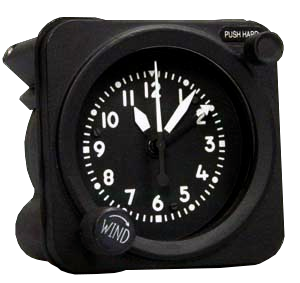
One of the most common mistakes new trainees make is that of trying to act too fast, before they have fully and correctly analyzed the situation at hand. Herein lies the titled technique. After blurting out a quick and incorrect answer, the instructor would admonish with: “rather than try to react instantly, maintain aircraft control, analyze the situation, then take appropriate action. The best thing you can do is to reach up and wind the clock. This will give your nervous energy some place to channel itself, while your brain takes in the full situation.”
Winding the clock might seem like an archaic notion, but, amazingly enough, even our most modern aircraft have the same clock we flew with as far back as the 1960s. The Waltham A-13A aircraft clock and timer is a wind-up device that only uses power to light up at night. Unless your emergency involved some type of catastrophic impact to the instrument panel, you could count on at least your clock to be functioning normally. Thus, reaching out and winding it was unlikely to cause any worsening of your evolving emergency and would distract your brain from the need to take some poorly-thought-out action, too quickly.
Now, in most aircraft there are a few emergencies that will require immediate, reactive actions. In fighters, we call these Boldface Emergencies. For each type of fighter, we memorize, to the letter, the few key actions that have to be instinctive, to prevent disaster. For all other emergencies, there is time to reach out and wind the clock while assessing all instruments and lights to fully understand your situation.
For your aircraft, know those Boldface or Critical Action Procedures, but for all other emergencies, take the time to maintain aircraft control, “wind the clock” while you analyze the situation, then take appropriate action.
Mike Hostage is a retired USAF pilot with 37 years of experience, flying a wide variety of aircraft. An instructor pilot for more than half of his 4800 flight hours, Mike is currently qualified in a Cirrus SR-22T and regularly flys his two homebuilt sailplanes.
There is truth in the old adage that 99% of flying is routine while the remaining 1% holds the potential for events that cause those who fly to hold themselves above mere ground-bound mortals. My 37 years of military flying might have distorted that ratio a fair bit given the complexity of high-energy fighter aircraft…
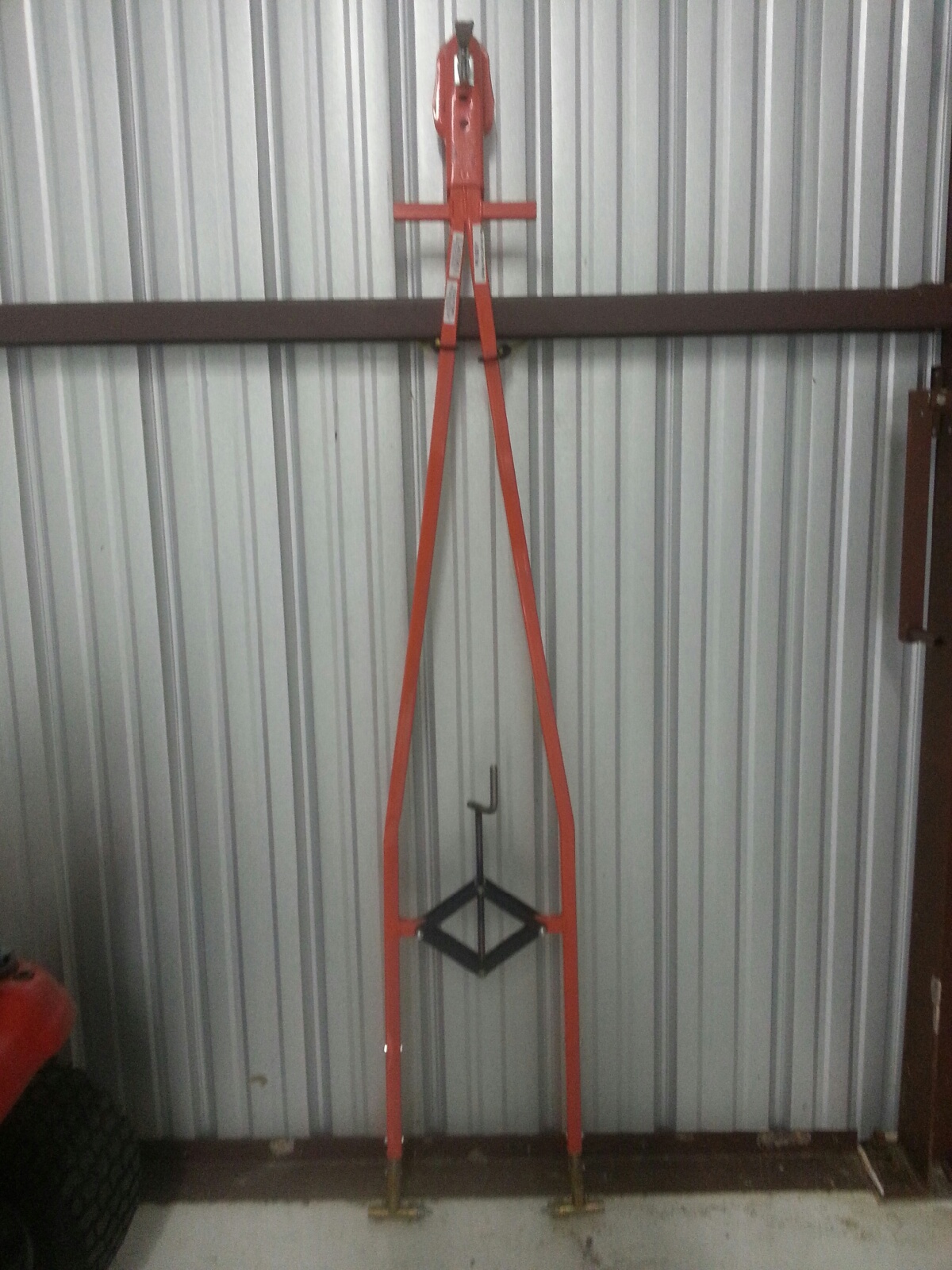
In the market for a tow-bar? This one is basically brand new and hasn’t been used all that much. It has the Cirrus connections on it as well. For more information, contact Texas Top Aviation.
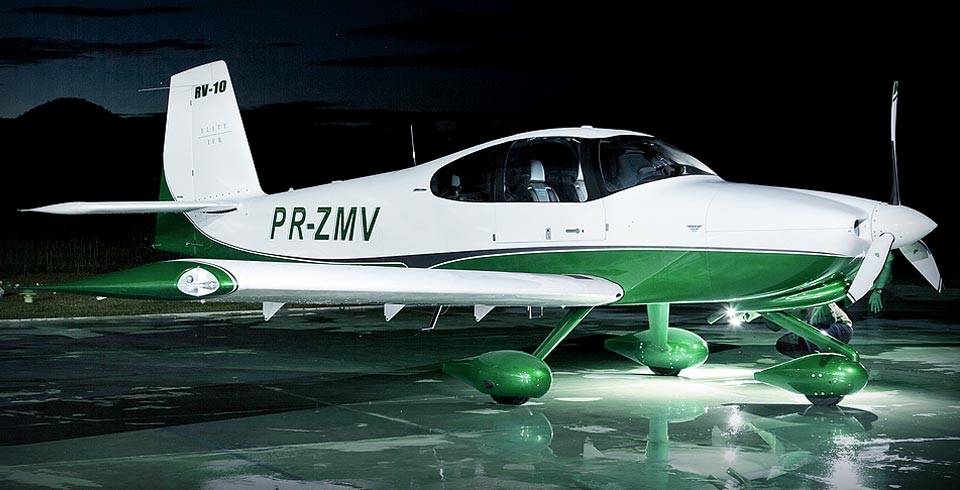
Randy Vanstory, a long-time customer of Texas Top Aviation, decided in early 2017 to build his own airplane. Randy currently owns a Mooney M20J and has been active in aviation for a number of years. He took on the Vans RV 10, starting in February 2017. He’s about halfway through right now, with an estimated completion of mid-2020.
A completed Vans RV 10
I asked Randy what gave him the desire to build his own plane. “I love building things, learning new things, and working on things” he said. “This satisfies those desires all in one project.” Randy had a desire to work with his hands, to create something of his own, and building an airplane put several of his passions together in one project.
Lots of pilots out there dream of building their own airplane in their garage. There is a certain cool factor to putting together an RV or a Lancair in a garage, then trucking it out to an airport, attaching the wings, then flying a personal creation for the first time. An airplane unique to you, since there isn’t one quite like it any where else.
Randy Vanstory, a long-time customer of Texas Top Aviation, decided in early 2017 to build his own airplane. Randy currently owns a Mooney M20J and has been active in aviation for a number of years. He took on the Vans RV 10, starting in February 2017. He’s about halfway through right now, with an estimated…
Figuring out the pattern altitude at an airport should be pretty simple, right? But, in this day of helpful technology, most pilots actually get it wrong. How can you always get it right? Well, it just takes about an extra 15 seconds. Here’s how.
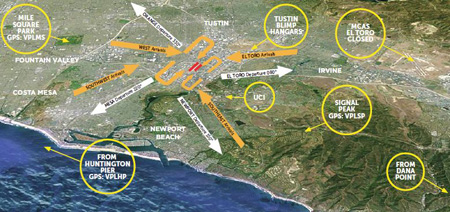
John Wayne Airport Traffic Patterns
As outlined in the Aeronautical Information Manual, section 4-3-3, “traffic pattern altitudes for propeller-driven aircraft generally extend from 600 feet to as high as 1,500 feet above the ground.” Further, in the Pilot’s Handbook of Aeronautical Knowledge on page 13-10, it states: “1,000 AGL is recommended pattern altitude unless established otherwise.”
Okay, so for piston driver’s, we’ve got it narrowed down to 1,000 AGL (Above Ground Level for those who don’t like acronyms). But wait! There’s that very important phrase at the end of the last quote: “unless established otherwise.” That means not all airports have traffic pattern altitudes of 1,000 AGL, or else they wouldn’t put that line in there!
How do you find out what the TPA (Traffic Pattern Altitude) is for a certain airport if it’s not 1,000 AGL? Great question! Your first guess is probably to look on Foreflight. Though this is a good start, it is not the full answer.
Let’s use an example. Look up KAQO, the Llano Airport on Foreflight. At the top of the page, the airport elevation is stated as 1,101′ MSL and the pattern altitude is stated as 1,902′ MSL. From what we just learned, 1,902′ MSL is not 1,000 AGL, so is 1,902′ MSL otherwise established?
On the Airports page with KAQO pulled up, tap the A/FD tab, second to last on the left. Scroll down to Llano Muni. Read the whole entry. Does it state in the entry that pattern altitude is different than 1,000 AGL? It sure doesn’t. So, because it is not otherwise established, pattern altitude at KAQO is 2,102′ MSL not 1,902′ MSL.
Where did Foreflight get that? I have no idea. Too often, though, pilots look at the Foreflight pattern altitude and don’t actually check the Airport Facilities Directory (A/FD). Then, they get the pattern altitude wrong.
What does it look like when pattern altitude is otherwise established? Look up KSGR, Sugar Land Regional, on your Foreflight app. Foreflight states the elevation as 82′ MSL and the Pattern Altitude as 1,000′ MSL. Is this correct? Well, tap that A/FD button again and let’s find out.
On the second line of the A/FD entry, it says TPA-See Remarks. Down in the remarks section, we find the following:
TPA-1000 (918) single engine piston acft, TPA-1500 (1418) for twin and turbojet acft, TPA-500 (418) for helicopters within 2NM.
Foreflight got it right this time for single engine pistons, but if you are in a twin, the pattern altitude is different. What’s the lesson here? Always check the A/FD and don’t always go by what Foreflight says. The A/FD is always right and usually has a little more detail to help set you straight.
One last thing. Both the AIM and the Pilot’s Handbook of Aeronautical Knowledge, when talking about pattern altitude, state, “When operating at an airport, traffic pattern altitudes should be maintained unless otherwise required by the applicable distance from cloud criteria in…section 91.155.” 91.155 defines basic VFR weather minimums. So, to fully interpret what the AIM is saying, we have to take into account the type of airspace we are in to determine if we can safely and legally operate at pattern altitude at a particular airport.
For example, let’s say we are at KCVB, the Castroville Airport. Pattern altitude there is 1,602 feet, which is 829 AGL. CVB is Class G airspace up to 700 AGL, then Class E above that. Let’s say there is a 700 AGL broken cloud layer. Pattern altitude is 829 AGL, so you won’t be able to get up that high with a broken ceiling. What altitude can you do pattern work at to stay legal?
Class G VFR weather minimums during the day below 1,200 AGL is 1 SM visibility and clear of clouds. So, legally, you could fly at 699 AGL (which at CVB would be 1,472 MSL) while in the pattern and be legal. Safe? Maybe, but probably not if you are skimming the base of the clouds. Is 1300 MSL a safer pattern altitude in this example? Well, that is 527 AGL, so probably not, since towers tend to stick up that high sometimes.
Let’s go back to KSGR and put a 1,000 AGL overcast ceiling there. SGR is Class D airspace and we already determined pattern altitude there was 1,000 MSL for piston singles. VFR visibility and cloud clearance requirements in Class D airspace are 1,000 feet above clouds, 500 feet below clouds, and 2,000 feet horizontally from the clouds with 3 SM visibility. In order to stay 500 feet below the clouds, you would be flying a 582 MSL pattern. Safe? Probably not, though it is legal.
To summarize, don’t take Foreflight’s word for pattern altitude. Cross reference the A/FD (it only takes 15 seconds at the most) to verify. If it’s cloudy, it’s really best to stay on the ground, but if you want to find out your legal pattern altitude with a cloud deck, cross reference 91.155. I don’t recommend flying below pattern altitude because it is there for a reason.
Figuring out the pattern altitude at an airport should be pretty simple, right? But, in this day of helpful technology, most pilots actually get it wrong. How can you always get it right? Well, it just takes about an extra 15 seconds. Here’s how. As outlined in the Aeronautical Information Manual, section 4-3-3, “traffic pattern…
The Malibu & M-Class Owner’s and Pilot’s Association recently released their MMOPA Vision Video. It is a great video detailing the history of the Piper PA46 & the history of MMOPA. The PA46 would have ceased to exist without the founding of the original Malibu Coalition.
Checkout the video above (and Texas Top Aviation’s Hank Gibson even gets a cameo!).
The Malibu & M-Class Owner’s and Pilot’s Association recently released their MMOPA Vision Video. It is a great video detailing the history of the Piper PA46 & the history of MMOPA. The PA46 would have ceased to exist without the founding of the original Malibu Coalition. Checkout the video above (and Texas Top Aviation’s Hank…
You have just received the keys of your shiny new (to you) airplane complete with a beautiful Garmin G1000 glass panel flight deck. Synthetic Vision, WAAS, and ADS-B are all installed. You are ready to cruise in high technology.
You turn on the PFD and MFD and notice one problem. All your databases are expired. No big deal, right? Your Garmin 530W was easy as pie to update with it’s single data card.
You start looking around and can’t find the data card. Then you notice that there are several SD cards in slots on the panels. SD cards won’t fit in your Blue Jepp Skybound card reader. Confusion sets in which quickly leads to full on panic.
What have you gotten yourself into?!
No need to fear, Texas Top Aviation is here to help with your Garmin G1000 database update confusion (and hopefully not panic).
Database Update Providers
First, you have to choose who to get your Garmin G1000 updates from. You have two options. One is Garmin (fly.garmin.com; always use either Firefox or Chrome to update, don’t use Safari). The other is Jeppesen.
Honestly, there is no difference between the data that each provides. If you had a 530 or 430 before, you used Jepp already. Just keep the Jepp account, call them, and have them get you set up for your Garmin G1000 updates.
If you didn’t have a Jepp account before, I would use Garmin, for a couple of reasons. You get multiple downloads in case you mess something up (Jepp NavData gives 1 download per month, while Safe Taxi, etc. you get 2-3). On Jepp, you have to call in and have them reset the account, which can be a pain if it’s after hours or a Saturday or Sunday.
The other problem with Jepp is since Boeing bought Jeppesen, I have found it extremely difficult to find online where to set up a new account and purchase databases. Yes, you can always call, but, again, problematic after hours or on a weekend.
The only problem with Fly Garmin for your Garmin G1000 updates is Garmin is constantly updating their program. You have to update their downloader quite often, which can be a bit frustrating.
I’m going to use Fly Garmin as my example.
What to Buy
Garmin gives you a couple of different bundle options for your Garmin G1000 updates, the OnePak and the PilotPak. The main difference between the two is the PilotPak includes approach charts that display on your PFD and the OnePak doesn’t. Therefore, the OnePak is about $200 cheaper.
Both include Navigation Data, SafeTaxi, Obstacles, Airport Directory, Terrain, and the BaseMap.
How to Update
Once you have followed all the instructions on Garmin’s website (or gotten Jeppesen set up), here is what to put on which SD card.
NOTE: YOU WILL NEED TO PURCHASE ONE OR TWO BLANK SD CARDS FOR THE NAVIGATION DATABASES. DO NOT PUT THE NAVIGATION DATA ON THE SD CARD THAT IS ALREADY IN THE TOP SLOT ON THE MFD. THAT IS FOR ENGINE DATA LOGGING ONLY. NO NAVIGATION DATA SHOULD EVER BE PUT THAT ON THAT CARD.
Bottom Card, PFD
SafeTaxi
Obstacles
Bottom Card, MFD
SafeTaxi
Obstacles
Airport Directory
Flite Charts
Top Card, PFD & MFD (This is the new blank SD card(s) you bought)
NOTE: REMOVE THE TOP SD CARD IN THE MFD THAT IS ALREADY IN THE SLOT AND DON’T PUT ANY DATABASE INFORMATION ON IT.
Ignore everything above and put all databases on the bottom card of the MFD. You have database sync, so you don’t have to mess with multiple cards. When you do an update though, go to the AUX chapter on the MFD and scroll down to the Databases page. Ensure that all dates match what you just put on the SD Card.
For you Jeppesen users, check out the new Bad Elf Wombat updater that works with the iPad JDM app for updates.
You have just received the keys of your shiny new (to you) airplane complete with a beautiful Garmin G1000 glass panel flight deck. Synthetic Vision, WAAS, and ADS-B are all installed. You are ready to cruise in high technology. You turn on the PFD and MFD and notice one problem. All your databases are expired….

 Texas Top Aviation was at the AOPA Regional Fly-In at the San Marcos Regional Airport (KHYI). If you weren’t there, you certainly missed out spending time with 2,500 other airplane and flying enthusiasts!
 Texas Top Aviation had several drawings for free training and 3 lucky winners. We also had a Lancair Super ES for sale, N132BB (which made the San Marcos Record newspaper!). It definitely stood out with it’s unique paint job. The flames on the tail drew many oohs and aahs.