Cirrus Vision Jet Receives FAA Certification

cirrus-vision-jet-interior

The long anticipated certification of the Cirrus Vision Jet finally happened.  On October 30th, the FAA awarded certification to Cirrus’ single engine jet.  Marketed as the world’s first single engine personal jet, the Cirrus Vision Jet will seat five adults, two children, and cruise around 300 knots.

The Williams FJ33-5A Turbo Fan engine is operated by a FADEC, single handle throttle, similar to the throttle in the piston powered Cirrus family.  In fact, the SR series was taken into consideration when designing the Cirrus Vision Jet in order to simplify the upgrade for pilots.  Many of the buttons and knobs are in the same places in the Cirrus Vision Jet.

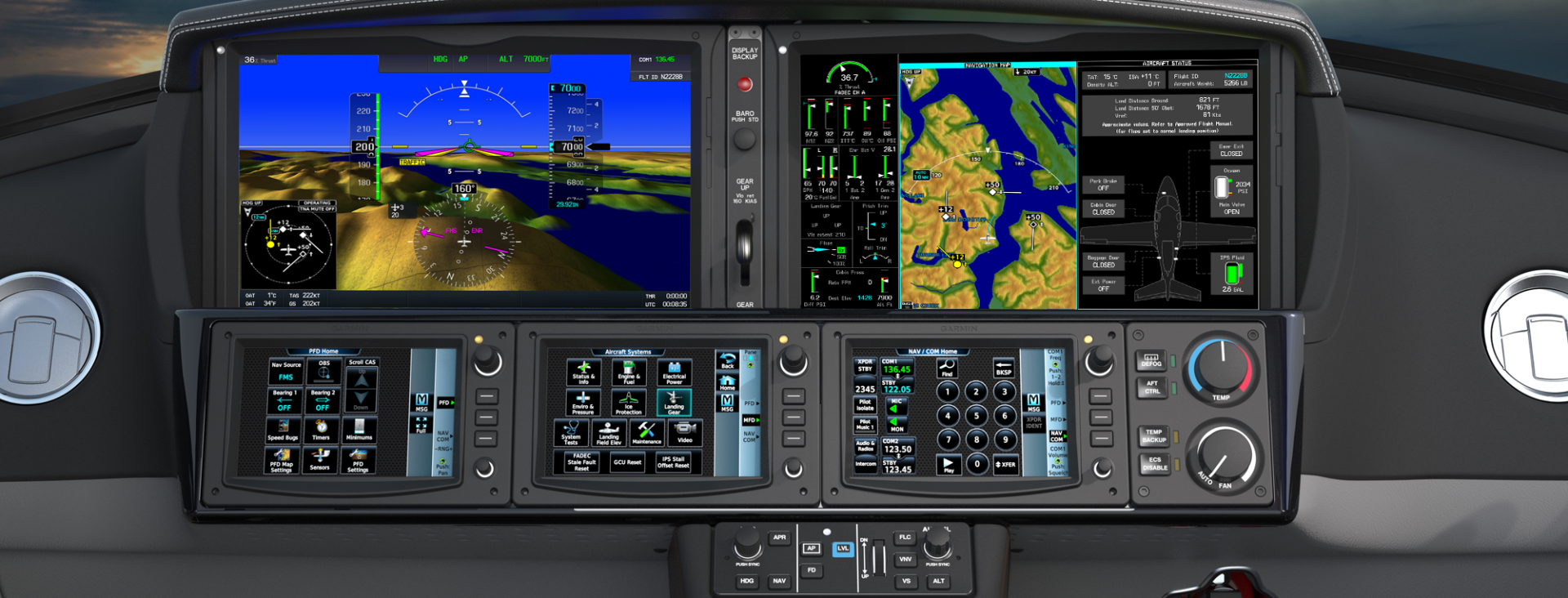
The Cirrus Vision Jet is equipped with the Cirrus Perspective Touch by Garmin that is very similar to the Cirrus Perspective by Garmin in the piston powered line.  Equipped also with the Flight Into Known Icing system and the Cirrus Airframe Parachute System (CAPS), both of which are standard.
cirrus-perspective-touch

Unlike the piston powered Cirrus lines, the CAPS system on the Cirrus Vision Jet is actually mounted in the nose.  Also, unlike the piston lines, the jet CAPS is integrated with the aircraft avionics to slow the airplane to between 67 and 160 knots when the system is activated.  In the jet, the CAPS system was designed to withstand higher weights, higher speeds and higher altitudes.

Cirrus hopes to start deliveries of the Vision Jet by the end of the year, with many more rolling off the line in 2017.  All Cirrus Vision Jet pilots will need to be type rated in order to fly the aircraft.  Cirrus is doing all the type rating training in house at their new Vision Center in Knoxville, Tennessee.

To read the full press release, click here.

cirrus-vision-jet

Similar Posts

  • Hold Anywhere

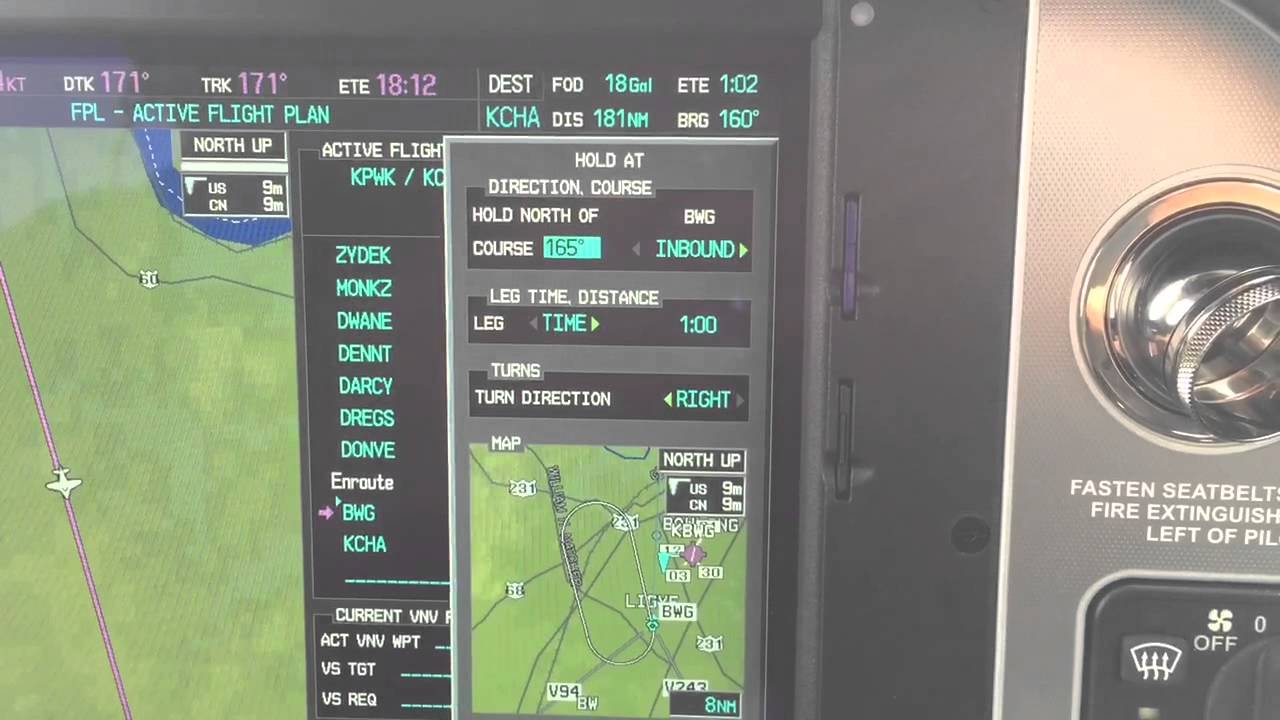
    The latest Garmin software version on the Garmin G1000 and Cirrus Perspective by Garmin has a really neat feature.  It gives the pilot the ability to create a hold at any fix, VOR, NDB, or even airport.  If the point is in the GPS database, a hold can be created over it.

    How does it work?  Here are the steps.

    Let’s say ATC tells you to hold over an intersection on a Victor Airway that you are already on.  Since you are tracking the airway already, the airway should be in your flight plan complete with all the waypoints on it.

    Bring up your flight plan and highlight the waypoint to hold at.  Press the menu key.  Using the big knob, scroll down to highlight the hold at waypoint option at the bottom of the bottom of the menu.  Press enter.

    garmin-holding-pattern

    Now you can build the hold.  You select what the inbound or outbound course will be.  Select a timed hold or a distance hold.  Then select left or right hand turns.  You can even input your expect further clearance time.  Press enter and now you have a hold as a waypoint in your flight plan.  Assuming you have a WAAS unit, the autopilot will fly the hold for you.

    If you are ever told to “Hold Present Position,” Garmin has you covered.  Simply press menu on the flight plan page, scroll down to Hold Present Position, then follow the prompts on the screen to build a hold at your present position.

    The latest Garmin software version on the Garmin G1000 and Cirrus Perspective by Garmin has a really neat feature.  It gives the pilot the ability to create a hold at any fix, VOR, NDB, or even airport.  If the point is in the GPS database, a hold can be created over it. How does it…

  • Garmin GFC 700 Autopilot

    The Garmin GFC 700 Autopilot is an amazing machine.  Fully digital and fully integrated with the Garmin G1000 glass panel, it makes a pilot’s workload a lot easier, especially in busy airspace.

    I train a lot of pilots in airplanes that have the Garmin GFC 700 autopilot.  The Cirrus SR22, the Columbia 350 & 400, the G36 Bonanza, and the Piper Mirage and M350 to name a few.  The most common problem I see for pilots transitioning into the Garmin GFC 700 equipped aircraft is that it doesn’t act like other autopilots.

    STECs and DFC 90 Autopilots function like this:  you push the button for the mode you want on the autopilot controller and that turns the autopilot on.

    Not so on the Garmin GFC 700.  If you push the button for the mode on the GFC 700, then the flight director engages, but not the autopilot.  This confuses folks a lot who move up from different autopilots because their autopilot primacy side of their brain is telling them the autopilot is on whenever they push one of the buttons on the GFC 700 controller.

    Here’s an example:  A pilot has just departed and is ready to turn on course.  In his old airplane with an STEC 55x autopilot, the pilot pushes the direct to key to go to his first waypoint, then pushes NAV on the autopilot controller and the STEC 55x comes on and starts flying on course.  Then he presses VS and ALT to initiate a climb.

    With the same scenario and a Garmin GFC 700 autopilot, the same pilot (who is used to a 55x), pushes the direct to key, then pushes NAV on the autopilot controller and pushes IAS or FLC to initiate the climb.  He lets go of the flight controls thinking the autopilot is engaged.  The airplane starts nosing over and he starts panicking.

    Why did this happen?  The pilot in the second scenario never pushed the AP button on the Garmin GFC 700 so the autopilot never engaged.  All he did by pressing the NAV button and IAS button was to turn the flight director on.

    How to remedy this?  Get in the habit of checking your scoreboard.  On the top of the G1000 or Garmin Perspective PFD, there is an autopilot annunciation strip (or scoreboard as I like to call it).  In the very middle of the scoreboard is an area to show if the autopilot or flight director is engaged.  AP means the autopilot is on; FD means the flight director is engaged but the autopilot is not.

    I teach pilots to be in the habit of checking your scoreboard each time you get done pressing buttons on the autopilot controller to ensure the Garmin GFC 700 is in the proper mode.  This saves some of those panic moments when it is supposed the AP is engaged, but it’s only the FD.

    The Garmin GFC 700 Autopilot is an amazing machine.  Fully digital and fully integrated with the Garmin G1000 glass panel, it makes a pilot’s workload a lot easier, especially in busy airspace. I train a lot of pilots in airplanes that have the Garmin GFC 700 autopilot.  The Cirrus SR22, the Columbia 350 & 400,…

  • PIREP: Austin Bergstrom Recovering After Flood Damage

    The massive storms that rolled through the Austin Bergstrom and San Antonio areas last Friday not only put a dent in the landscape, they put a dent in the skies too.

    The Austin Bergstrom (KAUS) control tower suffered significant flood damage Friday.  6 inches of rainfall in an hour caused water to come pouring into the first floor of the tower, flooding the radar room and knocking out the power.  This led to transmission outages for the tower, ground control, clearance delivery and the ATIS.  Similar to the Chicago Center fire last year (though this was a much smaller section of airspace), the area normally controlled by Austin Approach was replaced by a big, gaping radar hole.

    By 8:45am on Friday morning, the Austin Bergstrom airport actually closed.  One runway eventually opened back up Friday afternoon, but massive delays and cancellations had already taken place.  All the ILS approaches were down and Houston Center had taken over the airspace normally occupied by Austin Approach control.

    Austin Temprorary Tower

    A temporary, emergency tower vehicle was brought in by the FAA (it’s essentially an RV with communications and a giant window) by the end of the weekend.  All arrivals and departures were restricted to 17L and 35R.

    Due to the radar outage, I heard there was as much as a 4 hour delay even for planes coming into Austin Bergstrom from Dallas, and that was in VMC conditions on Sunday and Monday.  Tuesday and Wednesday brought IMC conditions which only enhanced the delays.

    The latest news is that Austin Approach will be opening back up, but in a satellite base in San Antonio.  The Austin controllers will be using the SAT radar room and will be receiving their radar picture via satellite.  The approach frequencies should be up and running today or tomorrow.  The Austin Bergstrom tower is up and running and most of the ILS approaches are operational at this point.

    In the meantime, expect delays going in and out of Austin.  If you don’t have to get to AUS, EDC, or GTU, you’re better off delaying a day or two until Austin Approach is back up and running.

    The massive storms that rolled through the Austin Bergstrom and San Antonio areas last Friday not only put a dent in the landscape, they put a dent in the skies too. The Austin Bergstrom (KAUS) control tower suffered significant flood damage Friday.  6 inches of rainfall in an hour caused water to come pouring into…

  • MAF Provides Disaster Relief in Haiti

    Hurricane Matthew rolled through the Caribbean last week and dumped vast amounts of rain across several of the island nations.  Haiti was one of them.  Haiti has been hard hit by disasters over the last 10 years.  Hurricane Ike in 2008, he devastating earthquake in 2010, Tropical Storm Isaac in 2012 and now Hurricane Matthew.

    maf-haiti

    MAF (Missionary Aviation Fellowship) has provided relief through all those disasters in Haiti.  Their disaster response team is preparing to provide relief yet again to the island nation in the form of relief supplies and personnel as well as damage assessment flights.

    MAF-US is based in Nampa, Idaho.  The organization uses aviation and technology to gain access to isolated people groups in order to allow those people to experience the love of Jesus Christ.  MAF-US serves in 6 countries around the world spread out amongst 15 bases.  MAF International works in 33 countries around the world.

    In addition, MAF works with multiple non-profits and human aid organizations to provide transportation to doctors and aid workers to those remote parts of the world where automobile transportation is impossible.

    In Haiti, MAF has 3 airplanes based in the country that serve 13 remote airstrips.  To read more about MAF, visit their website.

    Hurricane Matthew rolled through the Caribbean last week and dumped vast amounts of rain across several of the island nations.  Haiti was one of them.  Haiti has been hard hit by disasters over the last 10 years.  Hurricane Ike in 2008, he devastating earthquake in 2010, Tropical Storm Isaac in 2012 and now Hurricane Matthew….

  • The Flight Director as a Backup

    I’ve noticed that a lot of general aviation pilots tend to ignore the flight director on the attitude indicator.  A lot of pilots don’t even know what it’s there for or how to use it.  Talk to any airline pilot, though, and he or she will tell you how important the flight director actually is.

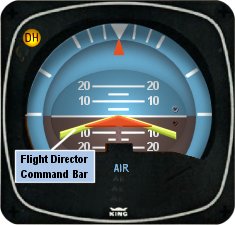
    In most high performance airplanes, the flight director comes on when the autopilot comes on.  Essentially, the autopilot is following the flight director, which tells the autopilot where to go.  The flight director can also be used with the autopilot off, when hand flying an approach, for example.  By turning the flight director on, it will show you where you need to fly to stay on course and on glide slope.

    Flight Director

    The flight director is most often controlled by the autopilot controller.  The same buttons you use to put the autopilot in heading mode also tells the flight director to follow the heading bug when the autopilot is off.  When you move the heading bug (or change course on the GPS, depending on which mode you have selected), the flight director will show you when you need to turn and when you need to stop turning.  It directs your flight attitude, hence the name.

    I recently discovered it’s a great backup when you have some instruments on the fritz.  I went on a long flight in a steam gauge Piper Malibu and the attitude indicator started reading erratically.  While flying straight and level, it would randomly indicate that I was in a 10 degree bank to the right, swing back and show wings level, then show a 3 degree turn left.  This went on for a while.  We were in VMC conditions, so legality wasn’t a problem, but it was kind of disorienting.

    After a little while of this, the autopilot started acting up.  It would start oscillating the pitch up and down, making it seem like we were going through a moguls course in the air.  I ended up turning the autopilot off and hand flying the airplane.

    This led to a conundrum, since my attitude indicator was unreliable.  I could definitely look outside, since it was VMC, seeing when I was level and when I wasn’t.  That would create a higher workload for me, which on a long flight like I was on, would lead to an increase in fatigue.  The solution?  The flight director!

    I turned the autopilot off, but I left the flight director up.  It wasn’t referencing the bank angle that the attitude indicator was showing since the KFC 150 goes off of the turn coordinator.  So, if I just followed the attitude indicator, I could just keep scanning the instruments and relieve a little bit of my workload.

    It actually worked really well.  By just following the flight director, I was able to stay on course and on altitude with only minor attitude adjustments whenever we hit turbulence.

    So, if you’re attitude indicator and autopilot decide to stop working on you, then bring up the flight director, push the same buttons you would if you were using the autopilot, and it works as a great backup.

    I’ve noticed that a lot of general aviation pilots tend to ignore the flight director on the attitude indicator.  A lot of pilots don’t even know what it’s there for or how to use it.  Talk to any airline pilot, though, and he or she will tell you how important the flight director actually is….

  • L-3 Lynx Transponder Line

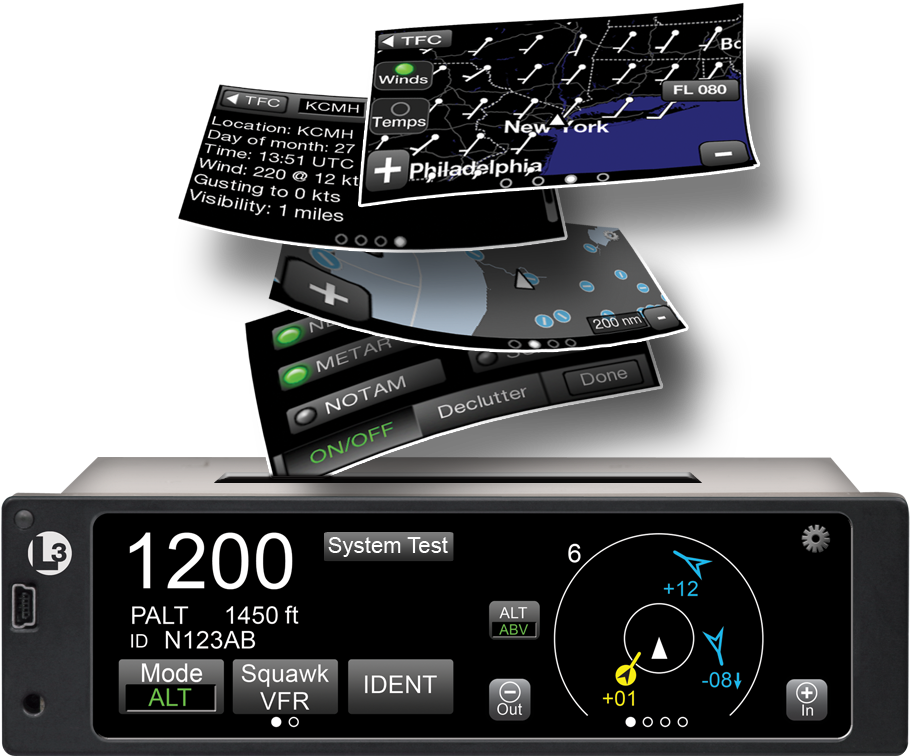
    L-3 has jumped into the ADS-B transponder game with their Lynx line of products.  Aircraft owners have a myriad of options with the Lynx line, from simply becoming ADS-B compliant with the NGT-1000 ($2,100, with ADS-B out that works with the GTX 327 and GTX 330), or going all in with the NGT-9000 touch screen transponder complete with ADS-B In, a traffic screen and NEXRAD ($6,800).

    L-3 Lynx

    The NGT 1000/2000/2500 line works with the existing transponder in the airplane (as long as it’s a Garmin GTX 327 or 330).  The 2000 gives ADS-B In capability, allowing the pilot to access NEXRAD and traffic, plus has a Wifi source to broadcast all the information to an iPad.  The 2500 includes all of that, plus gives the pilot MFD capability as well.  An optional control panel is available if the airplane is not equipped with one of the aforementioned Garmin transponders.

    The L-3 Lynx NGT-9000 is an actual transponder replacement.  It is a touch screen device that has a multitude of ADS-B features that, quite frankly, are really cool on a transponder.  The ADS-B traffic is displayed on the unit itself and can also be sent, via the optional Wifi connection, to an iPad on the WingXPro or SkyRadar apps.  The optional L-3 NextGen Active Traffic can also be installed to receive traffic callouts (this does not include resolution advisories).  Already have SkyWatch?  The L-3 Lynx can use the equipment.

    The L-3 Lynx NGT-9000 is also capable of displaying NEXRAD as well as METARs, TAFs, NOTAMs, and TFRs and a myriad of other weather products, all on it’s moving map.  It seems that L-3 has taken the transponder and turned it into something awesome.

    To read more about the L-3 Lynx line of transponders, you can visit their website.

    L-3 has jumped into the ADS-B transponder game with their Lynx line of products.  Aircraft owners have a myriad of options with the Lynx line, from simply becoming ADS-B compliant with the NGT-1000 ($2,100, with ADS-B out that works with the GTX 327 and GTX 330), or going all in with the NGT-9000 touch screen…

Leave a Reply

Your email address will not be published. Required fields are marked *