There was a bill introduced in Congress recently to take control of Air Traffic Control away from the FAA and give it to a private, for profit, corporation. The initial reaction of pilots is “Ahhh! User fees!” which we are all adamantly opposed to. There are a myriad of reasons why this is a bad idea (the “Flying” article makes a comparison to giving NASA to Richard Branson and Jeff Bezos) and we as pilots should be against it.
Sadly, in January, a pretty great airplane was put out to pasture. Textron (the conglomerate that now owns Cessna, Beechcraft, Hawker, and Lycoming) announced it was ceasing production of the Cessna TTx. With the end of the Cessna TTx production, an airplane that was the main “competitor” to Cirrus (if you can call it competition; Cirrus consistently outsold the Cessna TTx by a wide margin each year), it leaves the SR series to stand alone atop the High Performance piston single market.
I got to go through Cessna’s FITS Accepted Instructor (CFAI) course back in 2012 and have flown in the Cessna 350 and 400 (which is what they were known as at the time; the Cessna TTx name came around in 2011) for about 120 hours. I really like the airplanes. I’m partial to the Cirrus, but the Cessna 350 & 400 are fast airplanes and great for 1-2 people. I flew a 350 (the non-turbo charged version) from New York to San Antonio last fall and routinely saw 170 knots at 12 GPH.
Columbia started out making the 350 & 400 (the turbo-charged version) in the early 2000s, but went bankrupt in 2007. Lancair started Columbia to make a certified version of their popular kit planes. If you see a Lancair ES floating around, you would swear it’s a Columbia with only 1 door. Cessna bought the design from Columbia in 2007 to begin manufacturing the airplanes themselves.
Cessna then made a huge mistake as they moved the production facility from Bend, Oregon to Mexico. Production completely halted in 2009 as the planes coming out of Mexico were found to have defective composite work. The sales never really recovered, even though Cessna put the Garmin G2000 panel in the Cessna TTx, complete with a touchscreen key pad. A FIKI system was added as an option in 2012.
A prospective buyer can still get a great value on a used 350, 400, or TTx, as they are valued a little lower than a Cirrus. The 350, 400 or TTx all make excellent single pilot or two person speedsters with very comfortable amenities.
Sadly, in January, a pretty great airplane was put out to pasture. Textron (the conglomerate that now owns Cessna, Beechcraft, Hawker, and Lycoming) announced it was ceasing production of the Cessna TTx. With the end of the Cessna TTx production, an airplane that was the main “competitor” to Cirrus (if you can call it competition;…
Many people ask, which set of charts is better? Should I use the FAA Aeroservices charts on Foreflight or pay extra for the Jeppesen charts? Since you have to pay for Jeppesen, they are probably better, right?
I am not here to say which one is better as a chart preference is just that, a preference for one over the other or for certain features. After a while, muscle memory and routine take over and you probably wont even notice the difference.
History
In 1934, Elroy Jeppesen began making his own charts and sold them to other pilots. His little company grew into the giant Boeing chart company we know today. Jeppesen charts are used internationally and therefore include information that might otherwise seem common knowledge, like transition altitudes. The key is, you cannot get FAA Aeroservices charts for international destinations. Jeppesen is the only option for outside the US.
National Aerospace Charting Office (NACO), or the new(er) name “Aeroservices” or FAA chart, whatever you decide to call them, are United States government issued charts. In addition to civilian use, Aeroservices charts are used by the military so there will be some terminology that does not apply to civilians. The best part about FAA Aeroservices charts are… they’re free!
If you are in the middle of a transition or trying to decide which charts to use, you have come to the right place. Here are a few key differences.
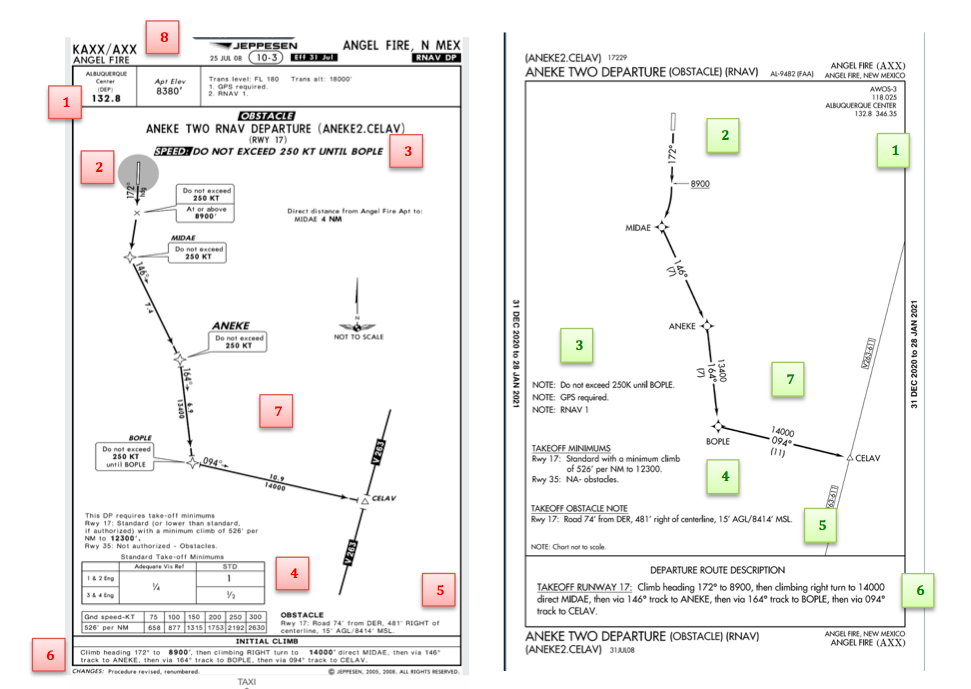
Obstacle Departure Procedure Chart KAXX (Angel Fire, New Mexico) ODP
Frequencies: FAA Chart provides the AWOS so you have all departure frequencies in once place.
Airport: Jeppesen highlight the airport, which is a nice feature so you can easily see the flow from the airport.
Notes and Remarks: Jeppesen bolds the speed restriction all over the chart so you won’t miss it. All other requirements are in the top right corner. Note the transition altitude 18,000′. Since Jeppesen is used internationally, it is published on the chart since other countries have different transition altitudes. It takes up a chunk of chart real estate, but it’s clear, easy to read, and always in the same place. The FAA charts post all the requirements and restrictions as notes off to the side. Since it’s in the same space as the chart graphic, it’s easy for the eyes to catch while studying the plate.
Take off Minimums: NOT APPLICABLE for PART 91 – however, it’s wise for all pilots to look and abide by them. Jeppesen displays the standard take off minimums table, as well as the rate of climb table, which is nice to have all in one place. The FAA chart gives the non standard information but you need to know/look up the rest in the Digital Terminal Procedures Supplemental document. (Hint: It’s in the Documents section of Foreflight)
Take Off Obstacles: About the same on both charts
Route Description: Similar on both charts, but larger font and clearer description on the FAA chart. When there are different routes from different runways, the FAA chart layout is really helpful.
Graphic Layout: Jeppesen and FAA use the same graphics for all their different charts and plates which makes it easy to read once you are familiar with the respective charts. FAA charts are easy to read and distractions are kept to a minimum. Jeppesen charts make things bold and enlarge pertinent information so you won’t miss it.
Airport altitude: This is only on the Jeppesen chart (the FAA chart doesn’t include it), but it is very helpful for situational awareness. As you brief the arrival altitudes, I think it’s important to have an idea what AGL you are at.
Approach Charts
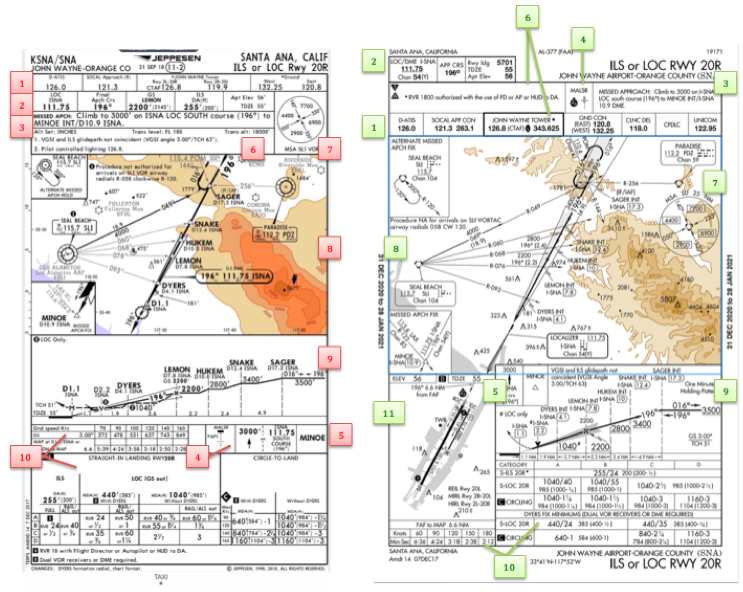
One thing pilots love about Jeppesen approach charts is the clear set up for an approach brief. The top section is created as a “briefing strip” starting with the frequencies, then navigation frequencies, minimums, airport elevation and the missed approach. It’s very natural and user friendly.
FAA charts have a slightly bigger picture of the approach planview, but the profile view and minimums section can get a bit cluttered. It can feel a little discontinuous when briefing the approach to bounce all over the page. However, some pilots really like the small airport diagram in the corner, which I find really helpful for situational awareness (particularly for students learning circle approaches). Non- standard alternate and takeoff minimums are also clearly noted, but unfortunately we must hunt elsewhere to find them. The Jeppesen alternate minimums and takeoff minimums will both be on the airport diagram
Frequencies: Getting weather and tuning radios is easy on the Jeppesen charts – just follow the briefing strip. The frequency section on the FAA charts is still easy to read, but closer to the center of the page. It’s split up from the nav frequencies and other important briefing information. a. FAA charts are created by the government and have military specific information, which are the odd looking frequencies and channels on the chart.
Approach Navigation: On a Jeppesen chart, you will continue to the next line to verify your frequency, course and set minimums (assuming you are straight in on the ILS). On the FAA chart, you will then have to skip to the top of the chart to get the frequency and course, and then scan to the bottom of the page to input your minimums. However, since you could be flying a localizer approach or a circle to land, it’s a good reminder that not everyone using this approach chart will be using the same Decision Altitude (DA). The FAA chart also includes runway distance information so pilots can make determinations of approach speeds and stopping distance if the runway is wet or icy.
Missed Approach – Textual
Approach Lighting
Missed Approach- Graphical: The missed approach information is the same on both charts. The lighting information is key for determining a missed approach and is next to the missed approach text on the FAA chart. It’s found next to the missed approach graphic on the Jeppesen chart. Personally, I find it easier to find and read the lighting information on the Jeppesen chart. Remember, on both charts, the placement of the PAPI on the chart indicates the physical location of the lights (left or right of the runway).
Notes: Both charts have a notes box, but they use them a little differently. Once again, remember that Jeppesen charts are used internationally and include the transition altitudes and altimeter setting info. On both charts, the notes section will be where other critical information will be shared which isn’t really applicable for this airport. On the FAA chart, the tower frequency is starred to note that there are operating hours (you’ll have to check the chart supplement AF/D to find out what those hours are). There is also an L next to the frequency to indicate it is the pilot controlled lighting frequency. You will also find the note about the VGSI and the Approach Glide path next to the profile view on the FAA chart, whereas the Jeppesen chart has that note in the notes section at the top. The FAA chart also has the T and an A in black triangles to note that this airport has non- standard alternate and take off minimums. Again, those are found in separate documents when using FAA charts and on the Airport Diagram when using Jeppesen charts.
Minimum Sector Altitude: Similar on both charts, but in different locations (reminder: ATC vector altitudes may be lower. It is the pilot’s responsibility for safety of flight to maintain safe obstacle clearance, so if you are ever concerned about going below the MSA – just ask ATC).
Planview: Other then differences in size, visuals, and text, the information displayed on both is very similar.
Profile View: Again, the displays look different and pilots will have their preference, but the information is the same.
Minimums: Jeppesen charts not only note the category for each approach with its designated letter, but also displays it in knots. It is recommended that if you increase your approach speed (based on flaps or gusty winds or perhaps a faster speed for a circle to land approach) that you should use the higher category minimums. The reference guide makes that easy to look up. The other benefit of the Jeppesen charts is right the table that contains the time from the final approach fix to the missed approach point for a localizer approach, it also shows the rate of descent with the associated ground speed to maintain a 3 degree glideslope. Now there is no excuse not to set pitch and power! The minimums posted in parenthesis are for the military, but RVR in statute miles is also included.
Airport diagram: Only on the FAA charts, this particular feature is particularly useful for situational awareness. The arrow pointing to the runway shows the direction the approach is arriving from so planning a circle to land is a cinch. There is also a lot of other information that can be gathered from the airport diagram for quick reference or to help a disoriented pilot: lighting, displaced thresholds, closed taxiways, and runway placement and lengths. This is easily one of the best perks of an FAA chart.
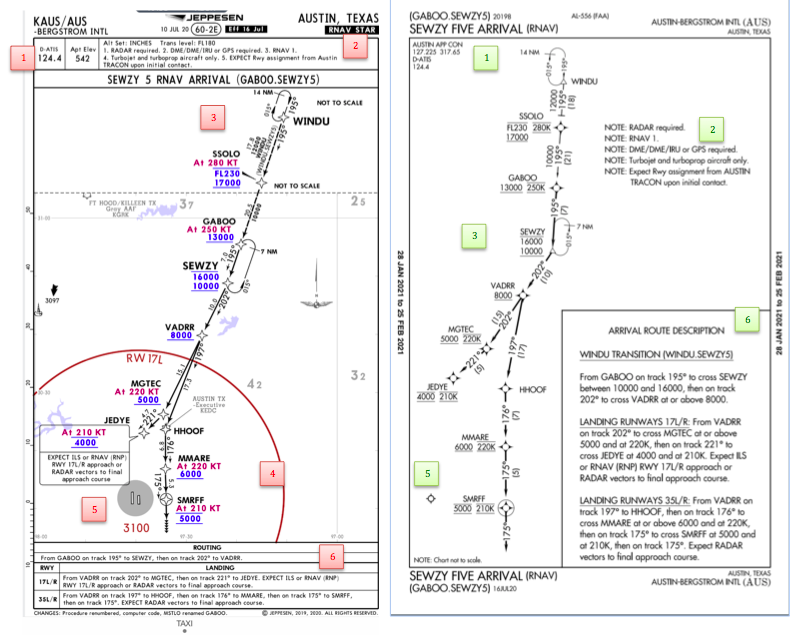
Arrival/ Departure Charts: Sewzy 5 Arrival KAUS
The Jeppesen lay out is very attractive and draws the pilots eye in a clear way to all the important information. The colors pop out, so the required altitudes and speeds are easy to read and remember. The chart, which is the proper scale, shows MORAs , easy to find airports (and runway layouts) and is over all easy to follow. However, the texts, while very clearly laid out, are small and difficult to read and pushed to the very edges of the chart. FAA charts are simple and fairly easy to read, but the airports are not as obvious and the flow to the airport requires a good look. The table on the Jeppesen chart is a really nice format, but the text and Notes for arrivals on the FAA chart are easy to find and much easier to read quickly.
Frequency: FAA charts include the approach frequency on the arrival, which is helpful for having radios tuned. During a busy time when the controller changes your frequency, all you have to do is verify the frequency you already set, rather then totally stop what you’re doing to switch it. The Jeppesen charts add the airport elevation next to the ATIS, which really aids situational awareness.
Notes: Jeppesen notes are clearly numbered and tucked away nicely in a box, but the FAA chart notes pop out in the middle of the page and are easy to skim for pertinent information.
Planview: I think Jeppesen is the clear winner here- it is so easy to read, it only takes one glance to know where the primary airport is and how the arrival flows. The chart being at the proper scale offers the pilot important geographical information and over all is a clean look. Notice the small series of arrows after SMRFF on the the Jeppesen chart; those indicate the pilot should expect radar vectors. The FAA charts include those instructions in the text, but I find the visual reference on the chart helpful. The FAA charts are equally clean, with altitude and speed restrictions easy to read even if they don’t jump out. When there are multiple airports that the arrival serves, the airports are clearly marked, though, I think it would be nice to have a little more information surrounding the primary airport for better situational awareness.
MSA: only on the Jeppesen chart
Primary airport: The runway alignment and grey highlight on the Jeppesen chart stands out very clearly, while the FAA airports are a little more obscure.
Arrival route description: The table on the Jeppesen chart is easy to follow but the text is very small and pushed to the bottom. The route description is much easier to find and read on the FAA chart.
Airport Diagram
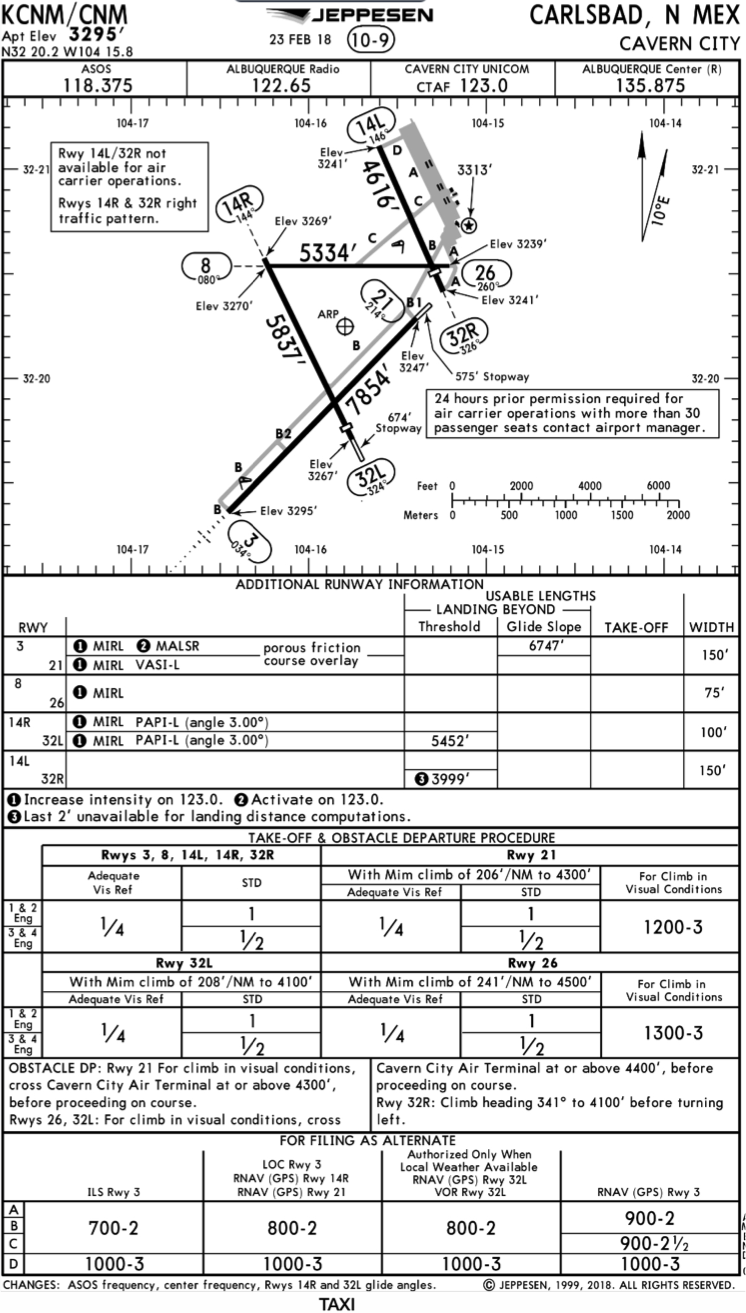
The Jeppesen Airport Diagram page has it all: frequencies, airport diagram, runway info, take-off minimums, departure procedures and alternate minimums. It’s a one-stop shop. It makes preflight planning easy when its all at your fingertips.
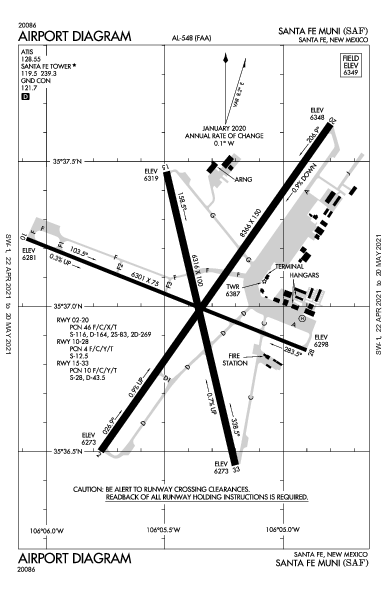
The FAA charts usually require a little more searching for different pieces of airport information. The Airport Diagram itself is just the airport layout. Above, you will see a simple FAA Airport diagram. It’s clean and simple, perfect for a knee board print out.
In the flight planning process, as you look at what approaches you will be using for the airport, you might see an A or T inside a triangle. Those indicate that you will need to look in the Alternate Minimum or Take off minimum documents for more information. The Takeoff Minimums document (see below) is also where you will find any obstacle departure procedures for that airport. Apps like Foreflight help you out by posting the take off minimums under the departure tab. Even though it’s a little more difficult to read, I didn’t crop out the airport information so you can see what it looks like in context.
FAA Alternate Minimums on the Left and Takeoff Minimums and Obstacle Departure Procedures on the Right
Many people ask, which set of charts is better? Should I use the FAA Aeroservices charts on Foreflight or pay extra for the Jeppesen charts? Since you have to pay for Jeppesen, they are probably better, right? I am not here to say which one is better as a chart preference is just that, a…
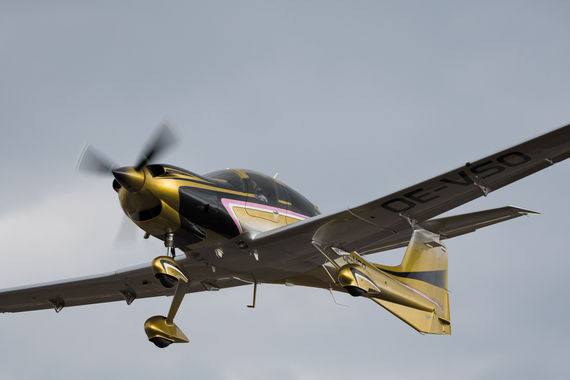
Diamond has joined the high performance single engine fray with the announcement of it’s new line of DA50 models. Cirrus currently has the cornered the market on easy flying, fixed gear, speedy HP single engine airplanes. But, (assuming that the Diamond DA50 gets certified in a timely manner and the appeal of the Jet A sipping SMA diesel engines appeals to a broad enough audience), Cirrus could have some competition soon.
The proposed Diamond DA50 will come in 3 different configurations, the IV, the V, and the VII. The IV and the V will each burn under 10 GPH of Jet A. The VII will burn about 14 GPH of Jet A, using the same amount of fuel as a normally aspirated SR22, but at cheaper Jet A prices (plus the discount of fuel companies like CAA or AEG Fuels).
According to AOPA, all 3 Diamond DA50 models will be equipped with the Garmin G1000 NXi panel and the GFC 700 Autopilot. The Diamond DA50 -V will be the first model expected out next year, with the IV to follow soon after. The wait for the VII will be a bit longer.
In testing, the Diamond DA50 -V showed true airspeeds of 173 knots with an expected range of almost 1100 miles. Gone is the bubble canopy that greatly increased the green house affect of the airplane. It’s replaced by two suicide doors, similar to what is on the Cessna TTx. The single back seat door on the pilot’s side remains.
Carrying capacity will be greater than the Cirrus as well. The Diamond DA50 -V will have a gross weight of around 4,000 pounds, giving it a useful load of 1,250 pounds, giving pilots a lot more flexibility in weight carrying. The Diamond DA50 exterior will be fully customizable as well as advances in carbon fiber paint and decals has come a long way since the early 2000s when white was the only option.
Here are some basic specs for each DA50 model:
Diamond DA50 -IV
230 HP
4 seats
Less than 10GPH fuel burn
Diamond DA50 -V
260 HP
5 seats
10 GPH Fuel Burn
Diamond DA50 -VII
360 HP
7 seats
Retractable Gear
Turboprop option
I am most excited to see the performance numbers on the VII model when it comes to market. With a 360 HP engine and retractable gear, it seems like it will be a screamer.
There are also rumors that Diamond is working on a rotorcraft, the Dart 280, but there isn’t a flying model at the moment.
Diamond has joined the high performance single engine fray with the announcement of it’s new line of DA50 models. Cirrus currently has the cornered the market on easy flying, fixed gear, speedy HP single engine airplanes. But, (assuming that the Diamond DA50 gets certified in a timely manner and the appeal of the Jet A…
I took a Piper Malibu to Cabo San Lucas a few weeks back. This was my second trip flying to Mexico, but the first where I arranged everything. Cabo is a beautiful place and the MMSL airport is a fabulous facility. For those who haven’t been fying to Mexico before, MMSL is the place to go. The folks there are extremely helpful and do most of the paperwork for you. You just have to pass along your information to them.
Flying to Mexico and back out is different than flying in the US. First of all, don’t forget your passport. The authorities on both sides frown upon that. You’ll probably get sent back to the US (or sent back to Mexico if you are on your return trip). Your aircraft also needs, Mexican insurance (talk to your US insurance agent) a radio license, and a customs decal.
Second, you’ll have to file an ICAO specific flight plan for flying to Mexico. This is available on Foreflight now, but I really like Fltplan.com’s way of doing it. I don’t fly internationally enough to remember what everything means, but Fltplan.com does a great job of walking pilots through the the different classifications. It’s almost impossible to get confused.
Third, you have to fill out an eAPIS form. This has to be done at least 24 hours prior to departure from the US, but it can be done as far in advance as you’d like. If your departure time changes or your passengers change, you can edit the eAPIS form to bring it current.
Flying to Mexico IFR is a lot simpler than flying VFR. I have only flown IFR and it is very easy. I’m already on a flight plan, already squawking a discreet code, and already on radar, so there really isn’t any way I can mess up the ADIZ penetration. I really recommend going in and out of Mexico IFR instead of VFR.
Once you land in Mexico, you have to close your IFR flight plan. The tower doesn’t do this for you. After clearing customs, you’ll have to pay a landing fee and sign your flight plan confirming you have arrived and closing it out.
When departing, you have to file another eAPIS 24 hours in advance. Wherever you plan on clearing Customs in the US, you’ll need to call the Customs office no less than 1 hour, but not more than 23 hours before arrival. It’s called an Advanced Notice of Arrival.
You’ll need to fill out a paper flight plan before departing, clear customs again to leave, then away you go.
There are a lot of really fun getaways in Mexico and flying there doesn’t have to be difficult. When you have the right information, flying to Mexico can be a breeze!
I took a Piper Malibu to Cabo San Lucas a few weeks back. This was my second trip flying to Mexico, but the first where I arranged everything. Cabo is a beautiful place and the MMSL airport is a fabulous facility. For those who haven’t been fying to Mexico before, MMSL is the place to…
I was recently clued in to a really cool (and very cost efficient) iPad yoke mount.
It’s called a PopSocket and you won’t find it on any aviation website (I have to credit Joe Casey of Casey Aviation with this nifty find).
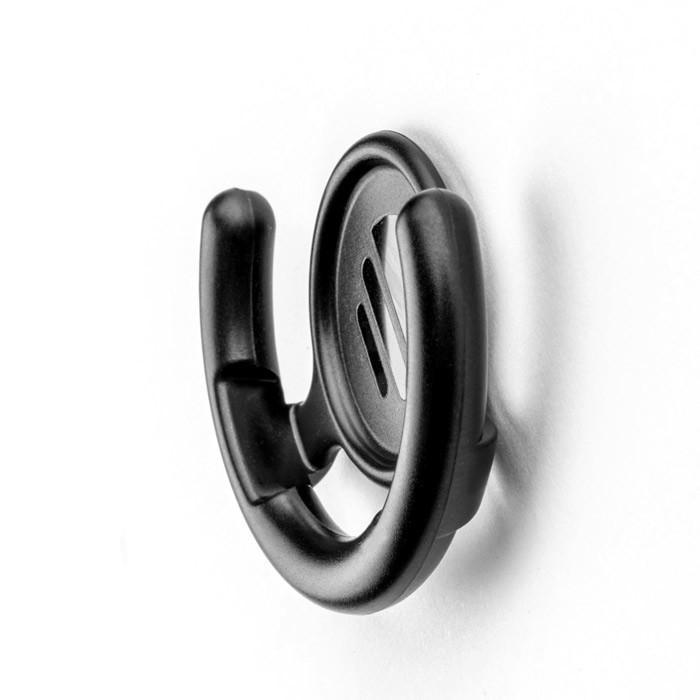
It’s very simple. You take the mount (see right) and stick it to your yoke. Then you pick one of a ton of designs from PopSocket and stick it to the back of your iPad (you can even create your own design! B2 Bomber anyone?).
It’s low profile, doesn’t get in the way of anything, and is easily removable. The PopSocket mounts are $10 apiece (depending on the size of your iPad, you may want to get 2). The PopSocket is $10, so at the most, you’ll be in $40 plus tax and shipping. Most mounts on Sporty’s are upwards of $50 and require a lot of installation, are big and bulky, and usually require lots of juggling to get the iPad in and out of the mount.
Give the PopSocket a try.
I was recently clued in to a really cool (and very cost efficient) iPad yoke mount. It’s called a PopSocket and you won’t find it on any aviation website (I have to credit Joe Casey of Casey Aviation with this nifty find). It’s very simple. You take the mount (see right) and stick it to…