|

2022 Texas Top Aviation Fly In is in the Books!

Thank you to everyone who made the 2022 Texas Top Aviation Fly In at the Hilton Santa Fe Buffalo Thunder Resort a success!

We had 22 attendees and 12 airplanes make it out to beautiful Santa Fe, New Mexico for the week.

After 2 days of very competitive golf, Chris Travland was our 2022 Texas Top Aviation Fly In Golf Tournament Champion.

While you are out in Santa Fe on your next trip, go check out the Rancho de Chimaya restaurant. It was excellent and a true New Mexican experience.

Mark your calendars for the 2023 Texas Top Aviation Dallas Fly In at the Westin Stonebriar Resort in Frisco, TX. McKinney National Airport (KTKI) will be our host airport. The event will be April 12th-April 14th, 2023. Hope to see you all there!

Similar Posts

  • Cirrus Austin, Texas Get Together

    The South Central Cirrus Owner’s and Pilot’s Association (COPA) Region is hosting a Fly In dinner at the Austin Executive Airport (KEDC) on Friday, October 8th.  The event is from 5-9pm.  There will be a cash bar, a catered dinner ($25/person), a special guest speaker, and great mingling amongst the Cirrus owners and pilots in our region!

    Fly in or drive to EDC.  The dinner will be in the Henrickson Jet Center’s main hangar.  You will need to RSVP so event organizers can get a proper head count.  The link to RSVP is here.

    Cirrus Aircraft will be bringing two new 2016 SR22s that will be available for viewing.

    Register for the CATGT before the slots are all filled up!

    cirrus-sr22-sunset

    The South Central Cirrus Owner’s and Pilot’s Association (COPA) Region is hosting a Fly In dinner at the Austin Executive Airport (KEDC) on Friday, October 8th.  The event is from 5-9pm.  There will be a cash bar, a catered dinner ($25/person), a special guest speaker, and great mingling amongst the Cirrus owners and pilots in…

  • Garmin VNV

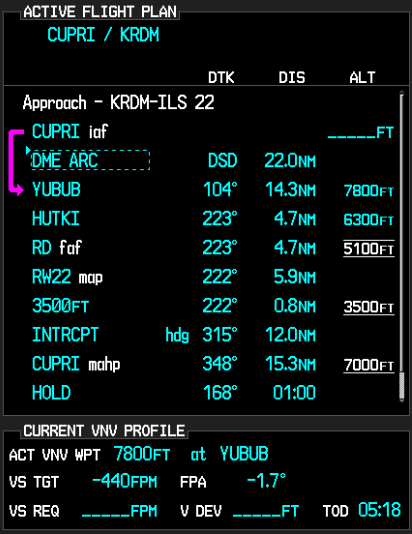
    The Garmin G1000/Perspective combined with the Garmin GFC 700 Autopilot can be a great tool in descent planning.  When you want to end up at pattern altitude a certain distance from the airport or you get a clearance to cross a fix at a certain altitude, Garmin VNV is a great tool.  Here’s how to use it.

    VFR Garmin VNV Use

    Let’s say you want to end up at pattern altitude 3nm from your destination, but you don’t want to descend down into the bumps before you have to.  Here’s how to set it up:

    • Go to the Flight Plan page on the MFD
    • Press the ATK OFST soft key on the bottom of the MFD.  It stands for Along Track Offset, which, in laymen’s terms, means you are setting a point along your track a certain distance from your destination.  In this case, it will be 3nm
    • Input the distance using either the keypad or the small FMS knob and press enter
    • Select the altitude you want to be at (in this case pattern altitude) and press enter
    • You will see a point 3nm before you destination appear on your magenta line and a Top Of Descent (TOD) appear where you need to start your descent
    • 1 minute before the Top Of Descent, an indicator will appear next to your altimeter
    • To have the GFC 700 Autopilot fly the descent for you, you have to do two things
      • Set the Altitude bug for the desired altitude
      • Press VNV on the autopilot
    • All you have to do now is manage power

    IFR Garmin VNV Use

    Let’s say you are told to cross a fix at a specific altitude.  Here’s how to use Garmin VNV to plan it out.

    • Go to the Flight Plan page on the MFD
    • Turn the cursor on and highlight the altitude blank next to the fix in the flight plan
    • Input the desired altitude
    • You will see a Top Of Descent (TOD) point appear along your course where you need to start your descent
    • 1 minute before the Top Of Descent, an indicator will appear next to your altimeter
    • To have the GFC 700 Autopilot fly the descent for you, you have to do two things
      • Set the Altitude bug for the desired altitude
      • Press VNV on the autopilot
    • All you have to do now is manage power

    The Garmin G1000/Perspective combined with the Garmin GFC 700 Autopilot can be a great tool in descent planning.  When you want to end up at pattern altitude a certain distance from the airport or you get a clearance to cross a fix at a certain altitude, Garmin VNV is a great tool.  Here’s how to…

  • MMOPA Safety Stand Down Rescheduled for Online

    April 18th, 2020 was supposed to mark the MMOPA Spring Safety Stand Down, an event held around the country for PA46 owners which counted toward the Master Aviator program. Sadly, due to the COVID-19 repercussions, the in person event had to be canceled.

    Thankfully, due to modern technology, the event has been rescheduled to a nationwide webcast. The date for the Online MMOPA Safety Standdown in Saturday, August 8th. Joe Casey and Travis Holland will be hosting the MMOPA Safety Standdown.

    The cost is free. To register, please click here.

    April 18th, 2020 was supposed to mark the MMOPA Spring Safety Stand Down, an event held around the country for PA46 owners which counted toward the Master Aviator program. Sadly, due to the COVID-19 repercussions, the in person event had to be canceled. Thankfully, due to modern technology, the event has been rescheduled to a…

  • Skyvector Has a New Look

    Skyvector has changed it’s look.  The aeronautical chart website is now offering flight plan filing capability. In order to gain the ability to file flight plans, the user has to form an account first.

    Personally, I really liked how Skyvector had a simple interface before they changed.  As an instructor, a lot of times, I go to multiple airports on one flight.  It was really nice to just plug in airport IDs to check distances and heading information on Skyvector.  The new format is a little clunky as the website has made it a little more difficult to do what it did best before.

    Did the aviation community need another venue to file flight plans?  Not with Foreflight, Garmin Pilot, and WingXPro leading the way in the app market.  Skyvector was smart in not trying to develop another app to compete with the big boys.

    Will the new Skyvector last?  We’ll see.  I’m hoping they’ll go back to the way they used to be, but we’ll see. I may use it enough to come around to liking it.

    Skyvector has changed it’s look.  The aeronautical chart website is now offering flight plan filing capability. In order to gain the ability to file flight plans, the user has to form an account first. Personally, I really liked how Skyvector had a simple interface before they changed.  As an instructor, a lot of times, I go…

  • Cirrus Braking Systems: A Hot Topic

    You just bought your Cirrus SR22. You do some flying, and soon find yourself with a brake temp sticker that isn’t white anymore. You remember from your transition training that any color other than white is a no go. You now ponder…. I don’t remember getting on the brakes hard, or riding the brakes while taxiing, but sure enough they aren’t white anymore. You now start thinking that all the horrible rumors of Cirrus brakes are true. They overheat so fast!

    I would like to share some little-known facts about the Cirrus factory equipped braking system. Following the procedures below can help make the brakes last a little longer. There is also a very popular STC that allows upgraded brakes to be installed on all SR series aircraft. More to come on that.

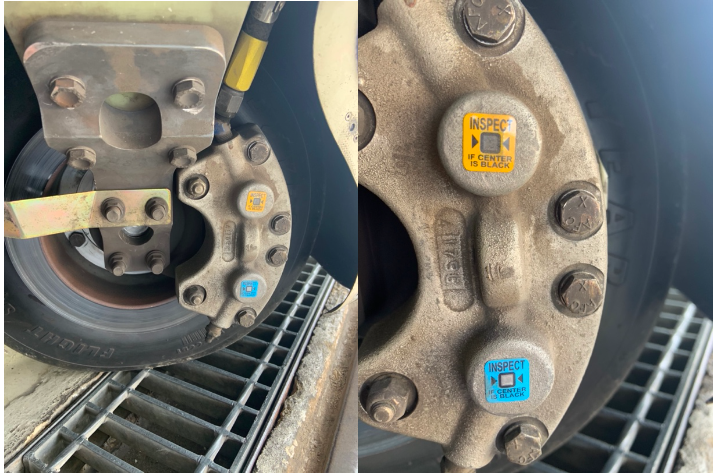
    Notice the Top Yellow sticker is far darker than the Bottom. The Yellow temperature indicator turns at 300 Degrees, while the bottom Blue indicator turns at 330 Degrees. This is an indication to the pilot that if the bottom sticker has turned colors, that the braking system has exceeded 330 degrees and is in need of servicing.

    Above is a photograph of an SR22 G1 braking system with turned brake temp stickers. The first things you may notice is that there are in fact two brake temperature stickers. We can only see the bottom blue sticker from the inspection port on the wheel pants. The other is higher on the caliper; in order to see it, the wheel pant must be removed. This isn’t common knowledge because there is no mention of this additional indicator in the POH.

    Now you may be asking yourself, what can I do to extend the service life of my factory equipped Cirrus brakes? Here are some tips. First, always taxi at 1000 RPM and use the rudder as much as you can while only tapping the brakes. This is not fool proof, since sometimes, depending on the grade, you will have no choice but to utilize brake tapping to keep the aircraft going straight. Taxiing is not typically where the brakes get overheated, though, but this is still a good practice to follow.

    What we tend to see is that the Cleveland brakes are generally overheated on landing. We always recommend to make sure your final approach speed is not excessive, land in the first 1/3 of the runway, and let the aircraft rollout to a smooth stop. What tends to happen is that the aircraft is too fast, and the pilot tries to exit at a certain taxi way, or brakes hard and continues to ride the brakes after landing during taxi. If you do your best to avoid these habits, it will serve you well.

    This braking system remained unchanged all the way until the 2016 G5 Cirrus SR series. Starting in 2016, the factory equipped G5 and G6 Cirrus SR series all now come standard with a single piston hydraulic braking system from Beringer. The Cirrus Beringer brakes far exceed the braking power and durability of the old system. The new system is more robust, withstands heat better, and is is very well built. There is also an option for an upgraded dual caliper system to increase durability and stopping power. A braking system STC for the older Cirrus G1 through early G5 models was created to upgrade those airplanes to the better stopping power and cooling of the Cirrus Beringer brakes.

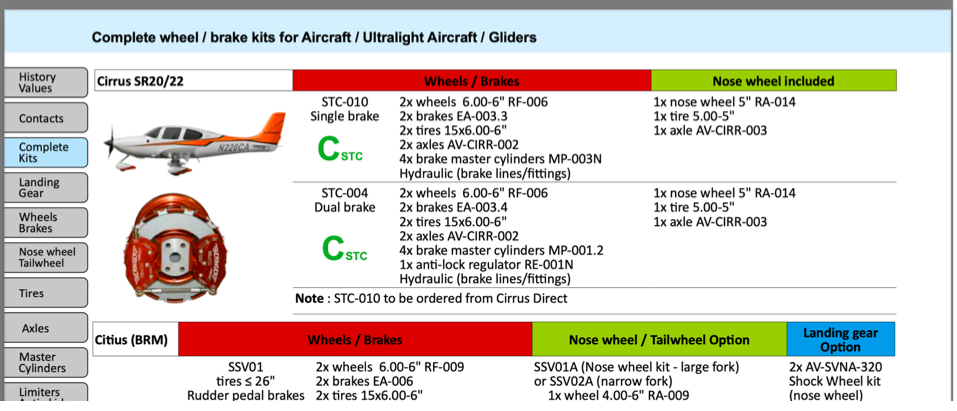
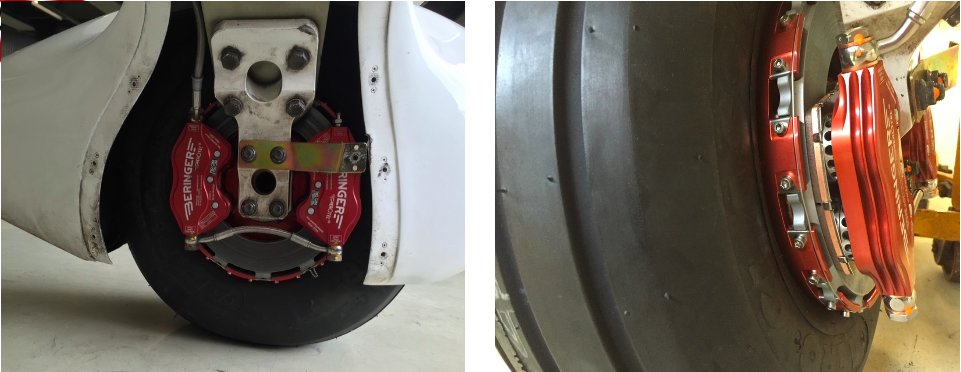
    Seen above is a page from a Beringer catalog highlighting the Cirrus SR series STC kits. Your local Cirrus service center will be able to quote prices for the kits. We have over 1000Hrs spent behind Beringer equipped Cirrus aircraft and the difference is quite apparent. The pilot has better control of the aircraft, no spongy pedal, and the confidence to get the plane stopped without possibly overheating the braking system. This, in our opinion, is one of the best upgrades you can do to your Cirrus.
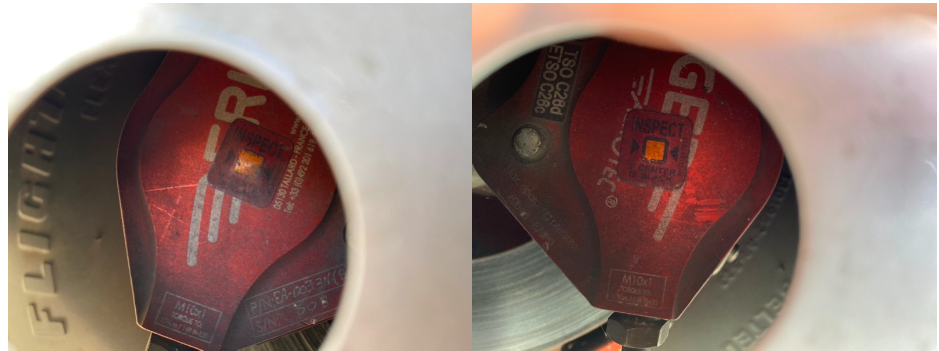
    Above is what an STC upgraded braking kit from Beringer looks like, as well as the new temperature indicator for the pre/post flight inspection. Notice the black spot on the left hand picture. These brakes have been overheated.

    One other difference for a pilot to note is that once upgraded to the Cirrus Beringer brakes, there is only one temperature indicator and it changes color at a whopping 450 Degrees Fahrenheit! Needless to say, it can handle some heat! The new temperature indicator is now Orange in color and turns grey/black when overheated.

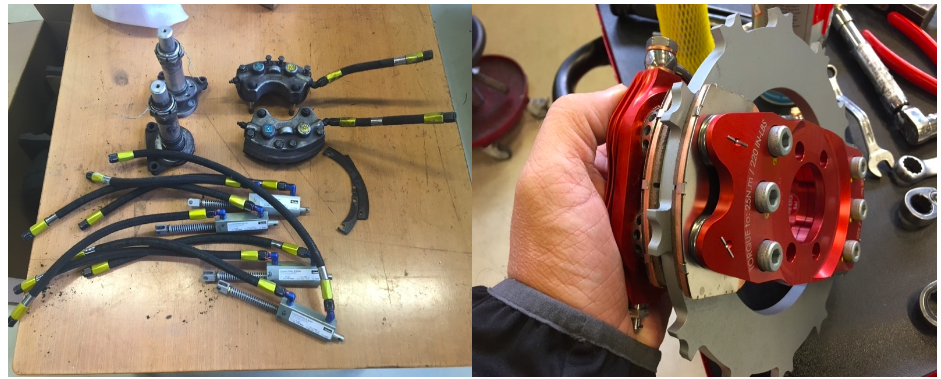
    On the left are the original Cirrus factory brakes. On the right is the caliper to the new Beringer brakes for a Cirrus.
    Dual Caliper Cirrus Beringer Brakes

    The Cirrus Beringer brakes upgrade is quite a step up in the world of slowing down. However, this doesn’t mean that they are completely issue free. There is one little-known problem with Beringer brakes that is not that big of a deal and can be fixed with relative ease.

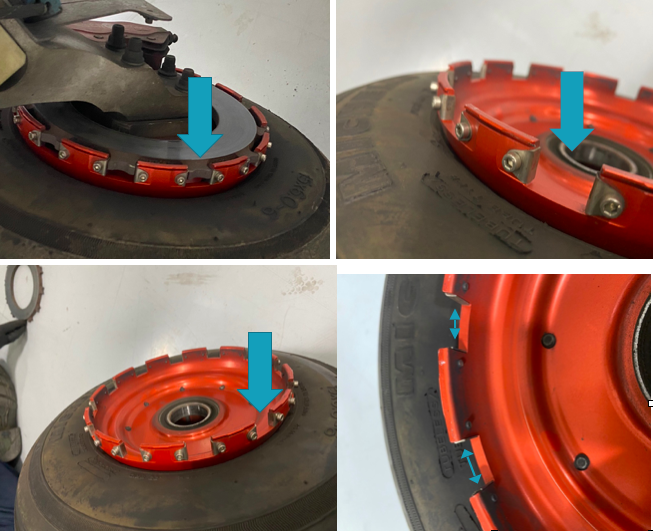
    The rotor on the Beringer braking systems is “free floating,” meaning it is not necessarily “fixed” in position when secured down to the spindle. It is “keyed” into the wheel rim with the male and female side interlocking.

    The brakes occasionally will get noisy, causing a “knocking” noise when brakes are applied. This noise is caused by the small metal tabs that tighten up the space between the wheel and the brake rotor. This is so the small tabs wear with use instead of the aluminum rim that they are fixed to. So, if your Beringers are making a knocking noise when brakes applied, this is most likely your culprit.

    These gaps above are the “keyed” position where the rotor finds home in the rim. Without these tabs that wear with use, we would be replacing the rim more often than the much cheaper replaceable tabs.

    It is highly recommended to upgrade your original Cirrus factory brakes to the new Beringer braking system. You will deal with less maintenance, less chance of a brake overheat, and less confusion on whether or not your brakes are airworthy. For more info, you can check out the Cirrus website for the single or dual caliper Beringer brakes.


    Zach Anderson is a Cirrus Standardized Instructor Pilot (CSIP) for Texas Top Aviation. Zach comes from a auto mechanic background and is very familiar with the ins and outs of maintenance. He started working for Texas Top Aviation in December 2020.

    You just bought your Cirrus SR22. You do some flying, and soon find yourself with a brake temp sticker that isn’t white anymore. You remember from your transition training that any color other than white is a no go. You now ponder…. I don’t remember getting on the brakes hard, or riding the brakes while…

  • IM SAFE: Are You Really?

    As pilots, we are all familiar with the IM SAFE acronym that the FAA puts out.  It comes up as part of the ground training over Human Factors during private pilot ground school.  We all memorize it, spit it out for our check rides, then most of us promptly forget about it.

    When I was training for my pilot’s licenses, I was at a Part 141 school that was very standardized (LeTourneau University, who has a fabulous aviation school).  Before each flight, we had to do a self evaluation based on the weather and the IM SAFE checklist.  Based on our answers, we would then determine if the conditions were conducive to flying as well as if I was physically okay to fly.

    This was a great tool because not only do pilots have to pre-flight the airplane, they also need to pre-flight themselves.  It’s very easy to fall into one of the “Hazardous Attitudes” if there is a pressing meeting or you haven’t flown in a while and it’s a beautiful day, but maybe you aren’t physically fit to control an airplane.

    Let’s break down the IM SAFE checklist to dig a little deeper into the physically fit side of flying.

    Illness

    This one is pretty easy.  Are you sick?  If so, how sick?  If you can’t hardly talk or your body feels like it was hit by a truck, then flying probably isn’t in your best interest.

    The tricky area can become if you are only a little sick.  Maybe you have a cough or a little cold or a headache is starting to form.  You probably could go fly, but is it really a good idea?  It could be something worse, or it may be nothing.  You have to know yourself and put limits on yourself before you wake up on the day of your big meeting two states over.  Set illness personal minimums and stick to them.

    Medication

    There are a slew of drugs, both prescription and over the counter, that pilots cannot take and fly.  AOPA has a hotline to call for pilots to find out if they can fly with the medication they are taking, or what meds they can take to give them relief and still operate an aircraft.

    Another great resource is your medical examiner.  Just give him/her a call and they will be more than happy to let you know what you can and can’t take.  They’ve been educated in the area of aviation so they are very knowledgeable.

    Stress
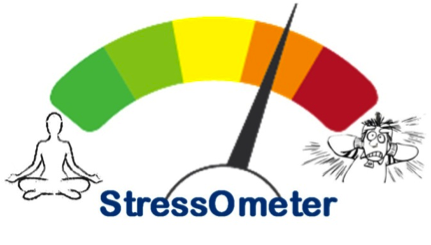
    StressometerThis is a huge one that pilots ignore a lot.  Maybe it was a stressful day at work, maybe you are running late to the airport, your meeting got moved up, whatever.  Stress can jump on you and mess up a pilot’s thinking very quickly.  If you have a lot of other things on your mind and you aren’t able to focus just on flying, it might be a good idea to stay on the ground.


    Alcohol

    Out of the whole IM SAFE list, the alcohol limitations are very clearly defined.  8 hours bottle to throttle, no more than 0.04% BAC, no operating an airplane while under the influence, and no carrying passengers who are visibly intoxicated.  For your personal minimums, it’s a good idea to increase that time to 12, 18 or even 24 hours bottle to throttle.

    Fatigue

    Learning to fly while a college student led to a fair share of canceled flights due to fatigue.  I operate best on 8 hours of sleep in the past 24 hours.  I can function on 6, but anything less than 6 hours, my performance drastically drops off, sometimes to a point where I wouldn’t be safe.  I discovered this while with my flight instructor attempting to do a holding pattern and completely botching it up.

    I observed this as a CFI quite often.  If I was doing ground with a student and they were struggling, my first question would be, how much sleep did you get last night?  More often than not, if I had to ask that question, I would get an average answer of 3 to 4 hours (I even had one guy show up for a flight block on 2 hours sleep.  I sent him back to the dorm).

    Fatigue is very easily overlooked because it’s not measurable.  Needing to get a flight lesson done or needing to get somewhere when you are obviously fatigued is not a good idea.  Make sure you get a good night’s sleep before a flight and don’t be afraid to cancel if you didn’t.  Set some sleep personal minimums and make them hard and fast.

    Eating

    Don’t skip meals and fly.  Performance greatly decreases when a pilot is hungry.  At the very least, stick a couple of food bars in your flight bag to give you some nourishment.

    Also, stay hydrated, especially in the summer time.  I carry a huge bottle of water with me on all my flights because I get headaches if I don’t drink enough.  Getting dehydrated on a long flight can lead to all sorts of performance problems (over hydration is also a problem in the air, but that’s what Gatorade bottles are for, right?).

    All this to say, have some personal minimums when it comes to you and your body.  Check the plane, check the weather and check yourself.  If anything falls in the “red” area in any one of those three categories, stay on the ground and don’t press your luck.

    As pilots, we are all familiar with the IM SAFE acronym that the FAA puts out.  It comes up as part of the ground training over Human Factors during private pilot ground school.  We all memorize it, spit it out for our check rides, then most of us promptly forget about it. When I was…


Leave a Reply

Your email address will not be published. Required fields are marked *