When filing an IFR flight plan, part of the process is determining whether or not an alternate airport is required. An alternate airport is required when the following conditions exist(as is outlined by the FAA in 91.169 (b)):
The weather conditions at the destination airport
From 1 hour before your arrival time to 1 hour after your estimated time of arrival, the weather conditions are forecast to be below
2,000 Feet AGL and/or
3 statute miles visibility
Let’s paint a scenario. You are traveling from KSAT (San Antonio International Airport) to KHBV (Jim Hogg County Airport in Hebbronville, TX). You start to file your flight plan and get down to the space where you put your alternate in. Since Laredo (KLRD) is the closest airport with a TAF, you check Laredo’s TAF and see that the forecast conditions there at your ETA are ceilings 1,500 and visibility of 2sm.
Based on this information, you need an alternate airport. Now, the process of finding one. In Part 91.169 (c), the forecast conditions at the alternate airport must be at or above:
600 Feet AGL and 2sm visibility for a precision approach, or
800 Feet AGL and 2sm visibility for a non-precision approach
Alright, now we have some guidance. Laredo is the nearest airport to KHBV, and we know the forecast from the above TAF showing the conditions are forecast to be above the alternate minimums outlined in Part 91, so let’s pick Laredo. All done?
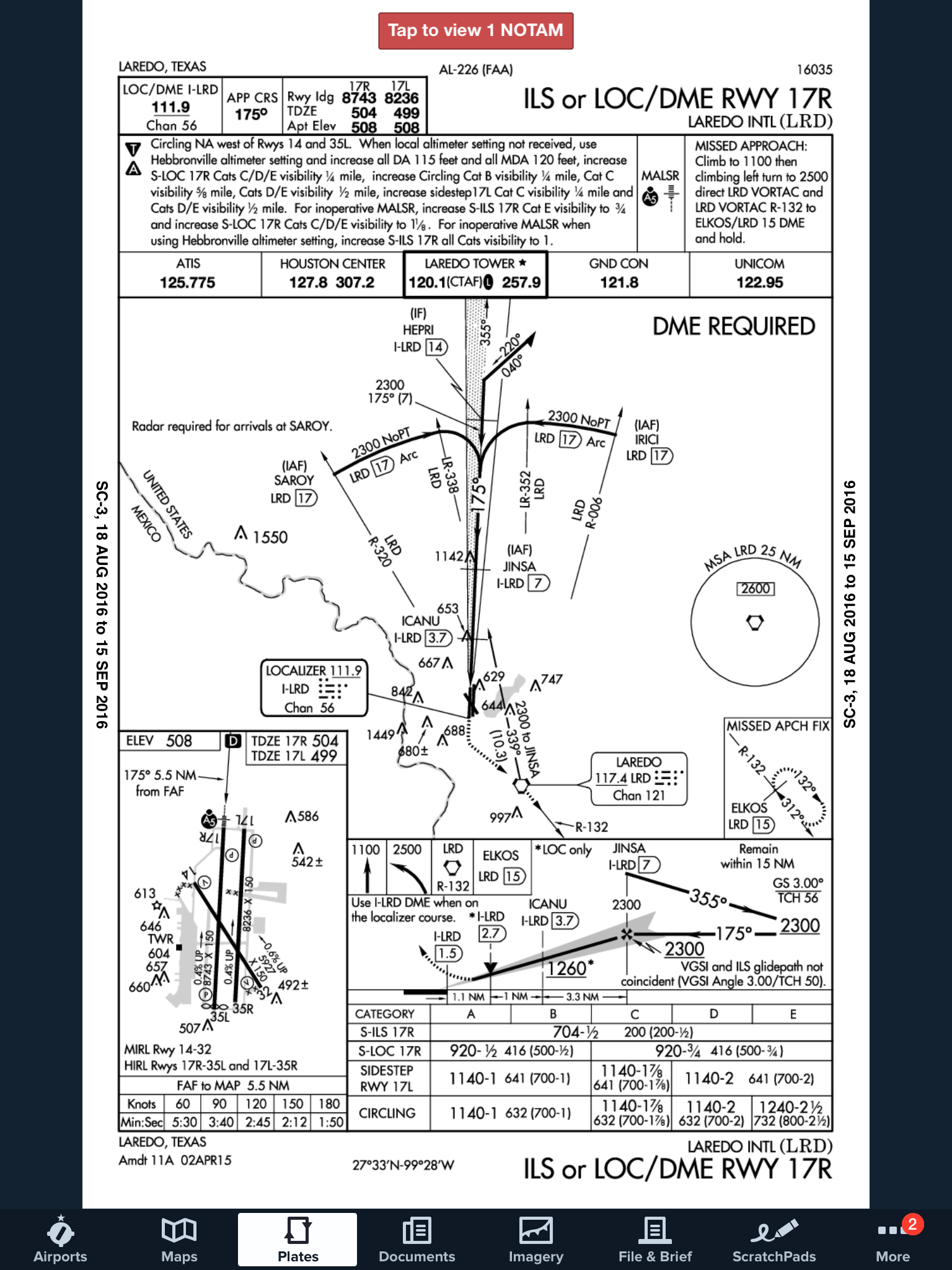
Not quite. A lot of airports have Non-Standard Alternate Minimums. How do you figure out if they do? The easiest way is to look at any approach plate for the airport. In the notes section of the government plates, there will be a black triangle with an A in it. That means there are non-standard alternate minimums published for that airport (in layman’s terms, different than the ones stated above in Part 91).
Now the question is, where do you find those non-standard alternate minimums? On Foreflight:
Go to the Airports page
Tap the Procedures button
Tap the Arrival button
Tap the Alternate Minimums option
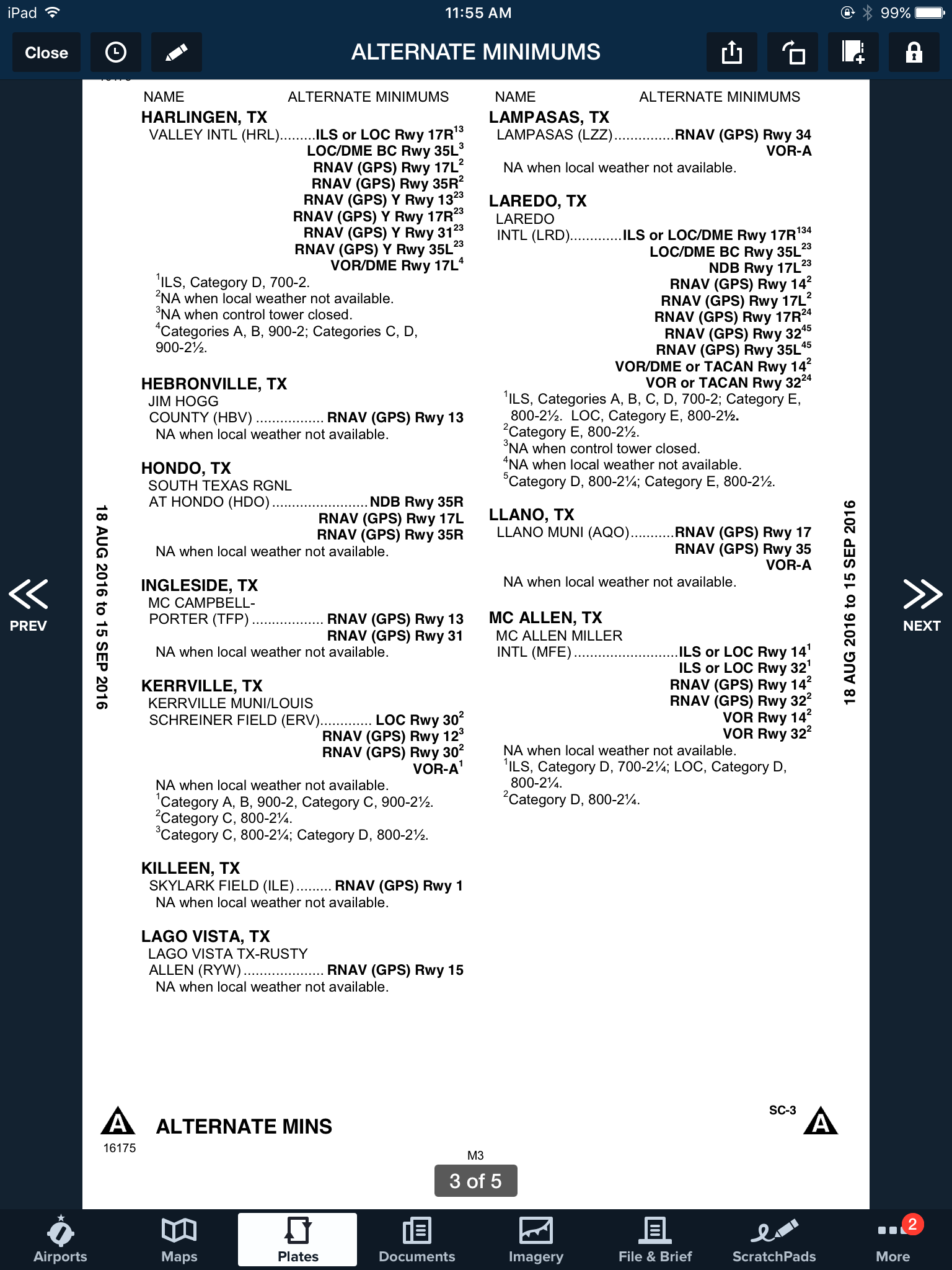
This brings up the IFR Alternate Minimums document for all the airports with non-standard alternate minimums in that area. Scroll through to find Laredo.
As you can see, there are several notes there concerning the different approaches into Laredo. For our example, we’ll say the winds are out of the south and we are planning on flying the ILS 17R if we cannot get into KHBV and have to come to Laredo. The note there is that the Alternate Minimums for the ILS 17R are actually 700 AGL ceilings and 2sm instead of the above state 600 AGL ceilings and 2sm, the procedure is NA if the tower is closed, and NA if the local weather isn’t received.
What does this tell us? If the forecasted ceilings at Laredo were below 600 AGL instead of 700 AGL, we would not be able to use LRD as an alternate airport if we were planning on flying the ILS 17R. The RNAV approaches are all fair game, so a GPS equipped aircraft would have no problem.
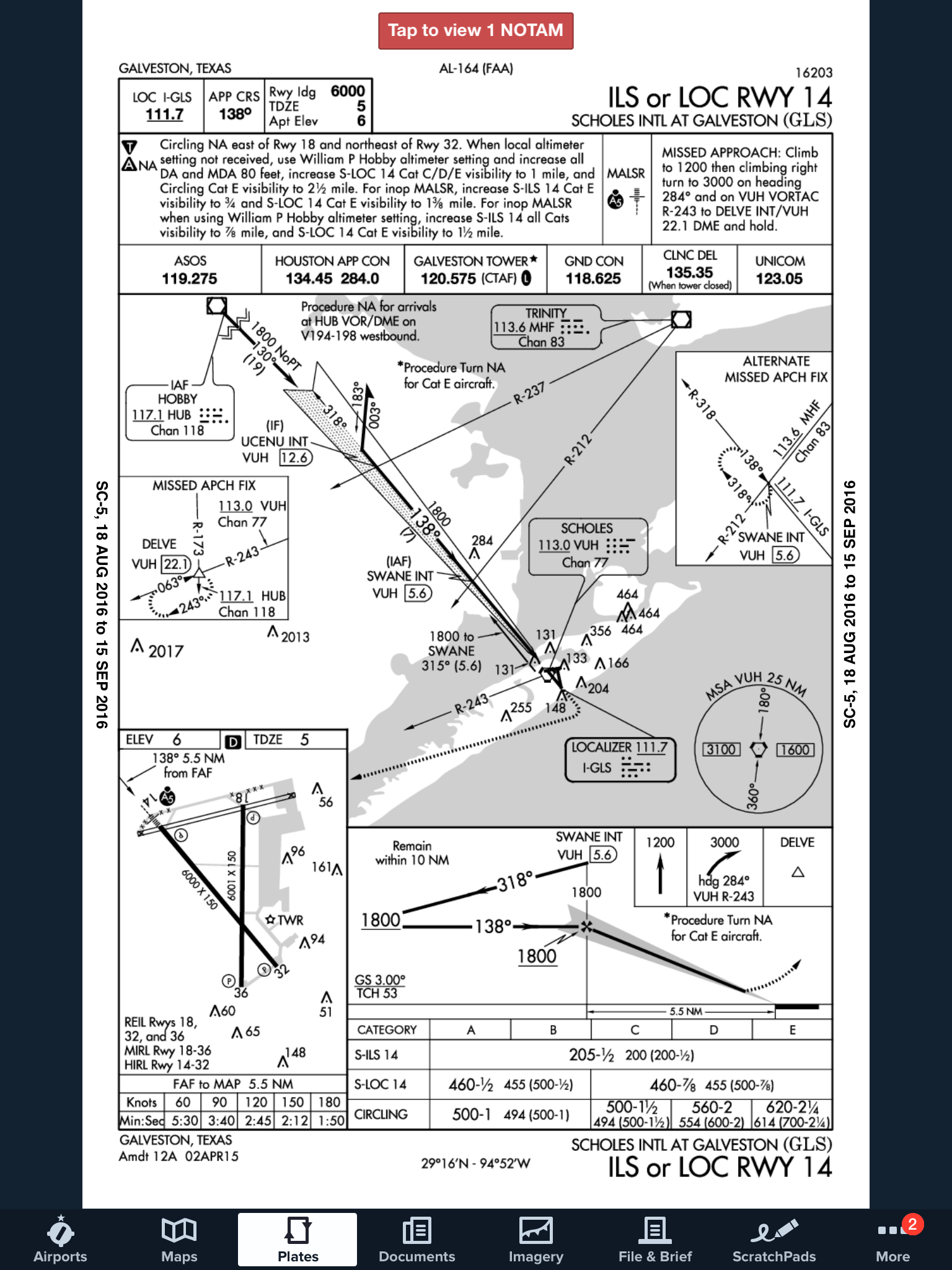
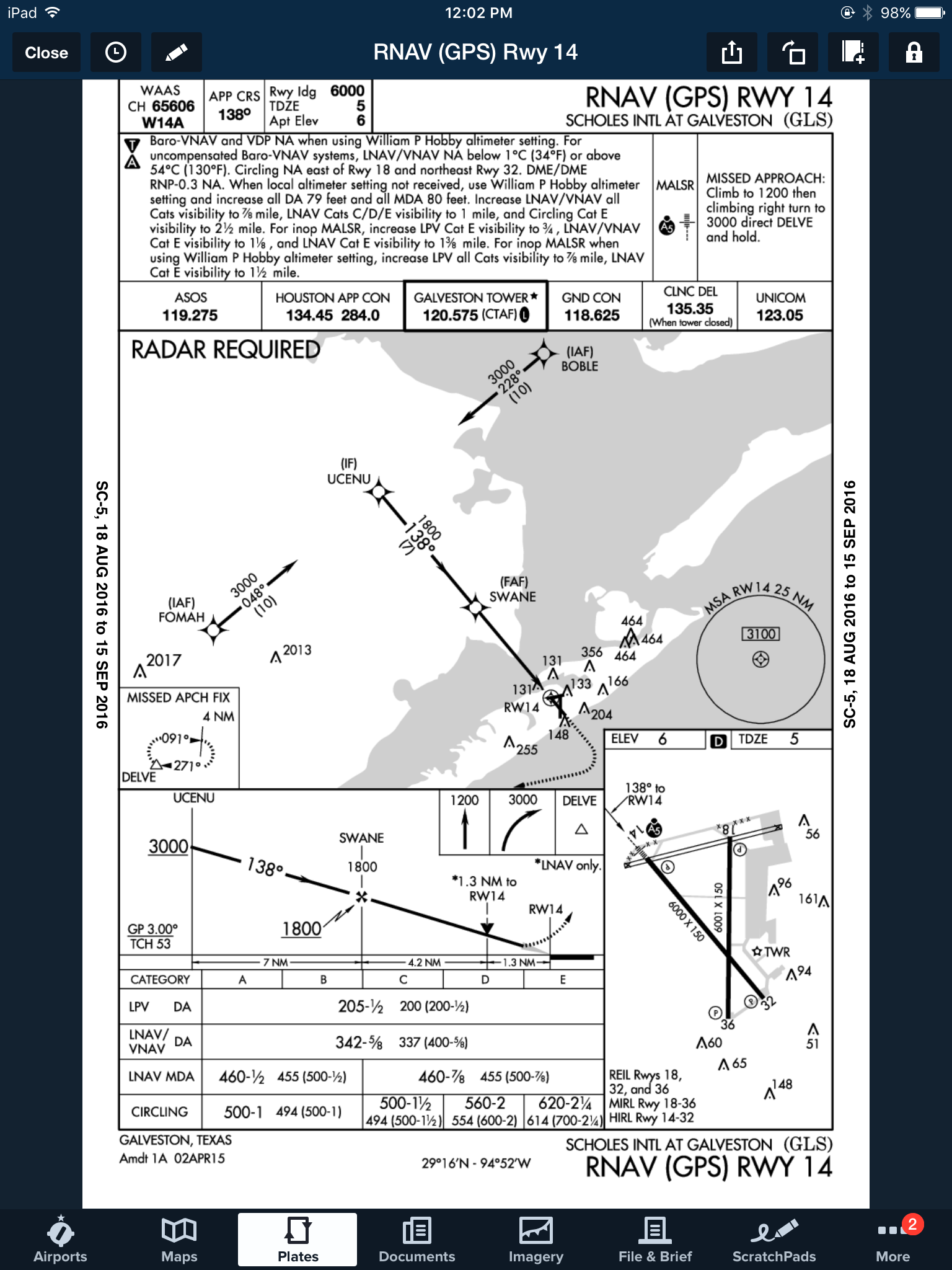
On top of that, some approaches at a certain airport are not authorized to be used in the case of the airport being used as an alternate. At the Galveston airport (KGLS), the ILS 14 is NA as an alternate procedure, but all the RNAV approaches are available.
Picking an alternate seems simple at first, but there are actually a lot of things to consider in the process.
Need help remember all this stuff? AOPA has put out a kneeboard sheet that helps all IFR pilots remember those important things when it comes to IFR flying. Check it out here.
A few years ago I took off out of Chicago’s Dupage airport (KDPA) in a Bonanza headed for Deck Airport (9D4), a small uncontrolled airport about 60nm to the west of Philadelphia. It was late November and, unfortunately, due to some unexpected ice, I found myself flying a significant portion of the flight at 4-5,000 feet instead of the 11,000’ at which I had originally planned. This was an issue because I was burning significantly more fuel at 4,000’ than I would have at 11,000’. I did my fuel planning math and came to the conclusion that I would still make it to 9D4 with the required minimums. On I flew, watching the number on the totalizer decrease.
I arrived at 9D4 after dark. Although I didn’t think I would need one, I ended up having to fly an approach to get down below the cloud deck. My troubles weren’t over. After breaking out of the clouds, I was terrified to realize that the runway lights weren’t working.
Now, I had a problem. I was in a relatively unfamiliar area in marginal VFR at night and I was quickly running out of options as far as my fuel was concerned. Fortunately for me, 9D4 is located 14nm north of Lancaster Airport (KLNS), which is a towered airport with very nice approaches and facilities. Also working in my favor was the fact that Lancaster was reporting VFR. I headed as quickly as I could for Lancaster and landed uneventfully.
When I landed I had the required fuel minimums on the airplane, but I managed to scare myself pretty thoroughly. I realized that while I had been forced to deal with some unexpected complications: icing forcing me down several hours before my planned descent and inoperative runway lights that were not listed in the airport NOTAMs. I was very blessed that Lancaster was so close by and that I was able to land without having make an approach. Had LNS not been VFR, I could have easily burned through another 15 minutes of fuel maneuvering for and executing an approach. If, for some reason I’d had to go missed or perform a hold, I would have gone through my remaining fuel pretty quickly. To me, this is a classic example of “just because it’s legal, doesn’t mean it’s safe.” I realized I needed to change how I did my fuel planning.
Since then, I have enforced a personal minimum: 18 gallons must be on the Bonanza at the time I reach my destination. If things change un-expectedly enroute and I realize I won’t make it to my airport with at least 18 gallons, I stop. I had always tried to have an hour of fuel on board as a reserve, but having a hard number is an easy way for me to make decisions.
Having a fuel totalizer installed in an airplane is a really nice way to upgrade the panel and give the pilot a clearer idea of how much gas is being burned/ how much is remaining. The totalizer installed in our Bonanza is a JPI Fuel Flow 450. It has a lot of nice features which make fuel management chores much easier. If a totalizer is something that you are considering installing in your aircraft, or if you have one already, here are a few things that I’ve learned from my experience flying with them.
The JPI 450 totalizer installed in the Bonanza
(photo credit: www.jpinstruments.com)
While helpful, don’t rely too heavily on the totalizer to do your fuel math for you. Similar to the negative effect that using GPS navigation can have on a pilot’s ability to navigate via a chart, over dependence on digital fuel systems can lead to problems. A fuel totalizer should be telling you what you already know, not doing all your math for you. Do your fuel math and confirm it with the totalizer. If it failed, you should still know how much you have and how much is needed.
Likewise, don’t rely completely on the accuracy of a totalizer. Technology isn’t perfect, and if the instrument isn’t quite calibrated correctly, the numbers could be wrong. Fuel information is absolutely critical, and thus warrants constant monitoring and double checking. When you do arrive at your destination, keep track of how much fuel the airplane takes and compare it to the numbers on the totalizer to verify its accuracy.
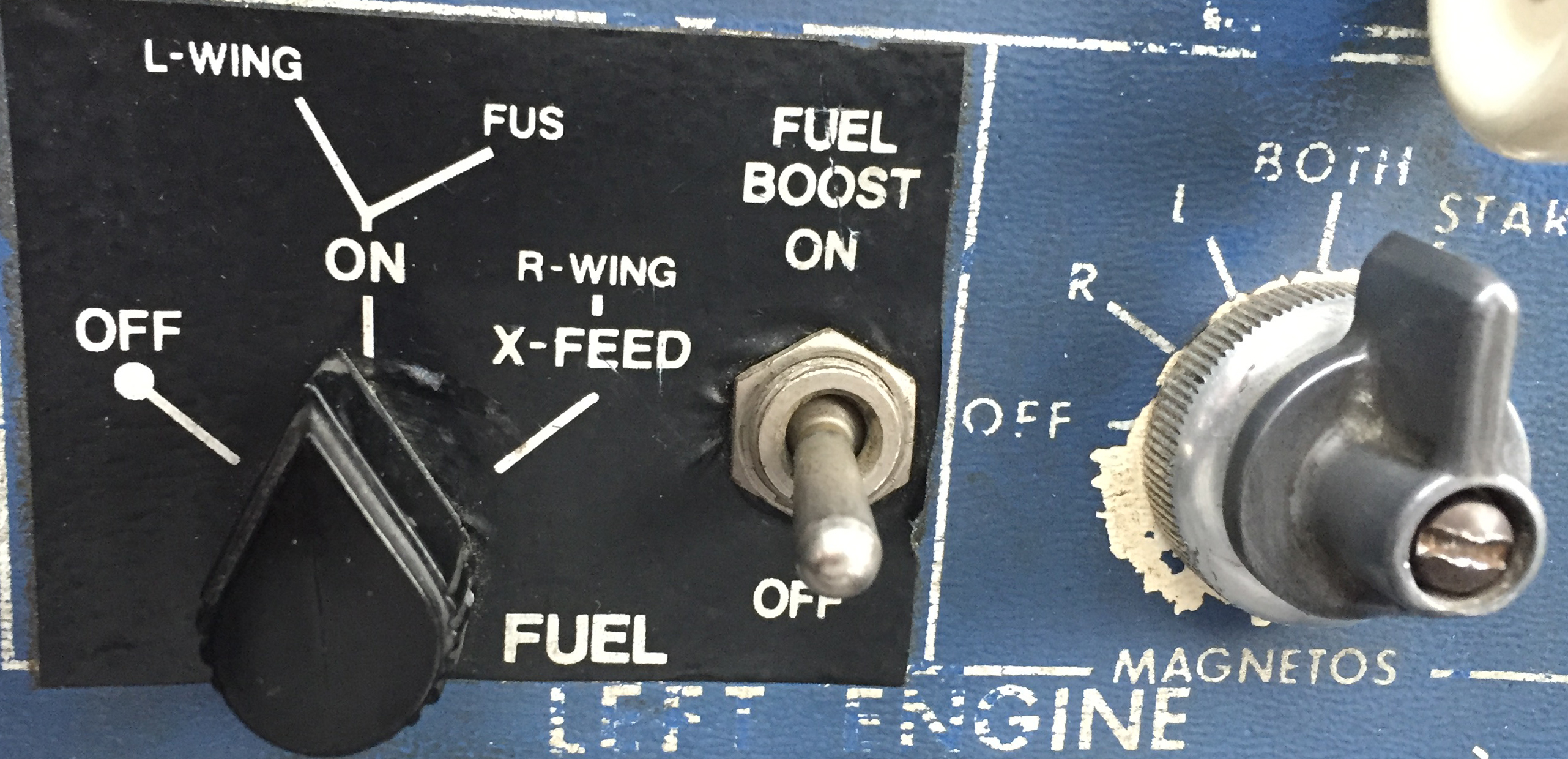
Unless you are flying an airplane which has a “both” setting, you will still need to be keeping track of how much fuel is available in the aircraft’s individual tanks. For example: our Bonanza has two tanks, but the totalizer doesn’t keep track of that information. If I don’t remember to switch tanks, I can run one completely dry and the digital read out will indicate the remaining gas in the other tank. The totalizer won’t indicate anything about the individual tank quantity until the engine quits and the flow drops to zero.
Pictured below on the left is a fuel selector from a Piper Aerostar. The airplane has two selector valves and three fuel tanks. While the system is not difficult to use, it does require proper understanding and regular monitoring to ensure that the fuel is distributed correctly. The picture on the right is the selector out of an A36 Bonanza. I love the simplicity of the Bonanza’s fuel system, but it still takes attention and intention on the part of the pilot to keep track of how much gas is available on either side.
The JPI unit that we have installed on our airplane even has an “hours and minutes remaining” screen as well as a “fuel required” screen. The totalizer actually talks to the GPS and is able to tell me how much gas I will need to get to my destination. Just remember that those numbers are computed only at the current flow and do not take into account the potential increases/ decreases in consumption which will occur as power settings are changed for descent and arrival into the airport. I may feel pretty good about my hours and minutes remaining when I’m sitting at 12,000 feet, but when center makes me descend to 5,000’ and I’m still an hour away from my destination, endurance will decrease. It also can’t take into account any additional flight time that may be required to shoot approaches, hold, or divert.
Have you ever heard of “G.I.G.O?” It stands for “Garbage In, Garbage Out.” What it means is that the information which the fuel totalizer is giving the pilot is only as good as the information that the pilot gave it at the beginning of the flight. The totalizer in our Bonanza does not have any method of checking the quantity in the fuel tanks. At start up the pilot inputs the amount of fuel on board the airplane and the totalizer keeps track of how much is burned which is then subtracted from that inputted number. Ergo, if the amount of fuel is not updated or is incorrect, the fuel total numbers displayed will be inaccurate. If a pilot told the computer that the tanks had been topped off, but didn’t verify it, the fuel could be exhausted and the totalizer would still indicate that there was fuel available. It is, therefore, VERY IMPORTANT to confirm the airplane is fueled to the amount desired (visually if possible) and use the fuel gauges in the airplane to verify the accuracy of the totalizer.
Use a timer: I like to use the timer on my phone to remind me when it is time to switch the fuel tanks. If I set the phone to vibrate and put it in my pocket, it will remind me to change tanks at the desired time if I haven’t remembered to otherwise. It’s also nice because I can write down exactly at what time (or quantity) I changed tanks so I can keep very accurate track of how much fuel I have in any given tank. This is especially helpful in airplanes that have more than two fuel tanks. Another option is setting the timer on a Garmin 430, 530, or G1000 to give an alert or message reminding the pilot to change tanks at a preset time.
It shouldn’t come as news to anyone that the importance of fuel planning cannot be overstated. I personally know multiple people who have run airplanes out of fuel because their planning wasn’t quite right or the weather changed and they were unwilling to take the time to stop. In the case of my Bonanza story earlier in this article, it was obvious to me before I even landed that I should have picked a fuel stop when it became apparent that I would arrive at my destination with less than my desired one hour margin.
The technology that we have now to help us keep track of our fuel usage is wonderful, but use it as an aid; not as your only source of fuel calculation. Remember to verify the amount of fuel on the airplane before you go because the number on the totalizer won’t mean anything if it doesn’t match the amount in the tanks! Above all, don’t be afraid to stop and get fuel when you need it. I’d rather have to tell the passengers that we need to stop for gas than deal with the potential consequences of running out.
Andrew Robinson is a 135 Charter Pilot and flight instructor who lives with his wife and 2 daughters in Pennsylvania. He flies Pilatus PC-12s and instructs in Beechcraft Bonanzas.
A few years ago I took off out of Chicago’s Dupage airport (KDPA) in a Bonanza headed for Deck Airport (9D4), a small uncontrolled airport about 60nm to the west of Philadelphia. It was late November and, unfortunately, due to some unexpected ice, I found myself flying a significant portion of the flight at 4-5,000…
Ever since I moved out to the Philadelphia area, the Hudson River corridor in New York City has become one my favorite places to fly. It’s hard to overstate the beauty of the city from low over the river. Every time I have a family member or friend come to visit, I try and take them over to see the city from the air.
Each time I fly up the river I can’t believe that we are actually allowed to do so, flying below the tops of the buildings and close enough that you feel that you could reach and out touch them. The draw back to the Hudson River Corridor is that it can be busy, intimidating, and confusing. However, with some reading and preparation, the Skyline flight is easy to do and extremely rewarding.
Having the right weather is an important first step. The second step is try to arrive during ideal lighting conditions. If possible, select a smooth, calm day to make it easier to maintain a track down the correct side of the river. I always try and target arrival at the city around sunset. The view is spectacular any time of day, but having the lights from the city while the sun is just setting gives the best viewing. I’ve also flown over and done the whole flight after dark, which is always spectacular.
View of the World Trade Center
The first method of flying the river is to utilize VFR flight following. If the controllers aren’t too busy, they will provide advisories to aircraft that request the Skyline. The nice thing about doing it this way is that the controller will clear you into the NY bravo airspace and keep you above the traffic flying the Skyline in the VFR corridor below. This is the method that I have always preferred as I enjoy the added benefit of the traffic advisories and it’s nice not to worry about position reporting on the radio.
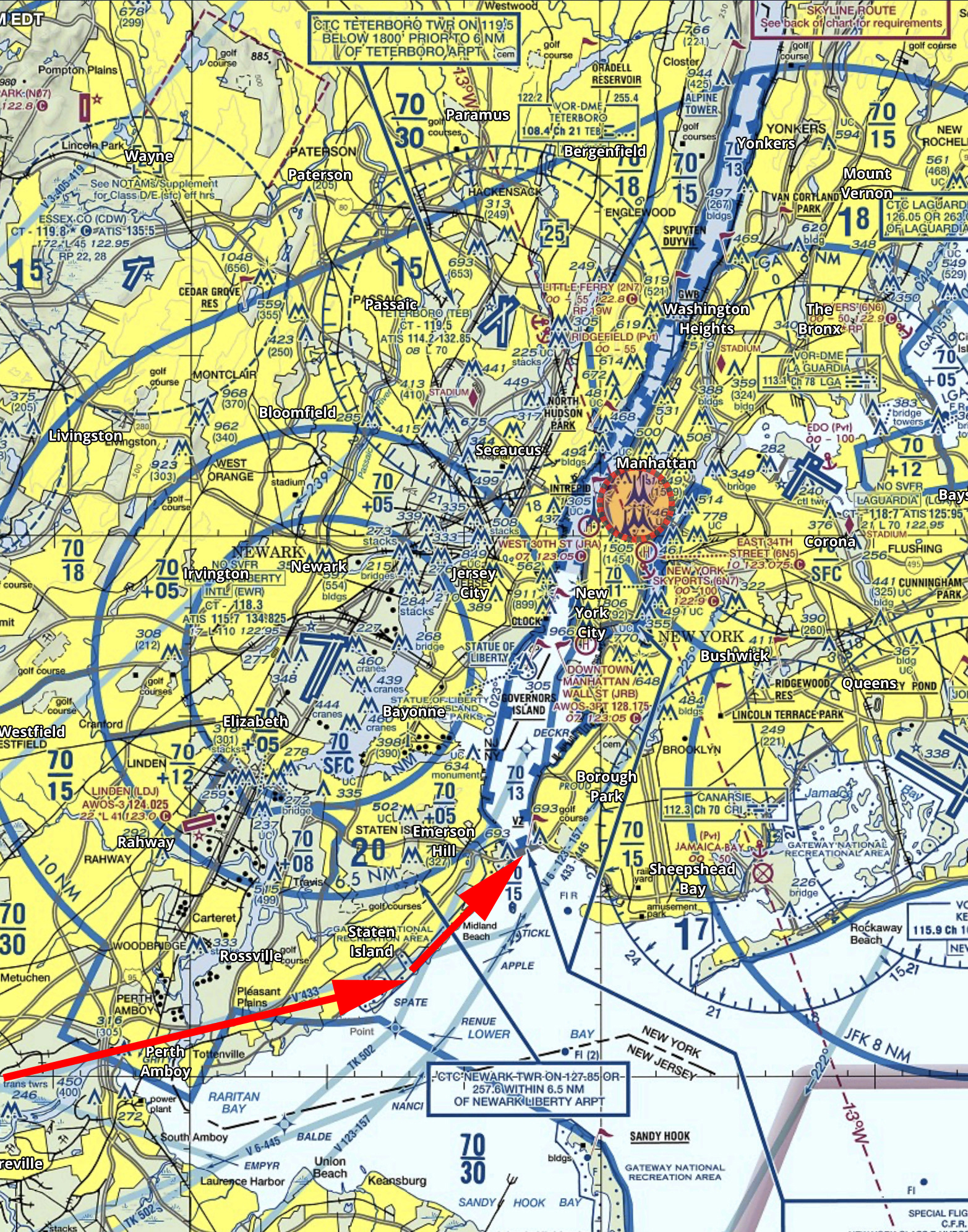
If you want to get flight following, head toward the corridor and request the Skyline route with NY Approach. (Remember to stay clear of the Bravo until you’re cleared in!) Once you’re cleared into the Bravo and approaching the corridor, they will hand you off to Newark/ LaGuardia Tower for traffic advisories over the river. I like to approach from the south and ask for a 180 over the George Washington Bridge. This allows me to fly past the city a second time before exiting the corridor over the VZ (Verrazano Bridge) and heading back toward home.
In red is the path I typically fly. I descend to 1400’ and fly toward the APPLE intersection picking up the shoreline around Staten Island and hugging it until crossing the middle of the VZ. Newark normally clears me into the Bravo at 1400’ or 1500’ to fly up the corridor.
Pros:
Better traffic Awareness
No position reports
Cons:
Flying slightly higher reduces the view
If the controllers are busy, they may deny your request for advisories
Can be intimidating to talk to NY Approach/ Newark/ LaGuardia
The other option is to fly in the VFR corridor. If you want to do it via this method there are just a few things you need to make sure you’re familiar with before you go. When in the VFR corridor you’ll need to make required position reports on a CTAF frequency. Make sure that you have the proper charts and have studied pictures of the landmarks so that you know what you’re looking for. I tend to plan on this as a backup in the event that the controllers won’t give me advisories.
Pros:
Doesn’t require talking to controllers/ class B clearance
More freedom to select altitude and routing as desired
Cons:
Less traffic awareness
Required position reporting
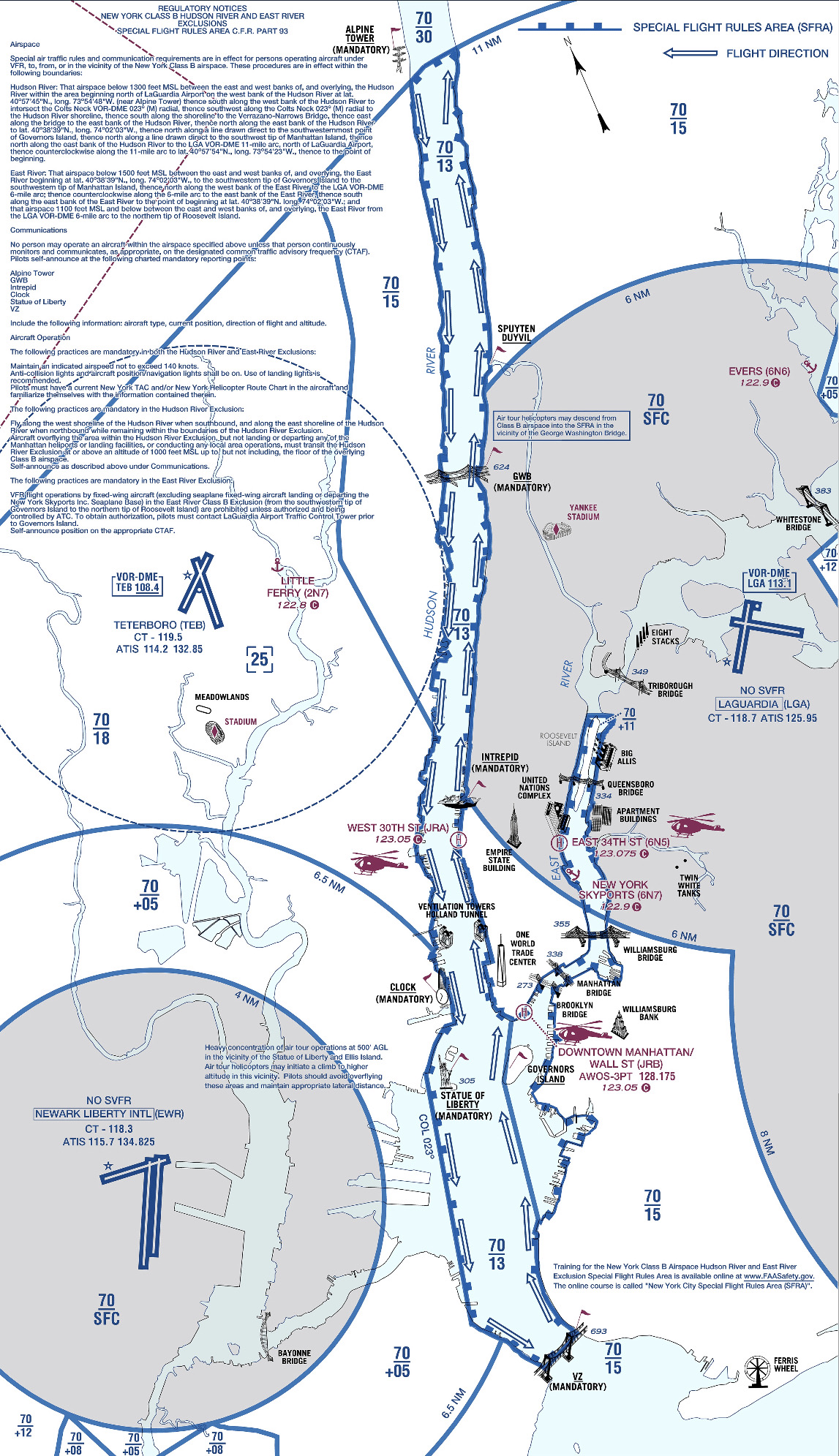
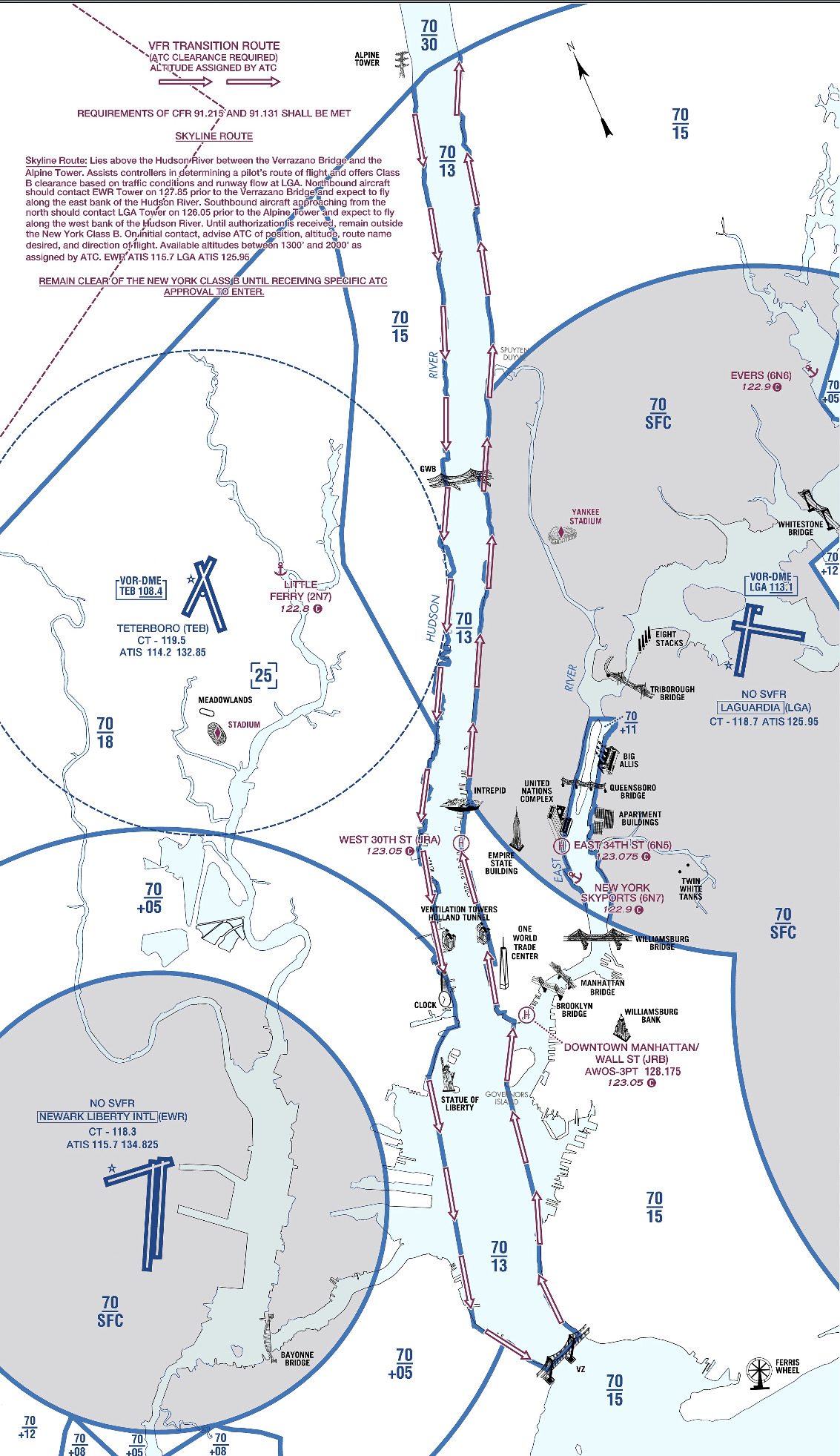
All the requirements and guidelines for flying the corridor can be found on the back of the NYC TAC chart. Any pilot flying the river is required to have one of these or a NYC helicopter route chart on board. If you’re using Foreflight, look in the Documents section under FAA Fly Charts and select the NYC TAC chart in order to read the back of page.
Below you’ll find examples of the diagrams/ instructions printed on the back of the NYC TAC charts.
You can see the traffic flow requires northbound airplanes to hug the east side of the river, while the southbound traffic stays on the west side. The VFR reporting positions (listed from North to South) are: Alpine Tower, George Washington Bridge, Intrepid aircraft carrier, Goldman Sachs (clock), Statue of Liberty, VZ (Verrazano Bridge). Each position report should include aircraft type, position, direction, and altitude.
Other things to be aware of: NYC is always a hotspot for TFR’s. There are often TFR’s for baseball games or presidential movements so make sure to check before you head that way. Additionally, there is a speed restriction in place of 140 kts, though I’m not sure why anyone sightseeing would want to go that fast anyhow.
I realize that all of the procedures and restrictions can be overwhelming, but with the proper preparation, the Hudson Skyline is one of the most incredible places in the world to operate an airplane. There are a lot of things that are easy to get excited about that don’t live up to expectation, but this isn’t one of them. I’ve never taken anyone to the river that wasn’t impressed by what they saw and that’s why I plan to keep going back.
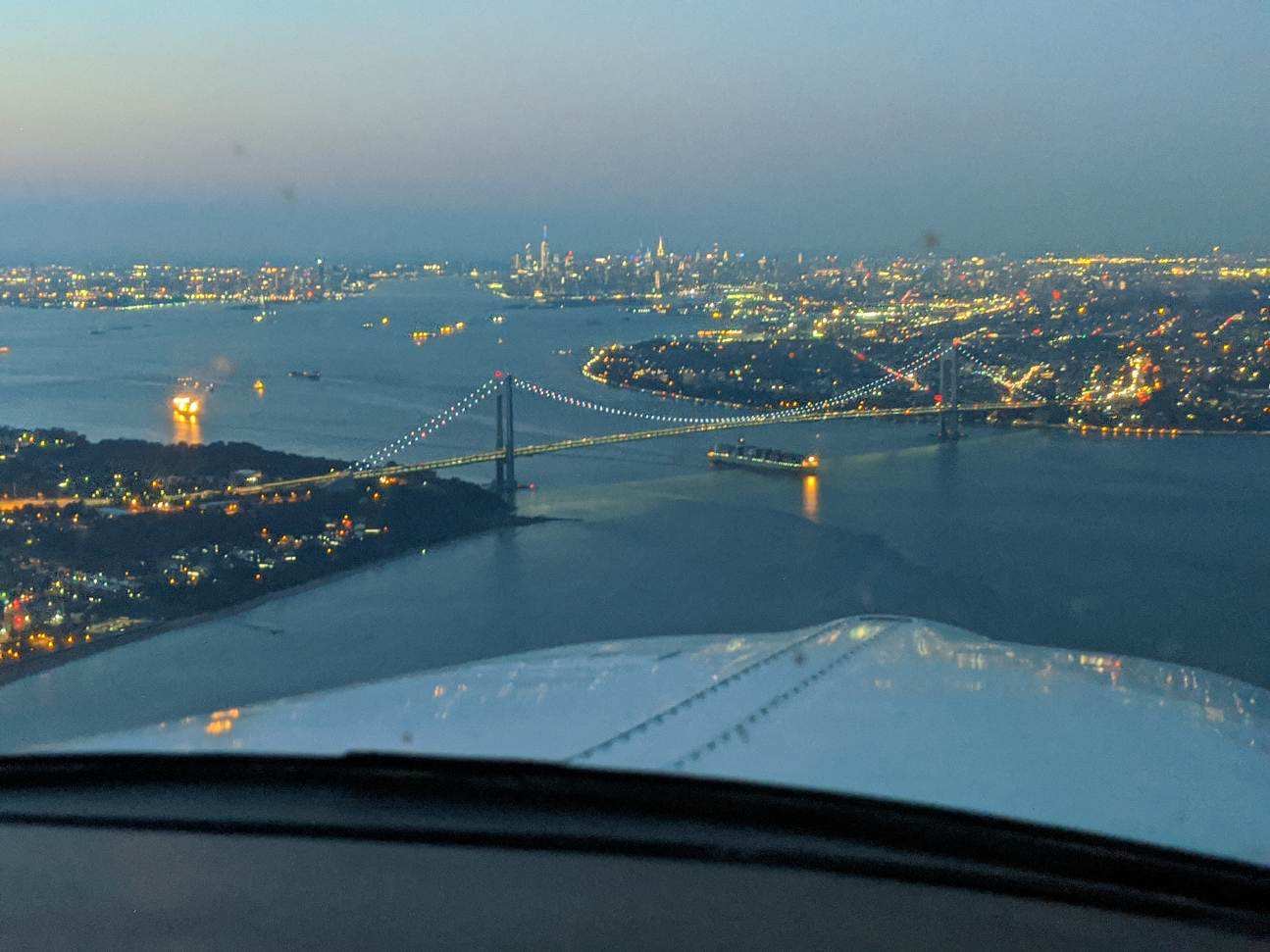
About to cross the VZ looking north toward the city
Ever since I moved out to the Philadelphia area, the Hudson River corridor in New York City has become one my favorite places to fly. It’s hard to overstate the beauty of the city from low over the river. Every time I have a family member or friend come to visit, I try and take…
Whenever I get in an airplane with a pilot for recurrent training, I can assure myself that I will mention rudder usage more than once during the flight. If it is in a tailwheel (or if the pilot is doing tailwheel training), I’m going to mention the rudder a lot. How do I know this? Because basic rudder skills are actually one of the most difficult things to master in flying.
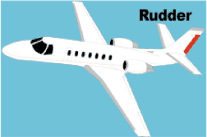
Let’s start simple. What does the rudder do? The dictionary definition is it controls the movement about the vertical axis of the airplane. If you stick a pole down through the CG of the airplane and rotate the airplane around that pole, this is the vertical axis. Looking at it another way, the rudder moves the airplane’s nose left and right. Keep this in mind as we move on.
Every pilot thinks about the rudder during the takeoff roll. Because of the torque effect, the pilot must add right rudder during the takeoff roll to stay on the runway centerline. Depending on the airplane’s horsepower, more rudder pressure is needed in higher powered airplanes. The problem usually shows up once the airplane gets in the air.
In the worst situation, after takeoff, the pilot will set both feet on the floor and completely disregard the rudder. Torque effect and now P-factor are continuing to cause the airplane to yaw left, causing the need for right rudder. With his feet on the floor, though, the pilot is allowing the airplane to yaw. It’s not terribly noticeable for him in the front seat, but the back seat passengers (especially in a six seat or larger airplane) are certainly feeling it.
One particular problem spot on the climb is the climbing left turn. In a climbing left turn, training says to add left rudder since it is a left turn (see below for the reasoning). But, since the airplane is climbing and therefore experiencing left yawing tendencies due to the aforementioned effects, the pilot needs to continue pressing the right rudder, though the pressure won’t be as much as in a straight climb. Watch the ball the next time you make a climbing left hand turn and it’ll make a believer out of you.
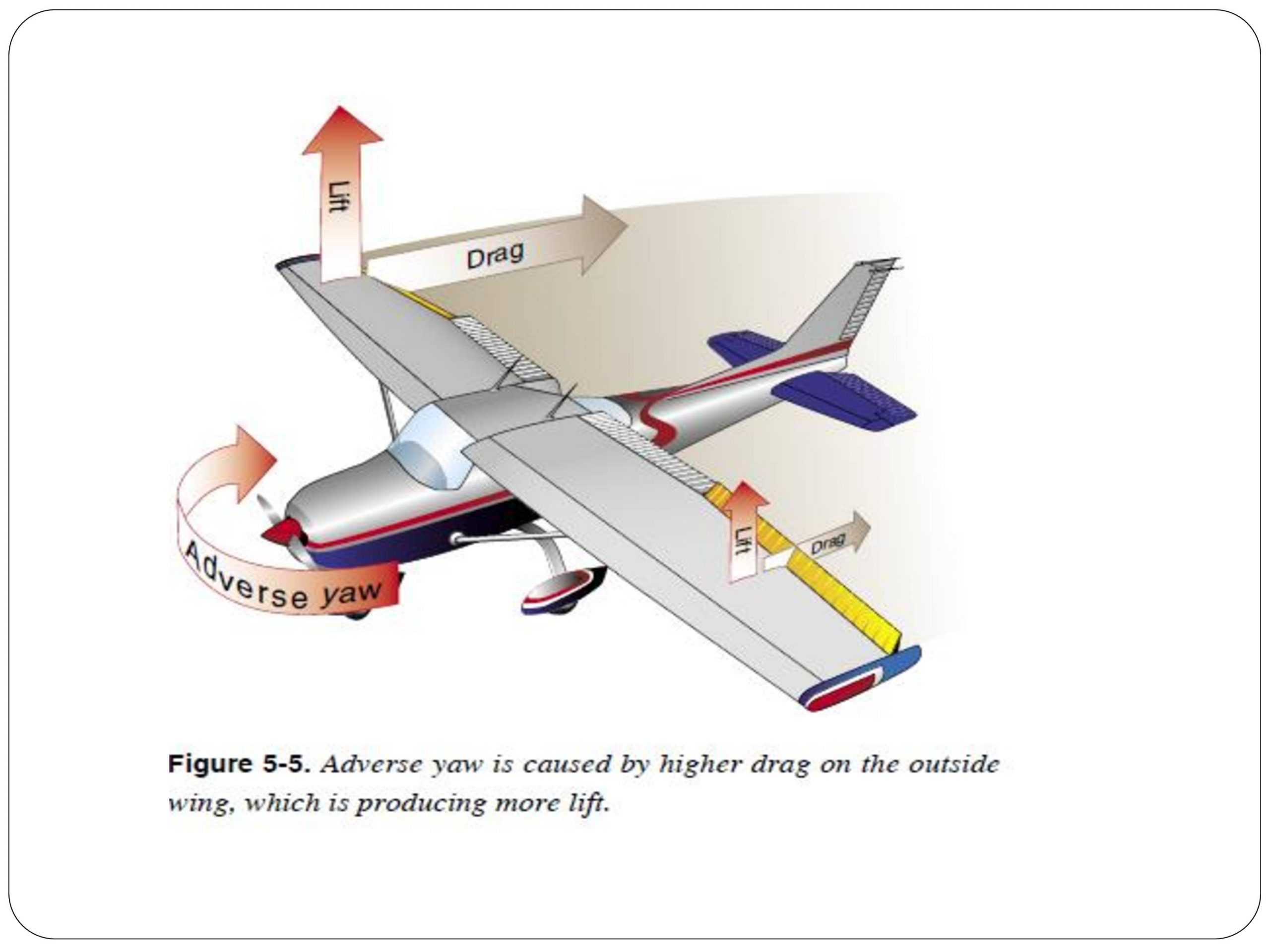
I find only a handful of pilots are this egregious. Most pilots have rudder problems in turns and in turbulence. We’ll tackle turns first. As we all learned when we first started flying, due to adverse yaw, a pilot must add rudder in the turn’s direction. Again, this isn’t usually where the problem shows up. During the rollout is the problem area.
Let’s take a turn to the left. The pilot rolls in, adding left rudder, arrives at his heading, then begins to roll out with the ailerons. Left adverse yaw is now being experienced and right rudder is needed to smoothly transition back to level flight. Need some visual assistance? Watch the nose the next time you make a turn. If you are working the rudder properly, the nose will pivot on one point in the horizon. If you aren’t using the rudder properly, the nose will draw a U shape on the horizon. Try making some turns without rudder, see what it looks like, then use the rudder properly. You’ll notice a big difference.
Finally, let’s talk turbulence. As we all know, turbulence in the hot summer afternoon is quite pronounced. When the airplane experiences a bump, it usually doesn’t bounce straight up in the air. There is usually some kind of rolling motion involved. As the pilot corrects this rolling motion by moving the ailerons, adverse yaw is experienced (just like rolling into and out of a turn that we talked about above), so rudder is needed. There isn’t a need to stomp on the rudder or you’ll cause the airplane to severely yaw in the other direction, but rudder pressure is needed.
Final approach is where this gets most pilots. By controlling the nose and not allowing it to move around on final by using the rudder, this will make your approaches a little more stabilized leading to a more successful landing.
Feeling lost when it comes to the rudder? Ask your instructor the next time you go fly to do some rudder exercises. Most instructors don’t emphasize these basic stick and rudder skills which leaves pilots lacking as they move on in their aviation lives. So make it a point to do some basic rudder work the next time you fly with your instructor.
Whenever I get in an airplane with a pilot for recurrent training, I can assure myself that I will mention rudder usage more than once during the flight. If it is in a tailwheel (or if the pilot is doing tailwheel training), I’m going to mention the rudder a lot. How do I know this?…
If you’ve ever been to Nantucket Airport during the summer, you’ll understand when I say that it is a crazy place. During the summer months, especially on weekends, the airport is visited by an endless parade of airplanes ranging from the smallest GA airplanes to the biggest private jets.
One sunny Sunday afternoon I was standing in line at the front desk of the Nantucket FBO when the ramp door opened and a very grumpy and entitled man walked in. The man marched right up to the front desk and barked a fuel order at the girl working there, which she mistakenly read back wrong. After yelling at her for her wrongdoing, he announced that he had flown in to go to the restaurant and stormed off to drown his sorrows in fish and chips. Although he was a jerk, his attitude got me thinking about FBO’s and everything that the people who work at them do for us pilots.
For anyone who may not know, FBO stands for Fixed Base Operator. FBO’s can be found at airports everywhere and their business is to provide services such as fuel, hangar space, and tie downs. Bigger FBO’s can offer more services including rental cars, food, maintenance, flight instruction, etc. FBO workers have the ability to make life really good or really miserable for pilots, and, it seems to me, we pilots have the same power over them. Based on my personal experiences and the experiences of some friends who have worked at airports around the country, here are some things to think about next time you taxi onto an FBO ramp.
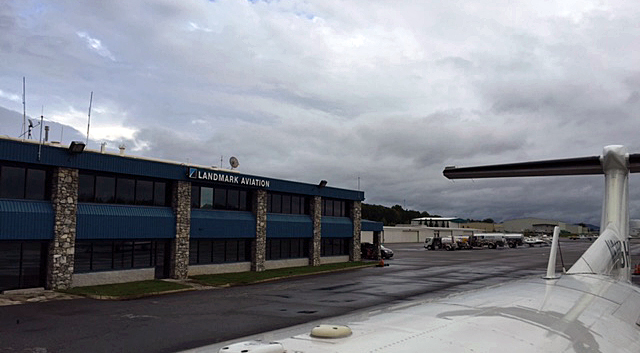
Landmark Aviation has the best pens
I’ve divided this article into two sections:
FBO Etiquette: What can we as pilots do to make life easier for the workers at the FBOs
FBO Pilot Perks: Ways that FBOs can help make a pilot’s life better (besides basic services like fueling)
FBO Etiquette
Be Polite
Everyone I talked to about their time working at an FBO said that simply by being friendly and polite is one of the biggest ways we can help. Most of the people that work at the FBOs love aviation and likely are working there to be around the industry in hopes of eventually being more involved. The girl working the desk at Nantucket didn’t deserve to be yelled at just for reading a tail number back wrong; don’t forget that “please” and “thank you” are still magic words.
Call Ahead
Whether you are flying to the airport, or you left your airplane at the FBO and you need them to pull it out or fuel it, calling ahead is greatly appreciated. Most FBO’s have a radio at the front desk and have their frequency listed online and in foreflight. Call ahead and tell them that you’re coming, when you’ll be arriving, and what you’ll need when you get there (gas, rental car, taxi..etc). That way they wont feel rushed and you may get what you’re looking for more expediently upon arrival.
Fuel orders
If your fuel order is difficult or confusing (example: 6.54 gallons in the right side and 4.32 in the left) you may be better off just to do it yourself at the self serve. One of the guys I talked to said that he would have pilots ask for extremely specific numbers and then stand there watching, ready to pounce when it wasn’t fueled exactly right. Its also worth noting that fuelers do make mistakes. Its highly recommended to watch and make sure that the correct truck (Jet A or 100LL) is the one pulling up to dispense your gas. Make sure you check that the fuel caps are properly installed before departing.
Look outside
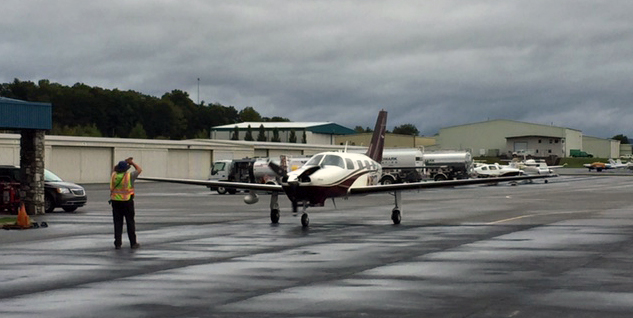
A lineman motions for the pilot to stop.
Taxiing onto the ramp is not the right time to be doing your after landing and shutdown checklists. Wait until the airplane is stopped before taking your eyes off the person marshaling you to your parking spot. I’ve been told that it isn’t uncommon for a pilot to be looking inside while taxiing and it makes the linemen very nervous as they are motioning to the pilot to stop (For those unfamiliar, with lineman hand signals, here’s a helpful link).
Brakes
Unless you have talked to them and get the okay, don’t leave the parking brake on when leaving your airplane at an FBO. Often the lineman will direct you to park upfront to make loading and unloading easy, but if you’re going to stay for a long period, the airplane will need to be towed and parked out of the way. Leaving the parking brake on can make serious headaches for the people trying to organize the ramp after you leave.
Lights
Don’t blind the poor guy parking you by leaving all your landing, taxi, and recognition lights on as you’re pulling into your spot at night. Likewise, when you are ready to leave your parking space, its courteous to signal the person waiting in front of your airplane by flashing one of your lights at them so they know you are ready to be directed off of the ramp.
FBO Pilot Perks
Good parking
This one is pretty basic. I’ve heard through the grapevine that you may get parked in the boondocks as punishment for being rude to the FBO staff. However, if asked, much of the time they can pull your airplane right up front and may even let you pull a vehicle onto the ramp to load people and bags more easily.
Cheaper hotel rooms/ rental cars
Some FBO’s have special rates with hotel and rental car companies around in the area. Although it varies from place to place, you may be surprised with the amount you can save on these travel essentials. I had a flight last week where I called and was given a quote of 185 dollars for a rental car…after telling them that I was parking at the local FBO, I got the special price of 125. Check with the FBO you will be stopping at for any of their current offerings.
Fuel discounts
Sometimes the price of fuel or the minimum uptake to waive the fees can be negotiated. Sometimes, the fees may be forgotten entirely. If you are unable to take the minimum amount of fuel to waive the landing or ramp charges, tell them what you can take and you may be pleasantly surprised with the response. Its not uncommon with our Bonanza that even though the “minimum” may be 20, I can waive the fees by up-taking 10 or 12 gallons instead.
Points/ Rewards cards
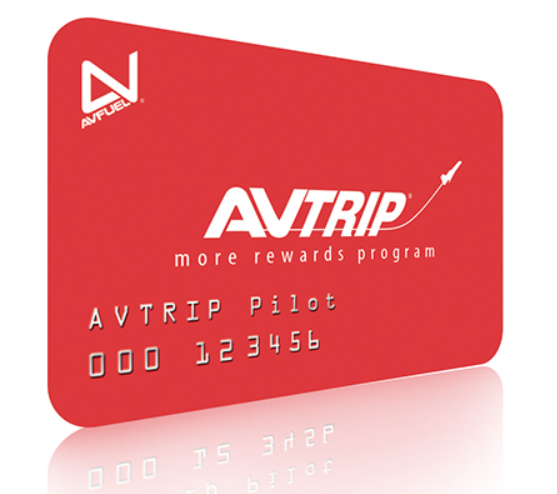
Some FBO’s offer incentives to pilots for buying gas. Many of the rewards programs are free to sign up for and will pay the fuel purchaser cash based on how much fuel they buy over a specified time period. I am a member of the Avtrip program which rewards fuel purchases at Avfuel airports with points that are redeemable for money. Avtrip is just one example of an FBO fuel rewards program; if you fly regularly, it may be worth looking into whether or not there is a fuel rewards program you can take advantage of.
Crew Cars
Most FBO’s have cars designated for use by the pilots. They are extremely nice for going to get lunch or taking care of whatever short errands you may need to run around town. Most crew cars are limited to about 1-2 hours of use, but they can often be loaned out longer based on the discretion of the people working the desk. On a few occasions, I’ve had the cars loaned to me for longer, even over night, by the nice people at the FBO (They always appreciate pilots splashing a few gallons of auto gas into the cars while they are out, too).
FBOs and the services that they provide are invaluable to pilots, both commercial and private. If we as pilots are willing to work with the linemen and service reps we can make both our lives and their lives easier. Remember to be polite and don’t be afraid to ask if you need something….that’s what they’re there for!
Andrew Robinson is a 135 Charter Pilot and flight instructor who lives with his wife and 2 daughters in Pennsylvania. He flies Pilatus PC-12s and instructs in Beechcraft Bonanzas.
If you’ve ever been to Nantucket Airport during the summer, you’ll understand when I say that it is a crazy place. During the summer months, especially on weekends, the airport is visited by an endless parade of airplanes ranging from the smallest GA airplanes to the biggest private jets. One sunny Sunday afternoon I was…
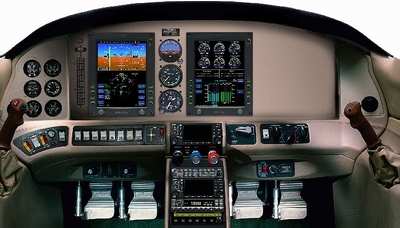
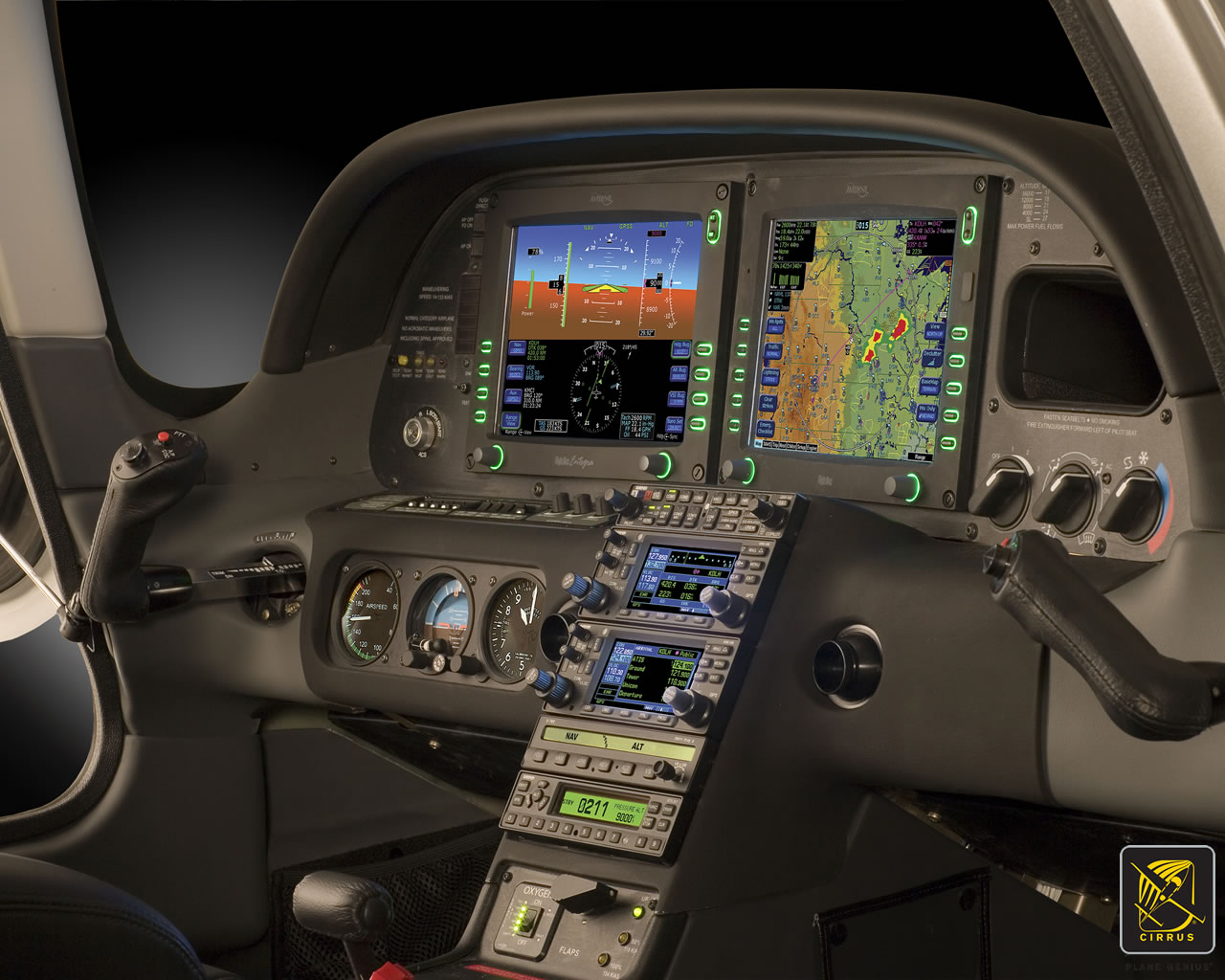
There are a number of airplanes out there equipped with the Avidyne Entegra PFD and MFD system, most notably the Cirrus SR20 and SR22 models from the early 2000s and the Columbia 350 and 400 from the same era. The Entegra is pretty simple and easy to learn, but doesn’t have the capability that it’s Garmin glass panel counterparts do (I have not, however, tried the R9, which could prove much more capable than it’s predecessor). I have found that pilots master the Entegra a lot quicker because of the reduced functionality.
One of the nice features of the Avidyne Entegra is the CMAX Chartview option. With a yearly subscription, you can get all the Jeppesen approach plates and airport diagrams for the entire US on your MFD. Just like your GPS, though, you have to update the charts monthly to keep them legal. After a period of time when you don’t keep up with the updates (I believe it is 90 days), then the charts disappear.
The update process is a little tricky if you don’t have someone to explain it to you. Once you go through it a few times, you’ll have it down pat. Here’s the process for the Avidyne Entegra Chart Updates.
Jeppesen Subscription
The first step in performing your Avidyne Entegra Chart Updates is to create an account with Jeppesen, who handles all the GPS NavData and MFD Chart updates for both Garmin and Avidyne. If you already have a Jeppesen subscription, you can skip down to the next section. To do that, simply go to jeppdirect.jeppesen.com, and then do the following:
Click on Avionics Data on the upper left hand side
Click “Purchase Avionics Subscription”
Then, click on “Create Account” in the new users section
Once you’ve created an account, login, then put in your aircraft information and select 1 update for the Avidyne Entegra EX500 EX 5000
Click Continue at the bottom and you can put in your payment information
Software Needed
There are two different programs depending on if you have a PC or a Mac. If you have a PC, you need the Jeppesen Services Update Manager (JSUM). If you have a Mac, you need the Jeppesen Distribution Manager (JDM). Download whichever one you need, then login, and your updates will show up.
Downloading the Avidyne Entegra Chart Updates
First, we’ll go through the process of performing the Avidyne Entegra Chart Updates process for a Windows computer, using JSUM. You’ll need two 2 GB USB drives formatted to FAT 16. Here’s how to format to FAT 16.
Go to My Computer after inserting the USB drive
Right click on the drive
Click on Format, then select FAT and press OK
Once the USB drive is formatted to FAT16, open up the JSUM program. Login and your updates will be displayed on the screen
You’ll need to set the Avidyne CMAX Key Code
Right click the Avidyne Electronic Charts Service and click Set Avidyne Key
To get the key code, visit MyAvidyne.com and create an account using your JeppView subscription number and your serial number for your Avidyne MFD (found on the AUX page) and your PFD serial number (displayed on startup when the PFD is warming up)
Once you get the Key Code, copy and paste it in the window and click OK
Click on the service and click Start
The program should automatically detect the drive (if it doesn’t, click browse and select the drive)
Click Continue and the charts will start downloading and automatically programmed to the USB drive
If you are updating NavData on the MFD as well, follow the same steps as listed above in order to update the NavData
Next, we’ll go through the Avidyne Entegra Chart Updates process on a Mac, using the JDM program. You’ll need two 2 GB USB flash drives formatted to FAT 16 (the easiest way to format to FAT 16 is on a Windows computer, using the process above).
Open the JDM program and login
Insert the first USB drive
You’ll need to set your Avidyne CMAX Key Code
Click Service Details under the Electronic Charts Service
Click Set Avidyne CMAX Key Code
Program automatically detects the USB drive
Click and drag the Electronic Charts service over to the USB and release
The service is downloaded and copied to the USB drive automatically
Eject the USB drive
Insert the second USB drive (or plug the USB drive in to your MFD, do the update, then reformat the drive) and follow the same steps for the NavData
Updated the MFD with the Avidyne Entegra Chart Updates
Once everything is programmed the your USB drives, the rest of the process is simple. Just go out to your airplane, plug in the first USB drive with the Electronic Charts on it, turn your battery on and the avionics master, and the system will upload the information automatically. Once it’s finished, turn everything off, pull the USB drive out, then insert the second USB drive and do the same thing.
Now, you’re all updated!
If you’d like to see a video on the process, Jeppesen has some very good videos on the updating procedure. The links are below. If you have questions, please contact Texas Top Aviation and an expert will help you through the process.
There are a number of airplanes out there equipped with the Avidyne Entegra PFD and MFD system, most notably the Cirrus SR20 and SR22 models from the early 2000s and the Columbia 350 and 400 from the same era. The Entegra is pretty simple and easy to learn, but doesn’t have the capability that it’s…
I have the blessing (same say it’s a curse) of being a tailwheel pilot. I did my tailwheel training in a Citabria and have gathered about 400 hours over the years in Citabrias, Super Cubs, and Maules (don’t judge all tailwheel airplanes by a Maule, by the way. The Maule is it’s own unique animal). The blessing of being a tailwheel pilot is that it greatly enhances my stick and rudder skills for all airplanes.
No matter what airplane you fly, basic stick and rudder skills are always important. At some point during a flight, the rudder will need to be used, even if you have an airplane that has a yaw damper. Rudder use is vitally important in the takeoff and landing phase, especially if you fly an airplane that generates a lot of torque on the takeoff roll. Rudder in that phase of flight is pretty evident, because if the rudder isn’t used, you’ll go off the left side of the runway.
Where I want to focus is rudder use in the landing phase. As an airplane comes down final, there are several forces that are be acting on the airplane. When it’s bumpy, updrafts and downdrafts are moving the plane up and down and all around. To correct for a bump that sends the airplane into a roll, aileron is added in the opposite direction of the roll. That aileron input also induces adverse yaw, pulling the nose of the airplane in the opposite direction that the pilot is moving the ailerons.
If a pilot isn’t using his feet correctly, then the nose of the airplane will wallow around through the air as aileron inputs are used. The tail is also moving around quite a bit, so the pilot might not “feel” the yawing moment, but the passengers in the back seat certainly will.
The other advantage that comes with proper rudder usage on short final is the airplane is more responsive to control inputs. When utilizing both the ailerons and the rudder, a pilot is able to fly the airplane much more precisely and control it much better.
This doesn’t mean you have to be staring at the turn coordinator the whole time down final. In fact, that’s exactly what you don’t want to do. Your eyes need to be outside the airplane. Just get in the habit of stepping on the rudder whenever you move the ailerons on final and eventually, you will feel what your airplane is doing. Don’t step on the rudder as hard as you can, but slight pedal pressure in the direction of aileron input will make a big difference.
Rudder is also vitally important for landing in a crosswind no matter that airplane. Crosswind landings are a learned skill that take a lot of practice to perfect. There is also a lot of confusion as to what control input does what during the landing.
Here is the simplest way to picture a crosswind landing and what the controls do:
Aileron-When performing a crosswind landing, the ailerons keep the airplane over the centerline. If the airplane is drifting to the right of the centerline, add left aileron to bring it back to centerline, then keep enough aileron control pressure in to keep the airplane over centerline. In a perfect crosswind landing, the main tire on the windward side will touch down first. Left crosswind means left tire touching first.
Rudder-When performing a crosswind landing, the job of the rudder is to straighten the nose to point down the runway. You will not be coordinated in a crosswind landing, you will be slipping, which is the goal. So, with a left crosswind, you will be inputting left aileron to remain over the centerline and you will also need right rudder to straighten the nose. This also prevents the airplane from actually rolling in the direction of the aileron input.
If you remember for a crosswind landing: “Aileron into the wind to stay over centerline, opposite rudder to straighten the nose.” Too much aileron and the plane will drift into the wind. Too much rudder and the nose will yaw in the opposite direction.
Rudder is very important, even in our day and age where a lot of general aviation airplanes have yaw dampers. Our feet only have a job for a short period of time, but that is the most critical time. An excellent way to get more proficient in rudder use is to go get a tailwheel endorsement. If you are in the central Texas area, check out TacAreo in Fredericksburg, T82.
Don’t let your feet fall asleep!
I have the blessing (same say it’s a curse) of being a tailwheel pilot. I did my tailwheel training in a Citabria and have gathered about 400 hours over the years in Citabrias, Super Cubs, and Maules (don’t judge all tailwheel airplanes by a Maule, by the way. The Maule is it’s own unique animal)….
2 Comments
Now the question is, where do you find those non-standard alternate minimums for people *not* using Foreflight?
Hi Theo, in almost all of the EFB apps, it’ll be wherever the arrival and departure info for that airport is stored. If you are looking at a Jepp plate, it’ll be on the airport information plate.






Now the question is, where do you find those non-standard alternate minimums for people *not* using Foreflight?
Hi Theo, in almost all of the EFB apps, it’ll be wherever the arrival and departure info for that airport is stored. If you are looking at a Jepp plate, it’ll be on the airport information plate.