|

Angle of Attack (AOA)

You are hand-flying an in-the-weather descent, power back, heading for the FAF. You start a 30 degree banked turn at your lead point to cross the FAF, when your passenger behind you gasps. Looking over your shoulder, you see he has spilled his drink into his lap…too bad for him! However, when you turn your head back to your panel, your inner ear tumbles and you see 45 degrees of bank, 15 degrees nose low, airspeed increasing.

Congratulations! You have managed to get distracted and sucked into an unusual attitude recovery. By the book, you should roll wings level, pull to the horizon, and adjust power as necessary to keep the airspeed within limits. In this scenario, if you had not experienced vertigo, you might have been able to roll to less than 30 degrees of bank, recover your turn, pull the nose up to less than the original descent attitude, pulled a bit of power to slow back to your desired penetration speed and then resumed your desired ground track. However, this would only be appropriate if you had full situational awareness as to the deviations caused by the look over your shoulder, plus full confidence that the moderate corrective actions would put you back on your desired flight path.

As a military aviator, I learned unusual attitude recoveries based upon hard maneuvering at extreme pitch and bank angles. In the hard-maneuvering environment, an unusual attitude could be 90 degrees straight up, airspeed decreasing below 120 kts…or 80 degrees nose low, 135 degrees of bank, airspeed increasing through 500 kts… etc. In these cases, understanding angle of attack, or AOA, is critical to maintaining controlled flight and returning to a normal attitude.

In an extreme nose-high attitude, a military aviator is trained to roll the aircraft to 90 degrees of bank, ease off the back-stick pressure to reduce AOA, add power as required, and allow the nose to slice back towards level, rolling to wings level as the nose approaches the horizon. If nose low, the recovery procedure is to roll rapidly, within asymmetric g limits, until wings level, then to pull at optimum g loading to recover to level flight. For the nose-low recovery, power was normally reduced until airspeed could be assessed and brought under control. However, when doing the nose-low pullout at 7-9 gs, pulling the power for too long would leave you much to slow to resume combat.
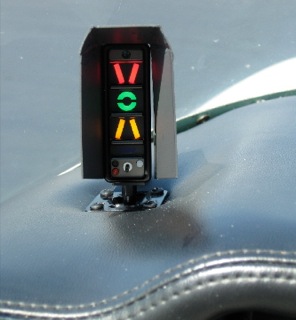
The AOA gauge on a fighter’s glare shield is a primary reference during hard maneuvering and for landing. The AOA for optimum maneuvering is 13 degrees, displayed as the green circle or “green donut” on the gauge. The red chevron on top represents a slow condition of 15 degrees or more and the yellow lower chevron represents 11 degrees or less.

For normal landing in the F-16C, the pilot slows to 220 kts and configures abeam the touchdown point while mentally computing the final approach airspeed of 136 kts plus 4 additional knots for each 1000 lbs of fuel. When rolling off the perch and flying the final turn, the pilot would usually only glance once at the airspeed once to ensure final turn airspeed of 180 kts while using the AOA sight gauge as the primary indicator of a best performance turn. As long as the AOA was green donut (13 degrees) or less, you would not stall. If on speed and 13 degrees wasn’t going to get you around the turn to line up with the runway, you knew you were going to overshoot. You never wanted to see the red chevron of 15 degrees or more as that meant you were too slow, pulling too hard, and in danger of building an un-recoverable sink rate!

Few GA aircraft are currently equipped with AOA indicators, though there are several after market devices available for retrofit. However, knowing the impact of AOA and how to manage it is vital to safe aviating, even without an AOA gauge. The bottom line is, as long as you don’t ask the wing to produce more angle of attack than it can handle, you won’t stall.

Practicing final turn stalls, to know what the wing feels like as you get too slow or pull too much on the controls, increasing AOA past the critical point, will keep you safe when you encounter that unexpected overshooting wind or you find yourself inadvertently on too tight of a downwind leg. Better to overshoot or take it around to try again, than to pull too hard and exceed critical AOA.


Mike Hostage is a retired USAF pilot with 37 years of experience, flying a wide variety of aircraft.  An instructor pilot for more than half of his 4800 flight hours, Mike is currently qualified in a Cirrus SR-22T and regularly flies his two homebuilt sailplanes.

Similar Posts

  • The Dual Garmin G5 Glass Panel Solution

    What’s the most cost effective glass panel retrofit?  There are several options out there (and it seems like more coming each Sun ‘N’ Fun or Osh Kosh event), but the consensus is the Aspen EFD 1000 or 1500, right?  At $12,000 installed, it’s about $8,000-$10,000 cheaper than the Garmin G500 (though you can make the argument that when you add a second screen and SVT to the Aspen, the price is about the same).

    I am here to blow your mind.  What if you could get a glass panel retrofit that is a complete AHRS system with airspeed and altitude, plus a slaved HSI that auto slews to your GPS and a 4 hour backup battery so you can throw your steam attitude indicator away, for only $4,600, plus installation?

    I am not crazy.

    The Garmin G5 debuted last year when the FAA relaxed it’s regulations to allow more experimental avionics into certified airplanes.  The single G5 was a big hit.  The 3.5 inch screen fit nicely into the hole that the traditional attitude indicator left, giving pilots a glass attitude, airspeed and altimeter options for less than $2,500.

    In March, Garmin brought out the HSI version of the G5.  Equipped with a low cost magnetometer, the DG/HSI version is a complete replacement for the traditional DG/HSI.  The unit also displays ground speed and distance (received from the GPS information), while auto-slewing to the GPS flight plan, so the CDI needle will move on it’s own, eliminating the annoying need for the pilot to set the course on the HSI (and ridding the GPS of the message that pops up reminding the pilot to set the course).

    The dual units provide a complete backup Attitude in the case of a display failure.  The reversionary mode you get with the Garmin G1000 and the Garmin G500 is also present in the dual G5s.  This eliminates the need for a backup steam gauge attitude indicator, freeing up panel space for an engine monitor or some other toy.  The G5 units can also be equipped with 4 hour backup batteries in case of electrical failure.

    The price for the dual G5 setup is very reasonable at just under $4,600 plus installation (which, according to Garmin, should be pretty simple as the units act as plug and play instruments).  The AHRS unit is available stand alone for under $2,200 while the DG/HSI unit standalone runs just under $2,600.

    For more information, check out Garmin’s website.

  • 3 Tips to Better Landings

    In my 3,000+ hours of flight training, I have developed some tips and tricks to help people fly better.  With teaching landings, I have 3 specific tips that will make smoother landings every time, guaranteed.

    A Good Pattern

    A wise flight instructor whom I would love to give credit to (but don’t know who it is!) once said that a good landing starts off with a good traffic pattern.  So true!  A good landing all begins with the setup.  This is true for a VFR rectangular traffic pattern or an IFR instrument approach.  Flying the proper speeds and being at the proper AGL altitudes helps immensely in making a good landing. Being at 600 feet AGL on a 1/2 mile final (or the alternative of 60 feet off the ground on a mile final!) makes it hard to make a good landing.

    Proper Use & Understanding of Pitch and Power

    Once flaps are used in the pattern, the plane is now on the back side of the power curve (or in the region of reverse command).  Power is now being used to control the plane’s rate of descent while pitch is being used to control airspeed.  The key is, both pitch and power work together, so if the pilot changes the power, he’ll also need to change the pitch and vice versa.

    The common mistake I see here is when the airplane gets low on final, the pilot tends to (quite naturally) pitch up.  All this does is bleed off airspeed and cause the airplane to sink faster.  The proper input would be to add power, then adjust the pitch for airspeed.

    Look Down the Runway

    Now that we have gotten to the point of the round-out and touchdown, it’s the most important part.  The best thing the pilot can do to make the best landing possible, is to look at the trees at the end of the runway.  When I worked with college students, I told them to find the owl in the trees at the end of the runway.

    The tendency is to stare at the pavement (or concrete) the whole way down to the landing.  When a pilot’s eyes are fixated on the ground, this destroys his depth perception and causes a level off too low to the runway, resulting in a 3 point landing and/or a bounce.

    By looking at the trees at the end of the runway, this gives the pilot much better depth perception and allows him to properly judge where to level off the airplane.

    The question now is when should the pilot start looking at the trees?  My recommendation is crossing the threshold of the runway.  For some, it works better to start looking at the trees when turning final.  Others, right before the level off.  Regardless, find that owl!

  • Iridium Zoleo Allows In Flight Messaging

    Satellite communications company Iridium now has a really nifty little product called the Iridium Zoleo Satellite Communicator. Most pilots who fly newer Cirrus Aircraft will be familiar with the company name Iridium. Iridium manufactures the built in satellite phone that is an option in all Cirrus after 2012. The Iridium Zoleo brings messaging capability to any airplane in a cost effective and simple manner.

    The Iridium Zoleo is a device roughly the size of a walkie-talkie. It links up with the Iridium satellite network to send and receive messages and emails anywhere in the world (or air!). To make things easier, the Iridium Zoleo links with a phone via Bluetooth to a free app that allows the user to write a message directly from the phone and send through the device.

    The Iridium Zoleo is affordable at only $200. A plan has to be purchased in order to send messages, with 3 different levels of subscription offered: 25 messages a month for $20, 250 messages a month for $35, or unlimited messages per month for $50. Each plan offers a $6 upgrade to allow unlimited worldwide breadcrumbs and tracking.

    The Iridium Zoleo has a 200 hour battery life and is designed to be shock, dust, and water resistant. Plus, the device has a built in SOS that can be used anywhere in the world. So, you can take it rafting down the Grand Canyon, hiking in the Andes, flying over the Atlantic, or SOS if you are stranded in the middle of the Indian Ocean.

    Click here to read more about Zoleo and here to read more about the Zoleo plans.

  • PIREP: Austin Executive Opens a Control Tower

    Austin Executive Airport opened a control tower on Friday, February 23rd 2018.  The airport is now officially Class D airspace.  The charts and A/FD are not updated yet to reflect the tower, but there is a NOTAM with the tower and ground frequency information.  The tower hours are from 6am to 10pm.  The weather frequency remains the same.

    Make sure you check those NOTAMs if you are headed to KEDC anytime soon!

    KEDC Tower Frequency:  120.3

    KEDC Ground:  119.45

  • Wind the Clock

    There is truth in the old adage that 99% of flying is routine while the remaining 1% holds the potential for events that cause those who fly to hold themselves above mere ground-bound mortals. My 37 years of military flying might have distorted that ratio a fair bit given the complexity of high-energy fighter aircraft and the uncertainties of combat, but rest assured we all earn our right to be proud of our wings every time we fly.

    The requirement that a single-seat fighter pilot be able to handle rapidly evolving emergency situations and complex systems diagnosis sets a high bar for any who join that group. However, the lessons we learned and techniques we developed for making fighter aviation significantly safer than in yesteryear have direct applicability to general aviation.

    Prioritization and compartmentalization are two important skills that every pilot should have. These skills amount to the ability to look at a complex problem, quickly determine the most critical elements, and mentally set aside those things that can wait so as to deal with highest priorities first. While this does not sound like rocket science, the art is in the doing!

    The technique for dealing with the immediate onslaught of information, such as when that caution tone or caution light presents and different gauges or displays go haywire, provided the title for this piece.

    All flight training will, at some point, involve what is called situational emergency procedures training, know to military aviators as SEPT. We do this type of training in a simulated cockpit that has all the dials and switches for our particular aircraft. None of the switches and dials do anything, some are just decals on a wooden dashboard, but the presentation allows the SEPT victim to reach for the appropriate switch or lever, while telling the instructor what and why they are doing so.

    One of the most common mistakes new trainees make is that of trying to act too fast, before they have fully and correctly analyzed the situation at hand. Herein lies the titled technique. After blurting out a quick and incorrect answer, the instructor would admonish with: “rather than try to react instantly, maintain aircraft control, analyze the situation, then take appropriate action. The best thing you can do is to reach up and wind the clock. This will give your nervous energy some place to channel itself, while your brain takes in the full situation.”

    Waltham clock

    Winding the clock might seem like an archaic notion, but, amazingly enough, even our most modern aircraft have the same clock we flew with as far back as the 1960s. The Waltham A-13A aircraft clock and timer is a wind-up device that only uses power to light up at night. Unless your emergency involved some type of catastrophic impact to the instrument panel, you could count on at least your clock to be functioning normally. Thus, reaching out and winding it was unlikely to cause any worsening of your evolving emergency and would distract your brain from the need to take some poorly-thought-out action, too quickly.

    Now, in most aircraft there are a few emergencies that will require immediate, reactive actions. In fighters, we call these Boldface Emergencies. For each type of fighter, we memorize, to the letter, the few key actions that have to be instinctive, to prevent disaster. For all other emergencies, there is time to reach out and wind the clock while assessing all instruments and lights to fully understand your situation.

    For your aircraft, know those Boldface or Critical Action Procedures, but for all other emergencies, take the time to maintain aircraft control, “wind the clock” while you analyze the situation, then take appropriate action.

    Mike Hostage is a retired USAF pilot with 37 years of experience, flying a wide variety of aircraft.  An instructor pilot for more than half of his 4800 flight hours, Mike is currently qualified in a Cirrus SR-22T and regularly flys his two homebuilt sailplanes.
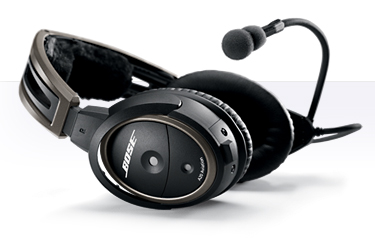
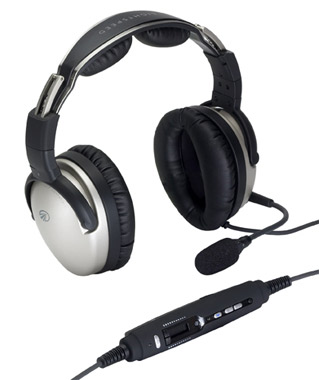
  • Lightspeed Zulu 2 vs. The Bose A20

    The debate about which headset is the better product will never cease.  We do know this for sure, though, Lightspeed and Bose make the best noise canceling headsets out there.  David Clark’s offering doesn’t match up with these two.  Newcomer AKG has a light (weight-wise that is, as the headset is equipped with a pair of LED lights as well) ANR headset that the jury is still out on.  For now, Lightspeed and Bose sit atop the ANR kingdom.

    The comparison for this article will be between the Lightspeed Zulu 2 and the Bose A20 headsets, both of which I have used quite extensively in my flying career.  I am officially in the Lighspeed camp at this point and after reading my comparison below, you’ll see why.

    ANR Functionality

    Bose A20

    Between the two, the Bose A20 cancels out more noise, no argument there.  This isn’t to say that the Lightspeed Zulu 2 doesn’t.  Quite the opposite, actually.  The Lightspeed Zulu 2 does a great job of canceling the noise.  But with the A20 on in a C172, you can barely hear the engine running.  The difference before you press the power button and after is extremely noticeable.  I had one client turn to me after turning on the noise canceling function of his new A20 headset and state, “These things are awesome!”

    The other advantage Bose has is a continuation of the noise canceling.  About the only thing I don’t like about the Lightspeed is if you don’t have the headset sized just right on your head, each time you turn your head to look at something, then the suction gets broken around the ear cup and you get some ambient noise.  My glasses probably don’t help with this.  It’s not that big of a deal, you just have to readjust the size of the headset, but, since I’m a little OCD, it bugs me.  Once I get the set sized right, it’s smooth sailing.

    Comfort

    Lightspeed Zulu 2

    Far and away, the Lightspeed Zulu 2 is much more comfortable than the Bose A20.   I flew for 5 hours in the right seat with my Lightspeed set on the other day.  I switched to the left seat for the last leg and used the owner’s A20 headset since it was plugged in on that side already and I noticed quite a bit of difference.  The ear cups seemed to press against my head more.  The pad on top of my head didn’t seem to be as cushiony.  It just wasn’t overall as comfortable as the Lightspeed Zulu 2.

    Bose has made a lot of progress from their original noise canceling headsets.  Those didn’t have much of a cushion on top at all.  After about 2.5 hours, the slim ear cushions began to dig in to the side of your head.  So, the A20 has made some progress, but the Lightspeed Zulu 2 takes the cake in comfort.

    Weight Distribution

    “Wait!”  You Bose boys scream (no pun intended).  “The A20 is lighter than the Zulu 2!”  While this is true (the Zulu 2 weighs in at 15.7 oz while the A20 is only 12 oz), the way that weight is distributed makes a massive amount of difference.  The Lightspeed Zulu 2 feels lighter on top of your noggin than the A20 because the weight of the A20 is firmly planted on the top of your head in a single point.  With the Zulu 2, the weight is distributed evenly across the top of your scalp, so even though the set is heavier, it feels lighter on your head because the weight is not all concentrated on one point.

    All this adds up to why I like the Lightspeed Zulu 2 more than the Bose A20.  As for a practical example, I wore my Lightspeed Zulu 2 set for 9.1 hours one day two weeks ago.  Needless to say, it was a long day.  But, once I climbed out of the airplane, I had no pain on the top of my head and only a very little where my glasses ran along the side of my head.  Now I call that a winner.

Leave a Reply

Your email address will not be published. Required fields are marked *