The debate about which headset is the better product will never cease. We do know this for sure, though, Lightspeed and Bose make the best noise canceling headsets out there. David Clark’s offering doesn’t match up with these two. Newcomer AKG has a light (weight-wise that is, as the headset is equipped with a pair of LED lights as well) ANR headset that the jury is still out on. For now, Lightspeed and Bose sit atop the ANR kingdom.
The comparison for this article will be between the Lightspeed Zulu 2 and the Bose A20 headsets, both of which I have used quite extensively in my flying career. I am officially in the Lighspeed camp at this point and after reading my comparison below, you’ll see why.
ANR Functionality
Between the two, the Bose A20 cancels out more noise, no argument there. This isn’t to say that the Lightspeed Zulu 2 doesn’t. Quite the opposite, actually. The Lightspeed Zulu 2 does a great job of canceling the noise. But with the A20 on in a C172, you can barely hear the engine running. The difference before you press the power button and after is extremely noticeable. I had one client turn to me after turning on the noise canceling function of his new A20 headset and state, “These things are awesome!”
The other advantage Bose has is a continuation of the noise canceling. About the only thing I don’t like about the Lightspeed is if you don’t have the headset sized just right on your head, each time you turn your head to look at something, then the suction gets broken around the ear cup and you get some ambient noise. My glasses probably don’t help with this. It’s not that big of a deal, you just have to readjust the size of the headset, but, since I’m a little OCD, it bugs me. Once I get the set sized right, it’s smooth sailing.
Comfort
Far and away, the Lightspeed Zulu 2 is much more comfortable than the Bose A20. I flew for 5 hours in the right seat with my Lightspeed set on the other day. I switched to the left seat for the last leg and used the owner’s A20 headset since it was plugged in on that side already and I noticed quite a bit of difference. The ear cups seemed to press against my head more. The pad on top of my head didn’t seem to be as cushiony. It just wasn’t overall as comfortable as the Lightspeed Zulu 2.
Bose has made a lot of progress from their original noise canceling headsets. Those didn’t have much of a cushion on top at all. After about 2.5 hours, the slim ear cushions began to dig in to the side of your head. So, the A20 has made some progress, but the Lightspeed Zulu 2 takes the cake in comfort.
Weight Distribution
“Wait!” You Bose boys scream (no pun intended). “The A20 is lighter than the Zulu 2!” While this is true (the Zulu 2 weighs in at 15.7 oz while the A20 is only 12 oz), the way that weight is distributed makes a massive amount of difference. The Lightspeed Zulu 2 feels lighter on top of your noggin than the A20 because the weight of the A20 is firmly planted on the top of your head in a single point. With the Zulu 2, the weight is distributed evenly across the top of your scalp, so even though the set is heavier, it feels lighter on your head because the weight is not all concentrated on one point.
All this adds up to why I like the Lightspeed Zulu 2 more than the Bose A20. As for a practical example, I wore my Lightspeed Zulu 2 set for 9.1 hours one day two weeks ago. Needless to say, it was a long day. But, once I climbed out of the airplane, I had no pain on the top of my head and only a very little where my glasses ran along the side of my head. Now I call that a winner.
Earlier this year, Cirrus debuted it’s new Learning Management System (LMS), Cirrus Approach. For several years, Cirrus has led the way in online systems training while using several different platforms for it’s LMS. Cirrus Approach is the culmination of lots of sampling and tinkering, and boy, did Cirrus knock it out of the park.
For those of you unfamiliar with the Cirrus training program, here is the quick rundown. When a pilot who has no Cirrus time buys a Cirrus aircraft, initial transition training is required to familiarize the pilot with the aircraft systems, speeds to fly, power settings, etc. The Cirrus Transition Course is a 3 day that gets a VFR pilot up to speed in the airplane. Under the Cirrus Embark program, those 3 days of training are covered by Cirrus and free to the new owner.
If the pilot is an IFR pilot, then the 5 day Cirrus Advanced Transition Training Course is required. If the pilot has Cirrus experience, but with a different engine or avionics configuration, there are courses for that too. The Cirrus Embark program covers 3 days of training for most courses for a new Cirrus owner.
As part of the aforementioned courses, there are systems to learn about and procedures to understand. This is where the Cirrus Approach LMS excels. Cirrus has done a great job of putting together lots of good videos (that are actually interesting but not annoying) on the airplane, systems, how to fly it, etc. for each course. It cuts down greatly on the time that the training instructor has to spend on the ground with the pilot since the pilot has already compiled knowledge through Cirrus Approach.
Cirrus Approach is accessible online at learning.cirrusapproach.com. To get access to the courses, create an account, then select the Learning Catalog. The courses are categorized based on the type of training (Transition, Advanced Transition, Avionics Differences, Airframe & Powerplant Differences, Recurrent, and Specialty), then further broken down into the type of airplane, engine and avionics (eg. SR22T G6 Perspective+). Make sure the correct engine and avionics configuration is selected! Notice, there is a difference between the SR22T and SR22 (Turbo & Non-Turbo).
Anyone can do the specialty courses. I would highly recommend for everyone to take the Engine Management course as well as the Icing Awareness Course for you TKS and FIKI operators. The Takeoff & Landing course is a good refresher course for a pilot who hasn’t done any training in a while.
The Recurrent Training courses are encouraged for all Cirrus pilots. There is an IFR Refresher, a VFR Refresher, and a Skills Refresher. These are recommended to rotate through with a CSIP (Cirrus Standardized Instructor Pilot) on a yearly basis. With a little extra ground, a Flight Review and an IPC can be accomplished yearly using these courses.
Earlier this year, Cirrus debuted it’s new Learning Management System (LMS), Cirrus Approach. For several years, Cirrus has led the way in online systems training while using several different platforms for it’s LMS. Cirrus Approach is the culmination of lots of sampling and tinkering, and boy, did Cirrus knock it out of the park. For…
When it comes to turboprop engines, a hot start is a really bad thing. For you piston drivers out there thinking, “What’s the big deal, you are just starting a hot engine,” then here’s a little education for you.
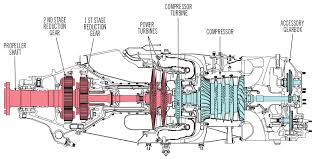
In a PT6 turboprop engine, there is a very important temperature gauge that a pilot monitors very closely during each and every start. It is called the Inter-Turbine Temperature gauge, or ITT. This temperature is a measurement of the exhaust gases between the compressor turbine and the power turbine (s). In the picture below, the probe is located where the blue and red colors meet.
In a turboprop engine, specifically the Pratt & Whitney PT-6 in all it’s different sizes and variations, there will always be a specific temperature that the pilot will want to keep the ITT below. This article will deal specifically with a Piper Meridian.
A Piper Meridian starts hotter than almost any other PT6 engine because of the way it’s air intake is designed. Unlike other turboprops, the Meridian has a permanently open inertial separator. This means that not all the intake air makes it to the engine during start because some of it goes out the inertial separator opening. So, coming to a Meridian from operating other turboprop engines can lead to a little bit of a surprise on the ITT temperature being higher than what a pilot is used to when starting.
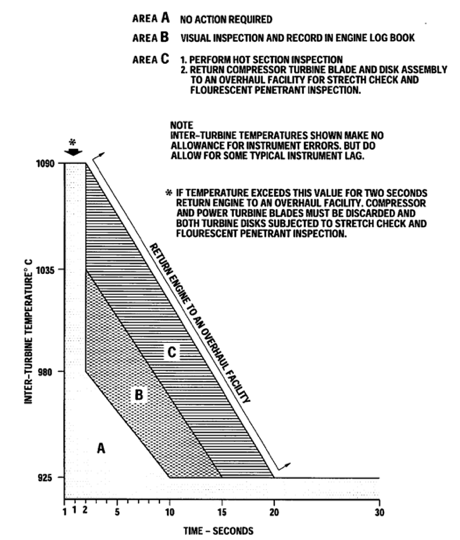
As a rule of thumb, when starting a Meridian, never let a start continue when the ITT hits 875 degrees. Based on the chart below, you are still in the safe zone at 875 and have about a 50 degree buffer before you have to start getting worried.
On cold starts with a good battery or a GPU, 875 is typically not an issue. Most starts when cold are going to be in the high 700s or low 800s. On a cold start, if you are seeing starts in the mid to upper 800s, try starting with a GPU and see if that lowers the start temperature. If it does, then that means your battery is weak and needs to be replaced. Another tell-tale sign of a weak batter is the Ng doesn’t spool up properly (meaning it settles around 12-13%) or takes a really long time to spool up. Also, never start on the battery with less than 24 volts.
When there are multiple flights in one day, the pilot has to take into consideration the warm engine prior to starting. If the ITT, prior to the start sequence, is above 150 degrees, it is time to do some motoring of the engine.
What is motoring? It is simply using the starter to turn the engine, which leads to air being sucked into the engine allowing the engine to cool off prior to start. The theory is, the cooler your engine prior to start, the cooler the ITT peaks at during start.
Here’s the steps on how to dry motor a Piper Meridian:
Battery on
Strobes on
Fuel Pumps and Ignition off
Throttle idle
Condition Lever feather/cutoff
Push the start button
Monitor the ITT temperature
Reaching 150 degrees, if less than 30 seconds have elapsed:
Fuel Pumps on
Ignition On
Condition Lever run
Reaching 150 degrees, if 30 seconds have elapsed:
Push Manual/Stop button to stop the start
Let starter rest for 30 seconds
The starter has a 30 second limit on the Meridian, followed by a 30 second rest period. You can do the sequence twice, then, after the 3rd start, there is a 30 minute rest period. Typically, if the ITT won’t cool down to 150 after the 3rd time, there is probably something wrong.
The most important thing a pilot can remember is never, ever push the condition lever forward if the ITT is above 150 degrees. You’ll be well on your way to avoiding hot starts that way.
When it comes to turboprop engines, a hot start is a really bad thing. For you piston drivers out there thinking, “What’s the big deal, you are just starting a hot engine,” then here’s a little education for you. In a PT6 turboprop engine, there is a very important temperature gauge that a pilot monitors…
If you’ve ever been to Nantucket Airport during the summer, you’ll understand when I say that it is a crazy place. During the summer months, especially on weekends, the airport is visited by an endless parade of airplanes ranging from the smallest GA airplanes to the biggest private jets.
One sunny Sunday afternoon I was standing in line at the front desk of the Nantucket FBO when the ramp door opened and a very grumpy and entitled man walked in. The man marched right up to the front desk and barked a fuel order at the girl working there, which she mistakenly read back wrong. After yelling at her for her wrongdoing, he announced that he had flown in to go to the restaurant and stormed off to drown his sorrows in fish and chips. Although he was a jerk, his attitude got me thinking about FBO’s and everything that the people who work at them do for us pilots.
For anyone who may not know, FBO stands for Fixed Base Operator. FBO’s can be found at airports everywhere and their business is to provide services such as fuel, hangar space, and tie downs. Bigger FBO’s can offer more services including rental cars, food, maintenance, flight instruction, etc. FBO workers have the ability to make life really good or really miserable for pilots, and, it seems to me, we pilots have the same power over them. Based on my personal experiences and the experiences of some friends who have worked at airports around the country, here are some things to think about next time you taxi onto an FBO ramp.
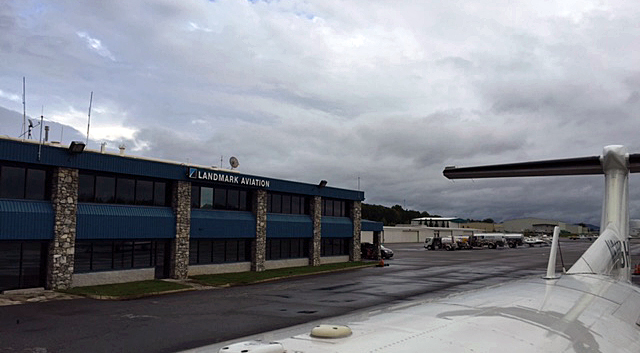
Landmark Aviation has the best pens
I’ve divided this article into two sections:
FBO Etiquette: What can we as pilots do to make life easier for the workers at the FBOs
FBO Pilot Perks: Ways that FBOs can help make a pilot’s life better (besides basic services like fueling)
FBO Etiquette
Be Polite
Everyone I talked to about their time working at an FBO said that simply by being friendly and polite is one of the biggest ways we can help. Most of the people that work at the FBOs love aviation and likely are working there to be around the industry in hopes of eventually being more involved. The girl working the desk at Nantucket didn’t deserve to be yelled at just for reading a tail number back wrong; don’t forget that “please” and “thank you” are still magic words.
Call Ahead
Whether you are flying to the airport, or you left your airplane at the FBO and you need them to pull it out or fuel it, calling ahead is greatly appreciated. Most FBO’s have a radio at the front desk and have their frequency listed online and in foreflight. Call ahead and tell them that you’re coming, when you’ll be arriving, and what you’ll need when you get there (gas, rental car, taxi..etc). That way they wont feel rushed and you may get what you’re looking for more expediently upon arrival.
Fuel orders
If your fuel order is difficult or confusing (example: 6.54 gallons in the right side and 4.32 in the left) you may be better off just to do it yourself at the self serve. One of the guys I talked to said that he would have pilots ask for extremely specific numbers and then stand there watching, ready to pounce when it wasn’t fueled exactly right. Its also worth noting that fuelers do make mistakes. Its highly recommended to watch and make sure that the correct truck (Jet A or 100LL) is the one pulling up to dispense your gas. Make sure you check that the fuel caps are properly installed before departing.
Look outside
A lineman motions for the pilot to stop.
Taxiing onto the ramp is not the right time to be doing your after landing and shutdown checklists. Wait until the airplane is stopped before taking your eyes off the person marshaling you to your parking spot. I’ve been told that it isn’t uncommon for a pilot to be looking inside while taxiing and it makes the linemen very nervous as they are motioning to the pilot to stop (For those unfamiliar, with lineman hand signals, here’s a helpful link).
Brakes
Unless you have talked to them and get the okay, don’t leave the parking brake on when leaving your airplane at an FBO. Often the lineman will direct you to park upfront to make loading and unloading easy, but if you’re going to stay for a long period, the airplane will need to be towed and parked out of the way. Leaving the parking brake on can make serious headaches for the people trying to organize the ramp after you leave.
Lights
Don’t blind the poor guy parking you by leaving all your landing, taxi, and recognition lights on as you’re pulling into your spot at night. Likewise, when you are ready to leave your parking space, its courteous to signal the person waiting in front of your airplane by flashing one of your lights at them so they know you are ready to be directed off of the ramp.
FBO Pilot Perks
Good parking
This one is pretty basic. I’ve heard through the grapevine that you may get parked in the boondocks as punishment for being rude to the FBO staff. However, if asked, much of the time they can pull your airplane right up front and may even let you pull a vehicle onto the ramp to load people and bags more easily.
Cheaper hotel rooms/ rental cars
Some FBO’s have special rates with hotel and rental car companies around in the area. Although it varies from place to place, you may be surprised with the amount you can save on these travel essentials. I had a flight last week where I called and was given a quote of 185 dollars for a rental car…after telling them that I was parking at the local FBO, I got the special price of 125. Check with the FBO you will be stopping at for any of their current offerings.
Fuel discounts
Sometimes the price of fuel or the minimum uptake to waive the fees can be negotiated. Sometimes, the fees may be forgotten entirely. If you are unable to take the minimum amount of fuel to waive the landing or ramp charges, tell them what you can take and you may be pleasantly surprised with the response. Its not uncommon with our Bonanza that even though the “minimum” may be 20, I can waive the fees by up-taking 10 or 12 gallons instead.
Points/ Rewards cards
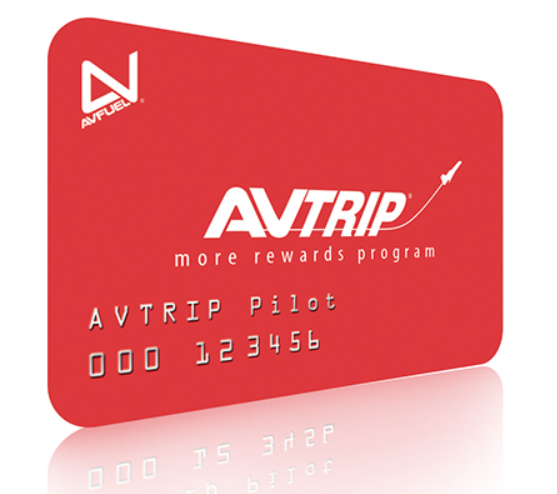
Some FBO’s offer incentives to pilots for buying gas. Many of the rewards programs are free to sign up for and will pay the fuel purchaser cash based on how much fuel they buy over a specified time period. I am a member of the Avtrip program which rewards fuel purchases at Avfuel airports with points that are redeemable for money. Avtrip is just one example of an FBO fuel rewards program; if you fly regularly, it may be worth looking into whether or not there is a fuel rewards program you can take advantage of.
Crew Cars
Most FBO’s have cars designated for use by the pilots. They are extremely nice for going to get lunch or taking care of whatever short errands you may need to run around town. Most crew cars are limited to about 1-2 hours of use, but they can often be loaned out longer based on the discretion of the people working the desk. On a few occasions, I’ve had the cars loaned to me for longer, even over night, by the nice people at the FBO (They always appreciate pilots splashing a few gallons of auto gas into the cars while they are out, too).
FBOs and the services that they provide are invaluable to pilots, both commercial and private. If we as pilots are willing to work with the linemen and service reps we can make both our lives and their lives easier. Remember to be polite and don’t be afraid to ask if you need something….that’s what they’re there for!
Andrew Robinson is a 135 Charter Pilot and flight instructor who lives with his wife and 2 daughters in Pennsylvania. He flies Pilatus PC-12s and instructs in Beechcraft Bonanzas.
If you’ve ever been to Nantucket Airport during the summer, you’ll understand when I say that it is a crazy place. During the summer months, especially on weekends, the airport is visited by an endless parade of airplanes ranging from the smallest GA airplanes to the biggest private jets. One sunny Sunday afternoon I was…
The South Central Cirrus Owner’s and Pilot’s Association (COPA) Region is hosting a Fly In dinner at the Austin Executive Airport (KEDC) on Friday, October 8th. The event is from 5-9pm. There will be a cash bar, a catered dinner ($25/person), a special guest speaker, and great mingling amongst the Cirrus owners and pilots in our region!
Fly in or drive to EDC. The dinner will be in the Henrickson Jet Center’s main hangar. You will need to RSVP so event organizers can get a proper head count. The link to RSVP is here.
Cirrus Aircraft will be bringing two new 2016 SR22s that will be available for viewing.
The South Central Cirrus Owner’s and Pilot’s Association (COPA) Region is hosting a Fly In dinner at the Austin Executive Airport (KEDC) on Friday, October 8th. The event is from 5-9pm. There will be a cash bar, a catered dinner ($25/person), a special guest speaker, and great mingling amongst the Cirrus owners and pilots in…
If you are based in Houston, or heading into or out of the Houston airspace under IFR, have you updated your charts? If not, you may hear a clearance stating: “N67889, cleared to Amarillo via the BORRN 1 Departure, CRGER Transition, Direct. Climb via the departure, expect 8000 in 10 minutes. Departure frequency 123.8, Squawk 3365.” You manage to get the clearance written down, but have completely messed up the spelling of both BORRN and CRGER, so you have no idea where the intersections are. After stumbling through a readback, you ask ground to spell the fixes for you.
Then, more bad news. You haven’t updated your GPS cards yet, so the departure isn’t in your 430. It’s an RNAV only departure, so you can’t fly it based on the NAV Radio. You were planning on updating your iPad when you got to Amarillo, so you don’t have the departure on there, either.
This has probably already happened to a few people today already.
Houston airspace got a major overhaul today. There are 20 new DPs and 29 new STARs guiding IFR traffic into and out of Houston airspace (including one named the DOOBI 1 Arrival, named after the Dooby Brothers band).
The FAA’s goal in all these changes, according to AOPA, is to “bring fuel efficiencies, time efficiencies, and reduce carbon emissions” (from Benet J. Wilson’s May 15th article on AOPA.com). The FAA issued a NOTAM today valid until June 6th describing what routes for pilots to file. The NOTAM also contains contingency plans for pilots flying without updated charts (like our example above).
Pilots should expect these wide scale procedure additions and changes to start showing up in other Class B airspace across the country. As always, make sure those charts are updated, GPS databases are current, and you do some studying of your route before you file your flight plan.
If you are based in Houston, or heading into or out of the Houston airspace under IFR, have you updated your charts? If not, you may hear a clearance stating: “N67889, cleared to Amarillo via the BORRN 1 Departure, CRGER Transition, Direct. Climb via the departure, expect 8000 in 10 minutes. Departure frequency 123.8, Squawk…
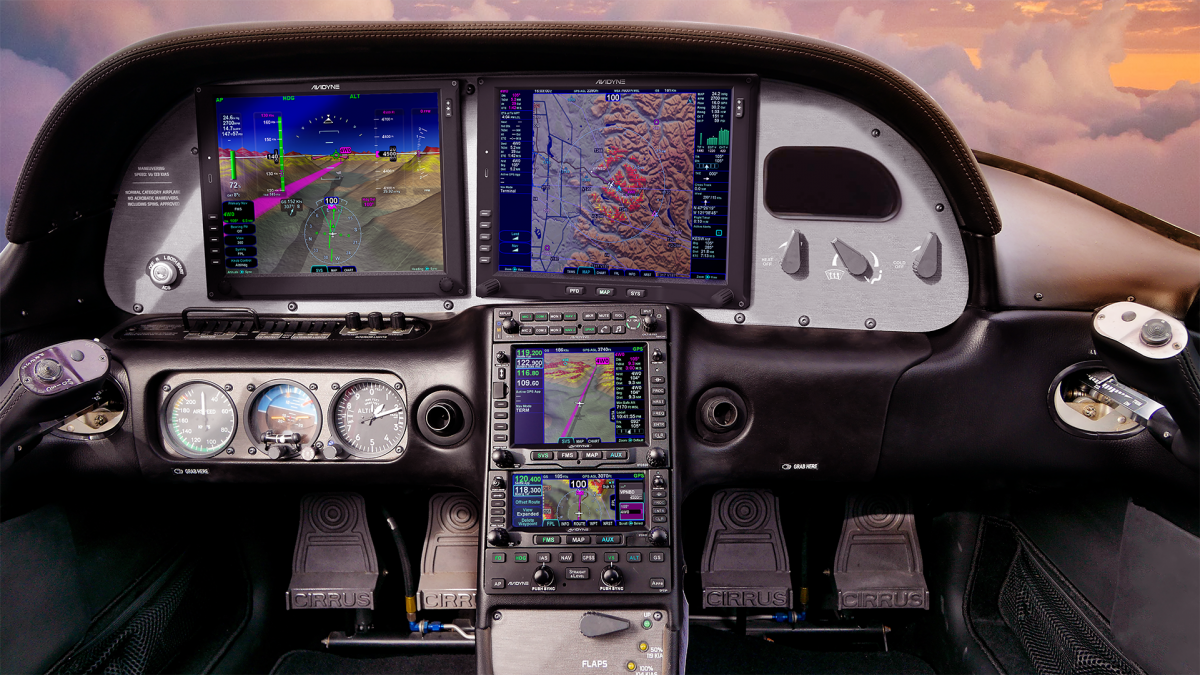
For years, Cirrus owners who have the Avidyne Entegra PFD and MFD have been clamoring for Avidyne to come up with some sort of upgrade. The Entegra, or EX 5000 system, is late ’90s technology and, though it still works, there will be a certain point in the future when it gives up the ghost. Avidyne still supports the Entegra system, but it’s hard for a Cirrus owner to see all this new technology coming on the market while not being able to upgrade the original Avidyne screens.
Avidyne gave it a go in the late 2000s with a panel upgrade known as the R9. The R9 was a good system, but Avidyne was very slow on the release (rumors were the company wanted it to be absolutely perfect before releasing it, which frustrated Cirrus, who then switched to the Garmin Perspective panel, leaving Avidyne behind) which led to the R9 only being available as a very expensive retrofit to the Entegra system ($80,000-$90,000 for the system and install). Needless to say, there weren’t that many takers.
Late in 2020, Garmin announced it had received certification to retrofit Avidyne Entegra equipped Cirrus Aircraft with the company’s G500 TXi displays, which gave new hope to G1, G2, and G3 Cirrus owners. The price tag wasn’t outrageous, coming in at $16,000 apiece for each display. The G500 TXi works with any possible GPS that can be installed in a Cirrus (GNS 430Ws, GTN 650s, GTN750, or the Avidyne IFD 540/440) and with the DFC 90 Autopilot (if the Cirrus is still equipped with an STEC 55x, the Autopilot would need to be changed to either a DFC 90 or a Garmin GFC 500).
Fast forward to June of 2021 and Avidyne re-enters the game with the Avidyne Vantage. After the R9 debacle, Avidyne has opted this time to go for a more simple approach. The Avidyne Vantage system changes out the Entegra PFD and MFD with bigger screens (12″; Garmin’s TXi units are only 10.6″) with high quality pixelation, synthetic vision, engine gauges, checklists, charts, a hybrid touch interface, and all the other information that was offered on the Entegra system, just all more modern and updated. The best news is that the system provides redundant reversionary mode, which was one of the biggest complaints about the Entegra system.
The price tag comes in lower than Garmin, with each screen being priced at $12,500. The units will work seamlessly with the Avidyne IFD Series GPS units, though, as of this writing, it isn’t clear if the Avidyne Vantage will work with Garmin GTN 430Ws or the GTN 750/650. I would assume that the integration would be there, but I haven’t found any documentation stating that yet. DFC 90 Autopilot integration would be seamless, but not sure the integration with the STEC 55x or Garmin GFC 500.
Avidyne says the Vantage will be fully certified in early 2022, but the company is taking orders now. Visit the Avidyne Website for more information.
For years, Cirrus owners who have the Avidyne Entegra PFD and MFD have been clamoring for Avidyne to come up with some sort of upgrade. The Entegra, or EX 5000 system, is late ’90s technology and, though it still works, there will be a certain point in the future when it gives up the ghost….