The Do’s and Don’ts of Drones

This is the second part in a series on drones and Unmammed Aerial Systems (UAS). To read Part 1, Drones: A Brief History, please click here.

I’m surprised how often I’ve been asked about drones by concerned passengers as they load up for a charter flight. Most commonly I’m asked how many drones I’ve seen while I’m flying, or how many drones I’ve hit/ almost hit. Sadly, the media has made this drone crisis into something that it isn’t. I’ve never seen a drone while I was operating a full scale aircraft, and I’ve certainly never been put into a situation where I felt that a drone was a threat to my safety or the safety of the flight. In fact, I only personally know one pilot who has reportedly seen one around an airport and that was an isolated incident (and a non-event).

The reality is that while Unmanned Aerial Vehicles can be a real danger to full scale aircraft, incidents aren’t actually all that common and detailed information is often lacking or missing altogether. It is likely that some of the reported drone incidents were actually a case of a pilot confusing a loose balloon or a bird for a drone. This, combined with the media’s sensationalizing of every “close” encounter nationwide has led the public to believe that the problem is much bigger than it actually is.

In actuality, when the AMA (Academy of Model Aeronautics, the USA’s governing body for model aircraft) analyzed the data from the FAA’s 764 recorded Drone sightings, only 27 of them (3.5%) were actually recorded as “near misses” or “near collisions.” Additionally, only 10 of the records (1.3%) indicate that pilot was required to take evasive action.

The records also include reports of drone sightings at altitudes which would be impossible for civilian models to attain (19,000-24,000′). Finally, some of the sightings took place in areas which are specifically set aside for model aircraft and drones to operate.   In those cases, the person flying the drone when it was reported was actually doing so in a safe and legal manner in an area designated for that specific purpose. If you’re interested, the whole article is available here and has a lot of great information.

As pilots, it is important that we do our part in helping reduce the risk of drone strikes. The biggest thing that we can do to help is to report any activity that we see so that it can be investigated and hopefully the drone operator can be found and dealt with. Try to get as much detail as possible about the incident, such as the size, color, location, direction and altitude of any sighted UAVs and report it to the closest tower or controlling agency.

Recently, the people in Washington have come up with a bunch of new rules to regulate the operation of model aircraft. As of this year, every unmanned aerial vehicle between 0.5 and 55 lbs must be registered with the FAA and have an FAA issued registration number located on the model itself. The logic here is that if someone crashes a drone where it shouldn’t have been operated, the officials will be able to identify the owner of the model and take action.

Model manufacturers and vendors have also agreed to start providing information about a program called “Know Before You Fly” (KBYF) in the packaging of the drones.  This program seeks to help educate new hobbyists to the rules and responsibilities associated with model aviation. For more information on KBYF, here is a link to their website.

In the end, the sad reality is that it’s a combination of many factors: new technology making models cheaper and easier to fly, GPS navigation and automation, the media blowing the incidents out of proportion, and inexperienced and foolish operators which have caused the growing concern and required the FAA’s action. I think that it is important to understand that thousands of people have been flying radio controlled models for many years responsibly and this has never been a problem. The AMA has rules (which are the same ones now adopted by the FAA) regarding flying location, altitudes, speeds, and more which have kept both the modelers on the ground and the pilots in the air safe until now. Its a classic case of a few foolish individuals who have caused all modelers to be cast in a bad light.
Birds and Airplanes

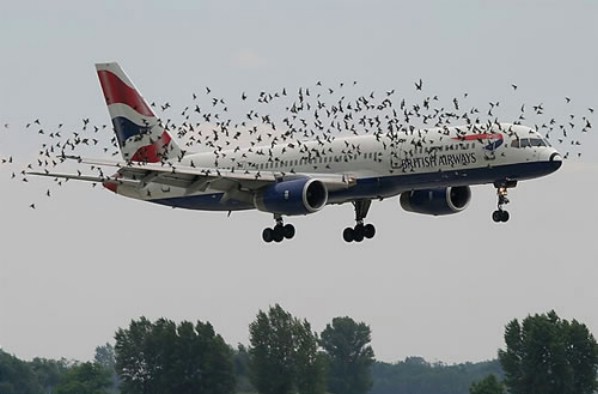
There is no reason to fly in fear, though. A pilot should always be watching for hazards as he or she is flying, regardless of the variety. In fact, according to the FAA’s website, there were 142,000 wild life STRIKES with civil aircraft in the USA between 1990 and 2013. That seems like a much bigger concern to me than the 764 reported drone SIGHTINGS. As with any new technology, drones are suffering from growing pains. As the rules fall into place and new operators become better experienced, hopefully we will hear about fewer incidents on the evening news. Anyway, I’ll stop “droning” on. Fly safe.

Andrew Robinson is a 135 Charter Pilot and flight instructor who lives with his wife and 2 daughters in Pennsylvania.  He flies Pilatus PC-12s and instructs in Beechcraft Bonanzas.

Similar Posts

  • Garmin GFC 700 Autopilot

    The Garmin GFC 700 Autopilot is an amazing machine.  Fully digital and fully integrated with the Garmin G1000 glass panel, it makes a pilot’s workload a lot easier, especially in busy airspace.

    I train a lot of pilots in airplanes that have the Garmin GFC 700 autopilot.  The Cirrus SR22, the Columbia 350 & 400, the G36 Bonanza, and the Piper Mirage and M350 to name a few.  The most common problem I see for pilots transitioning into the Garmin GFC 700 equipped aircraft is that it doesn’t act like other autopilots.

    STECs and DFC 90 Autopilots function like this:  you push the button for the mode you want on the autopilot controller and that turns the autopilot on.

    Not so on the Garmin GFC 700.  If you push the button for the mode on the GFC 700, then the flight director engages, but not the autopilot.  This confuses folks a lot who move up from different autopilots because their autopilot primacy side of their brain is telling them the autopilot is on whenever they push one of the buttons on the GFC 700 controller.

    Here’s an example:  A pilot has just departed and is ready to turn on course.  In his old airplane with an STEC 55x autopilot, the pilot pushes the direct to key to go to his first waypoint, then pushes NAV on the autopilot controller and the STEC 55x comes on and starts flying on course.  Then he presses VS and ALT to initiate a climb.

    With the same scenario and a Garmin GFC 700 autopilot, the same pilot (who is used to a 55x), pushes the direct to key, then pushes NAV on the autopilot controller and pushes IAS or FLC to initiate the climb.  He lets go of the flight controls thinking the autopilot is engaged.  The airplane starts nosing over and he starts panicking.

    Why did this happen?  The pilot in the second scenario never pushed the AP button on the Garmin GFC 700 so the autopilot never engaged.  All he did by pressing the NAV button and IAS button was to turn the flight director on.

    How to remedy this?  Get in the habit of checking your scoreboard.  On the top of the G1000 or Garmin Perspective PFD, there is an autopilot annunciation strip (or scoreboard as I like to call it).  In the very middle of the scoreboard is an area to show if the autopilot or flight director is engaged.  AP means the autopilot is on; FD means the flight director is engaged but the autopilot is not.

    I teach pilots to be in the habit of checking your scoreboard each time you get done pressing buttons on the autopilot controller to ensure the Garmin GFC 700 is in the proper mode.  This saves some of those panic moments when it is supposed the AP is engaged, but it’s only the FD.

  • The Flight Director as a Backup

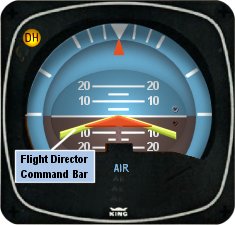
    I’ve noticed that a lot of general aviation pilots tend to ignore the flight director on the attitude indicator.  A lot of pilots don’t even know what it’s there for or how to use it.  Talk to any airline pilot, though, and he or she will tell you how important the flight director actually is.

    In most high performance airplanes, the flight director comes on when the autopilot comes on.  Essentially, the autopilot is following the flight director, which tells the autopilot where to go.  The flight director can also be used with the autopilot off, when hand flying an approach, for example.  By turning the flight director on, it will show you where you need to fly to stay on course and on glide slope.

    Flight Director

    The flight director is most often controlled by the autopilot controller.  The same buttons you use to put the autopilot in heading mode also tells the flight director to follow the heading bug when the autopilot is off.  When you move the heading bug (or change course on the GPS, depending on which mode you have selected), the flight director will show you when you need to turn and when you need to stop turning.  It directs your flight attitude, hence the name.

    I recently discovered it’s a great backup when you have some instruments on the fritz.  I went on a long flight in a steam gauge Piper Malibu and the attitude indicator started reading erratically.  While flying straight and level, it would randomly indicate that I was in a 10 degree bank to the right, swing back and show wings level, then show a 3 degree turn left.  This went on for a while.  We were in VMC conditions, so legality wasn’t a problem, but it was kind of disorienting.

    After a little while of this, the autopilot started acting up.  It would start oscillating the pitch up and down, making it seem like we were going through a moguls course in the air.  I ended up turning the autopilot off and hand flying the airplane.

    This led to a conundrum, since my attitude indicator was unreliable.  I could definitely look outside, since it was VMC, seeing when I was level and when I wasn’t.  That would create a higher workload for me, which on a long flight like I was on, would lead to an increase in fatigue.  The solution?  The flight director!

    I turned the autopilot off, but I left the flight director up.  It wasn’t referencing the bank angle that the attitude indicator was showing since the KFC 150 goes off of the turn coordinator.  So, if I just followed the attitude indicator, I could just keep scanning the instruments and relieve a little bit of my workload.

    It actually worked really well.  By just following the flight director, I was able to stay on course and on altitude with only minor attitude adjustments whenever we hit turbulence.

    So, if you’re attitude indicator and autopilot decide to stop working on you, then bring up the flight director, push the same buttons you would if you were using the autopilot, and it works as a great backup.

  • AOPA Air Safety Institute: More Difficult Decisions

    The AOPA Air Safety Institute is making it’s annual loop through Texas this January. The topic for this Safety Seminar is “More Difficult Decisions: Choices & Consequences.”

    The seminar is geared our the decision making process that we as pilots face on each flight. Some decisions are easy (what altitude should I pick?) while some have much greater consequences and should be taken very seriously.

    This event will be interactive for the participants as several scenarios will be presented. The goal is to help pilots learn to think through each decision, weighing the consequences along the weigh to arrive at the safest outcome of the flight.

    The first area seminar will be held on Tuesday, January 21st at the Stinson Field Airport (KSSF, 8535 Mission Road, San Antonio, TX 78214). The second area seminar will be held on Wednesday, January 22nd at the TXDOT office in Austin (200 E. Riverside Dr., Austin, TX 78704). WINGs credit is available for all attendees.

    Learn more here.

  • BendixKing Throws It’s Hat in the Glass Panel Ring

    Two pilots walk into an FBO.  “Nice airplane,” Pilot 1 says to Pilot 2.  “What kind of panel do you have in it?”

    “I just went all glass,” Pilot 2 says.  “Put in the Garmin G500 TXi, a GTN 750, and upgraded to the GFC 600 Autopilot.  Even put in the Mid-Continent standby instruments.  It’s a pretty sweet set up.  What about you?”

    “Wow, sounds like it!” Pilot 1 responds.  “I went a different route.  I liked all my old BendixKing instruments, so I stuck with the company.  I put in a BendixKing AeroVue Touch panel, a BendixKing KSN 770 touch screen GPS, kept my KFC 225 autopilot, got the ADS-B out compliant BendixKing KT 74 transponder, and finished it off with a King AeroFlight KI 300 Digital Backup instrument.”

    Wait, what?  BendixKing?

    Yes, my friends, BendixKing is still around.

    We are all used to the latest and greatest Garmin products these days.  Don’t get me wrong, Garmin and Aspen make great retro-fit products for your instrument panel, while Garmin and Avidyne are at the top of the touch-screen GPS market, but don’t forget about BendixKing.  They are staying in the game too.

    BendixKing announced in April the xVue Touch for experimental aircraft, with the STC for the AeroVue Touch for certified aircraft coming later this summer.  The xVue and AeroVue touch are pretty nifty units, comparable in features to what Garmin is doing with the G500 TXi and G600 TXi.  It will be difficult to claw back into a competitive market share with Garmin, but BendixKing might find a niche market of followers.

    Let’s take a look at the unit.

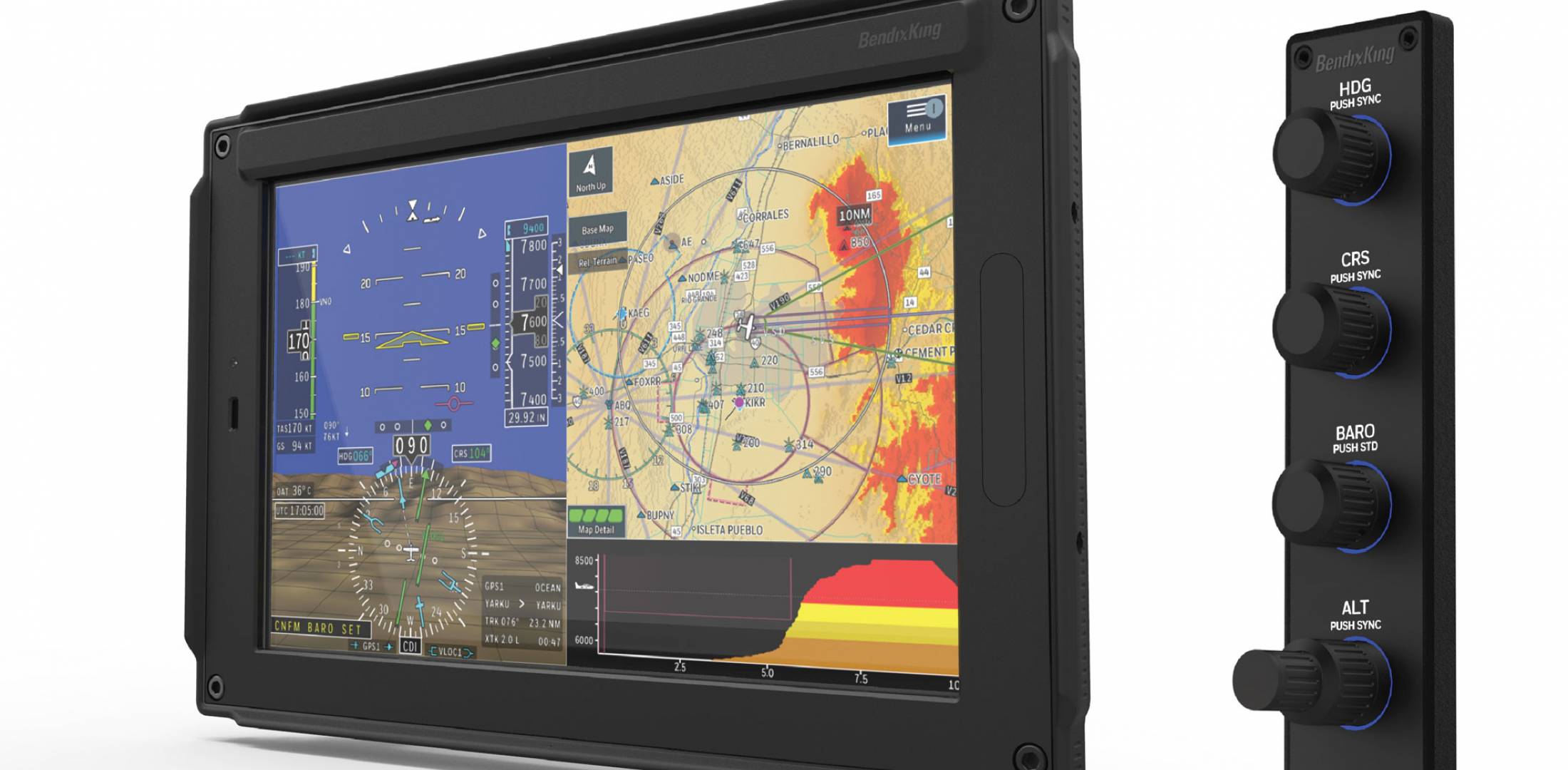
    BendixKing AeroVue Touch

    Now, I have not used the BendixKing AeroVue Touch or the xVue Touch, only read about them.  But, what I’ve read sounds pretty cool.  The display has really good resolution (BendixKing brags it is the highest screen resolution available), synthetic vision that comes standard (Garmin & Aspen charge extra for synthetic vision), plus VFR Sectional Charts & IFR High and Low Enroute charts, making paper charts even more obsolete.

    The display is 10.1 inches and can be easily swapped between a full screen instrument mode or a split screen setup as seen above.  Apparently, BendixKing has 3-D moving maps available on the AeroVue Touch too, which is standard.

    The one thing Garmin has on the BendixKing AeroVue Touch right now is engine information.  The G500TXi has a full complement of engine gauges available; the AeroVue Touch doesn’t, yet.  BendixKing says it’s in the works, as well as radio information and autopilot control.  I’m assuming the future autopilot control software would mean you could remotely mount an autopilot controller and input all functions from the AeroVue Touch display.  The nice thing about these future upgrades is all the software updates are free through BendixKing.

    The sticker price for the forthcoming unit is going to be about $12,600.  Garmin’s 10.5 inch G500 TXi is $16,000, while Aspen doesn’t offer anything quite that big.

    BendixKing KSN 770

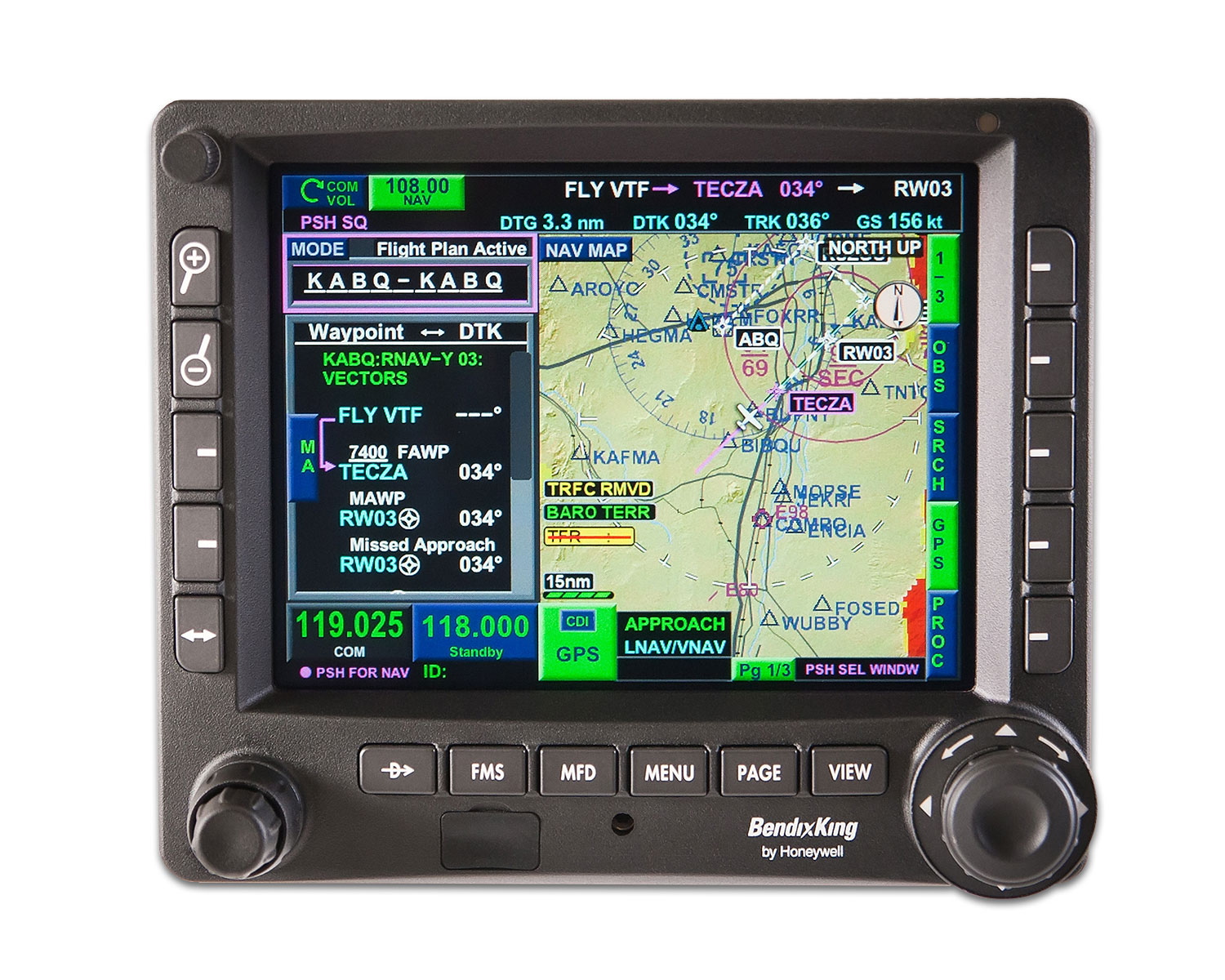
    I’ve been keeping my eye on the BendixKing KSN 770 Touchscreen WAAS GPS for a few years now.  It never really has caught on quite like the Garmin GTN 750 or the Avidyne IFD 540.  BendixKing took the same route that Avidyne did in creating a hybrid touch GPS (or mini-MFD if you want to look at it that way) where a pilot can perform functions either using the touch screen or utilizing soft keys on the edges.  I like the hybrid touch approach as I have been bounced around in turbulence while trying to tap something into a Garmin GTN 750 and it can prove difficult.

    Similar to the AeroVue Touch, BendixKing utilized split screen technology in the KSN 770.  It’s a full WAAS unit that is already certified.  It’s sticker price is $14,200, compared to the Garmin GTN 750 at $17,200 and the Avidyne IFD 540 at $15,000.

    Other BendixKing Gadgets

    Here are some other BendixKing Gadgets both available now and in the works:

  • Iridium Zoleo Allows In Flight Messaging

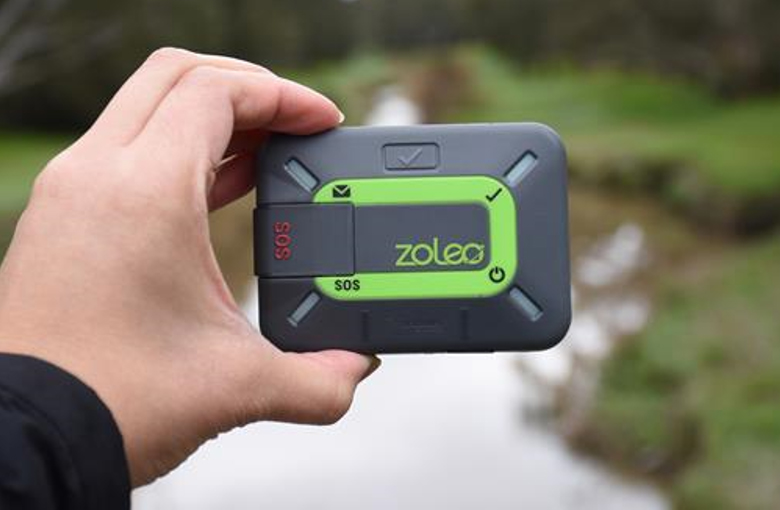
    Satellite communications company Iridium now has a really nifty little product called the Iridium Zoleo Satellite Communicator. Most pilots who fly newer Cirrus Aircraft will be familiar with the company name Iridium. Iridium manufactures the built in satellite phone that is an option in all Cirrus after 2012. The Iridium Zoleo brings messaging capability to any airplane in a cost effective and simple manner.

    The Iridium Zoleo is a device roughly the size of a walkie-talkie. It links up with the Iridium satellite network to send and receive messages and emails anywhere in the world (or air!). To make things easier, the Iridium Zoleo links with a phone via Bluetooth to a free app that allows the user to write a message directly from the phone and send through the device.

    The Iridium Zoleo is affordable at only $200. A plan has to be purchased in order to send messages, with 3 different levels of subscription offered: 25 messages a month for $20, 250 messages a month for $35, or unlimited messages per month for $50. Each plan offers a $6 upgrade to allow unlimited worldwide breadcrumbs and tracking.

    The Iridium Zoleo has a 200 hour battery life and is designed to be shock, dust, and water resistant. Plus, the device has a built in SOS that can be used anywhere in the world. So, you can take it rafting down the Grand Canyon, hiking in the Andes, flying over the Atlantic, or SOS if you are stranded in the middle of the Indian Ocean.

    Click here to read more about Zoleo and here to read more about the Zoleo plans.

  • IM SAFE: Are You Really?

    As pilots, we are all familiar with the IM SAFE acronym that the FAA puts out.  It comes up as part of the ground training over Human Factors during private pilot ground school.  We all memorize it, spit it out for our check rides, then most of us promptly forget about it.

    When I was training for my pilot’s licenses, I was at a Part 141 school that was very standardized (LeTourneau University, who has a fabulous aviation school).  Before each flight, we had to do a self evaluation based on the weather and the IM SAFE checklist.  Based on our answers, we would then determine if the conditions were conducive to flying as well as if I was physically okay to fly.

    This was a great tool because not only do pilots have to pre-flight the airplane, they also need to pre-flight themselves.  It’s very easy to fall into one of the “Hazardous Attitudes” if there is a pressing meeting or you haven’t flown in a while and it’s a beautiful day, but maybe you aren’t physically fit to control an airplane.

    Let’s break down the IM SAFE checklist to dig a little deeper into the physically fit side of flying.

    Illness

    This one is pretty easy.  Are you sick?  If so, how sick?  If you can’t hardly talk or your body feels like it was hit by a truck, then flying probably isn’t in your best interest.

    The tricky area can become if you are only a little sick.  Maybe you have a cough or a little cold or a headache is starting to form.  You probably could go fly, but is it really a good idea?  It could be something worse, or it may be nothing.  You have to know yourself and put limits on yourself before you wake up on the day of your big meeting two states over.  Set illness personal minimums and stick to them.

    Medication

    There are a slew of drugs, both prescription and over the counter, that pilots cannot take and fly.  AOPA has a hotline to call for pilots to find out if they can fly with the medication they are taking, or what meds they can take to give them relief and still operate an aircraft.

    Another great resource is your medical examiner.  Just give him/her a call and they will be more than happy to let you know what you can and can’t take.  They’ve been educated in the area of aviation so they are very knowledgeable.

    Stress

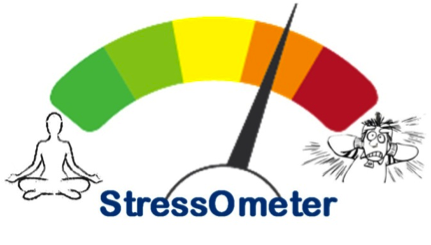
    StressometerThis is a huge one that pilots ignore a lot.  Maybe it was a stressful day at work, maybe you are running late to the airport, your meeting got moved up, whatever.  Stress can jump on you and mess up a pilot’s thinking very quickly.  If you have a lot of other things on your mind and you aren’t able to focus just on flying, it might be a good idea to stay on the ground.


    Alcohol

    Out of the whole IM SAFE list, the alcohol limitations are very clearly defined.  8 hours bottle to throttle, no more than 0.04% BAC, no operating an airplane while under the influence, and no carrying passengers who are visibly intoxicated.  For your personal minimums, it’s a good idea to increase that time to 12, 18 or even 24 hours bottle to throttle.

    Fatigue

    Learning to fly while a college student led to a fair share of canceled flights due to fatigue.  I operate best on 8 hours of sleep in the past 24 hours.  I can function on 6, but anything less than 6 hours, my performance drastically drops off, sometimes to a point where I wouldn’t be safe.  I discovered this while with my flight instructor attempting to do a holding pattern and completely botching it up.

    I observed this as a CFI quite often.  If I was doing ground with a student and they were struggling, my first question would be, how much sleep did you get last night?  More often than not, if I had to ask that question, I would get an average answer of 3 to 4 hours (I even had one guy show up for a flight block on 2 hours sleep.  I sent him back to the dorm).

    Fatigue is very easily overlooked because it’s not measurable.  Needing to get a flight lesson done or needing to get somewhere when you are obviously fatigued is not a good idea.  Make sure you get a good night’s sleep before a flight and don’t be afraid to cancel if you didn’t.  Set some sleep personal minimums and make them hard and fast.

    Eating

    Don’t skip meals and fly.  Performance greatly decreases when a pilot is hungry.  At the very least, stick a couple of food bars in your flight bag to give you some nourishment.

    Also, stay hydrated, especially in the summer time.  I carry a huge bottle of water with me on all my flights because I get headaches if I don’t drink enough.  Getting dehydrated on a long flight can lead to all sorts of performance problems (over hydration is also a problem in the air, but that’s what Gatorade bottles are for, right?).

    All this to say, have some personal minimums when it comes to you and your body.  Check the plane, check the weather and check yourself.  If anything falls in the “red” area in any one of those three categories, stay on the ground and don’t press your luck.

Leave a Reply

Your email address will not be published. Required fields are marked *